For businesses running multiple printers and copiers across departments or locations, this scenario plays out more often than most owners would like to admit. Unpredictable downtime, mystery error codes, and last-minute toner runs aren't just annoying. They're expensive, and they eat into productivity in ways that rarely show up on a budget line item until you add them up.
This article breaks down what remote printer management actually is, how it works, what it costs, and what to look for in a local partner if you're weighing your options in Metro Atlanta.
Key Takeaways
- Remote printer management catches problems before they cause downtime, not after a support call.
- Cloud dashboards give one view across every device, department, and location.
- Encrypted data transmission cuts risk from rising print-related security breaches.
- Pricing typically follows per-device, cost-per-page, or bundled managed print models.
- Local, factory-trained support fills the gaps that pure software vendors can't cover.
What Is Remote Printer Management?
Remote printer management is centralized, proactive oversight of your printer and copier fleet using cloud-based or secure remote tools. It tracks device health, supply levels, and security status from off-site, often before you'd ever notice a problem yourself.
Think of it like a smoke detector versus a fire that's already spread through the building. One warns you early. The other forces you to react.
Reactive vs. Proactive Support
Traditional break-fix printer support waits for someone to notice a problem, pick up the phone, and describe an error code they don't understand. A technician then has to diagnose the issue on-site, sometimes making a second trip once the right part arrives.
Remote printer management flips that sequence:
- Continuous monitoring tracks device health, supply levels, and security status through software agents or embedded connectors
- Early alerts flag problems before staff notice anything's wrong
- Remote resolution fixes many issues without waiting for an on-site technician
Core Components of a Remote Printer Management System
Most remote printer management platforms share a common architecture, even if the specific tools vary by vendor.
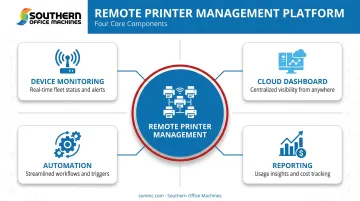
- Device monitoring: Secure agents or embedded connectors report page counts, error codes, and supply levels in real time.
- Cloud dashboard: A single view across every device and location shows alerts, usage trends, and current device status at a glance.
- Automation: Rule-based actions trigger toner reorders, generate service tickets, and enforce print policies, such as defaulting to duplex printing.
- Reporting: Usage breakdowns by department, color-versus-black-and-white ratios, and cost tracking feed directly into budget planning.
Ricoh's @Remote platform, for example, can manage up to 5,000 Ricoh and third-party devices from a single dashboard, tracking usage, meter readings, supply needs, service alerts, and power status.
That scale illustrates just how far centralized monitoring has come.
Southern Office Machines builds this same type of remote monitoring into its document management solutions for Metro Atlanta clients. The company pairs automated meter reading, usage tracking, and toner auto-replenishment with factory-trained, on-site technicians who step in when a physical visit is genuinely needed.
That combination matters: software alone can flag a jammed feeder tray, but it can't walk over and clear it.
Key Benefits of Remote Printer Management for Your Business
The case for remote printer management comes down to five practical advantages that compound over time.
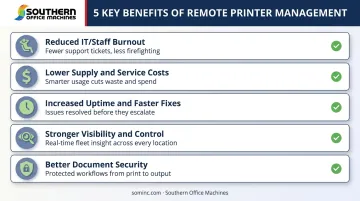
Reduced IT and Staff Burnout
Every ticket about a printer jam or a "cannot connect to network" error pulls someone away from work that actually moves your business forward. Offloading routine printer troubleshooting to a dedicated remote system frees internal staff, whether that's an IT admin or an office manager, to focus on higher-value tasks instead of babysitting a copier.
Lower Supply and Service Costs
Tracking toner levels and page volumes in real time prevents two costly habits: emergency overnight toner shipments and cabinets full of cartridges nobody needs yet. It also surfaces devices that barely get used, which helps you decide what to retire instead of continuing to pay for a machine that mostly collects dust.
Increased Uptime and Faster Fixes
Proactive alerts mean technicians often know what's wrong, and what part to bring, before they ever leave the shop. One documented case cut a toner-order troubleshooting call from 20 minutes down to 5 minutes. Remote diagnostics revealed the toner cartridge was still nearly 60% full and simply hadn't triggered a reorder. That's the kind of friction remote visibility removes.
Stronger Visibility and Control
Usage reports reveal patterns you'd never catch manually:
- Which department prints the most color pages
- Which floor has a bottleneck every Monday at 9 AM
- Where costs leak out of your budget unnoticed
That visibility turns fleet planning from guesswork into an actual strategy.
Better Document Security
Security isn't optional anymore. Quocirca's 2025 survey of 400 IT decision-makers across the US and Europe found that 56% had experienced at least one print-related data loss incident in the prior year. Features like user authentication, secure release printing, and encrypted data transmission matter, particularly for healthcare and government clients working under strict compliance requirements.
Southern Office Machines addresses this through Sharp's built-in security architecture. Features include 256-bit AES encryption on all data written to a device's RAM and hard drive, audit trail logging, and Common Criteria Certified data security kits for government and defense-level environments. That level of protection is a documented reason the Georgia Department of Community Health continues to rely on the company for its print environment.
Challenges and Limitations to Know Before You Start
Remote printer management solves real problems, but it isn't a magic fix. A few limitations deserve honest attention before you sign anything.
- Network dependency: If your internet connection drops, remote monitoring pauses. Local printing typically still works, but you lose visibility until connectivity returns.
- Data privacy questions: Ask any provider exactly what data gets collected, how long it's retained, and who inside their organization can access it. Don't assume; get it in writing.
- Contract and billing complexity: Remote print management is usually billed per device or bundled into a broader managed print agreement. Clarify upfront what's included in the base fee versus what counts as a billable extra.
Remote Printer Management vs. Traditional Printer Support
The core difference is timing. Traditional support waits for a call. Remote management flags problems before they escalate into a full stop.
Cloud-based remote management also reduces your dependence on on-premises print servers and simplifies driver management across a mixed fleet. That said, this shift is gradual, not universal. According to Quocirca's 2024 print security research:
| Metric | 2023 | 2024 |
|---|---|---|
| Organizations using cloud print management | 55% | 69% |
| Organizations running hybrid cloud/on-premises setups | — | 74% |
Full cloud migration isn't happening overnight, and that's fine. What matters is whether your provider gives you proactive visibility now.
Outsourcing to a dedicated provider tends to deliver steadier costs and faster resolutions than leaving a small internal IT team to juggle printer tickets alongside everything else on their plate. Printers rarely get priority when a server issue or a security patch is competing for the same two people's attention.
Southern Office Machines pairs factory-trained on-site technicians with remote support through LogMeIn Rescue, giving Metro Atlanta and Marietta businesses proactive monitoring without losing the option of an in-person fix when needed.
What Does Remote Printer Management Typically Cost?
Pricing depends on a handful of variables that any honest provider should walk you through before quoting a number.
Main cost drivers include:
- Number and type of devices in your fleet
- Page volume and color-versus-black-and-white mix
- Scope of service, whether that's monitoring-only or full-service management
- Compliance and security add-ons, such as certified data security kits
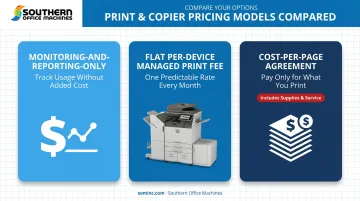
Common pricing models:
- Monitoring-and-reporting-only plans: lower cost, tracks device health and usage without bundling service or supplies
- Flat per-device managed print fees: predictable monthly cost regardless of usage swings
- Cost-per-page agreements: bundles supplies and service into a rate tied to how much you actually print
Before signing anything, compare the quoted price against what you're currently spending on emergency service calls, rush toner shipping, and supplies that end up wasted or overstocked. That comparison usually reveals the real savings, or the real gap, faster than any sales pitch.
How to Choose the Right Remote Printer Management Partner in Metro Atlanta
Not every provider approaches this the same way, and the differences matter more than most businesses realize until they've signed a bad contract.
Questions worth asking any provider:
- What specific data do you collect, and who can access it?
- What's included in the monthly fee, and what counts as an extra?
- Do you guarantee response and resolution times, and what happens if you miss them?
- How are firmware updates and security patches handled?
Look for a partner that starts with a consultative approach rather than a one-size-fits-all package. Southern Office Machines calls this its Business-to-Technology approach. It starts with understanding a company's actual workflows and print volume, then moves to recommending the smallest, sturdiest equipment that fits, plus a clear picture of total cost of ownership.
That approach plays out in practice at Southern Office Machines, which has served Metro Atlanta businesses since 1985 with factory-trained technicians, a Sharp equipment partnership, and both new and refurbished options depending on your budget. That's paired with a lowest-price guarantee and the kind of hands-on local service a pure software vendor simply can't offer when a machine physically breaks down.
Before signing with anyone, request:
- Sample usage and cost reports showing your actual print volume
- A clear service agreement outlining parts coverage
- Loaner equipment availability during repairs
- Documented performance benchmarks and response times
If a provider can't produce these, that tells you something.
Ready to get a real look at your print fleet's health? Contact Southern Office Machines at 770-919-8989 or info@sominc.com for a tailored assessment.
Frequently Asked Questions
Do I need special hardware for remote printer management?
Most network-enabled printers work with existing monitoring software right out of the box. Older devices may need a small adapter or gateway to connect properly.
Is remote printer monitoring secure?
Security depends on the provider's encryption, authentication, and access controls. Ask for documentation on data handling practices and compliance certifications before signing anything.
Can remote printer management work across different printer brands?
Many platforms support mixed fleets with multiple brands. Still, verify which advanced features, like predictive maintenance, are actually available on each specific model you own.
How much does remote printer management typically cost?
Pricing varies based on device count, page volume, and service scope, typically billed per device or per page. Request a custom quote based on your actual fleet.
Is remote printer management worth it for a small business with only a few printers?
Very small offices with minimal printing may not need it yet. Growing businesses or multi-location operations, however, usually see fast returns through reduced downtime and less wasted supply spending.
What's the difference between remote printer monitoring and full managed print services?
Monitoring alone tracks device health and supply levels. Full managed print services add on-site service, toner delivery, and proactive maintenance on top of that visibility.