Nobody planned this. It happened one purchase at a time, over years, with no single person tracking the total cost.
That's the problem. Most organizations have no idea how much this hidden sprawl is actually costing them, because printing rarely shows up as its own line item on a budget report. It's buried across IT, facilities, and departmental supply orders.
This article breaks down what printer consolidation actually means, why it matters financially and operationally, and how to build a simple strategy to fix it.
Key Takeaways
- Printer consolidation shrinks your device fleet into fewer, standardized, networked machines
- Unmanaged print environments can cost businesses over 3% of annual revenue
- A healthcare case study cut printer count by 42% and expenses by nearly a third
- Building the right strategy starts with a fleet audit, not a hardware purchase
- Local partners like Southern Office Machines right-size fleets using real usage data, not guesswork
What Is Printer Consolidation?
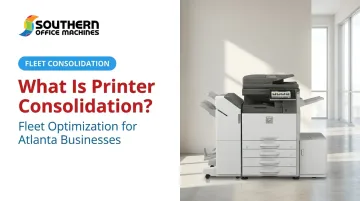
Printer consolidation is the process of reducing and standardizing the number of print devices in an office down to fewer, shared machines that everyone can access. Instead of five people each guarding their own desktop printer, a department shares one networked device built to handle the volume.
But consolidation isn't just about hauling old hardware to the recycling center. It also involves:
- Centralizing management so one team or platform oversees the entire fleet
- Standardizing device models and brands to simplify supplies, training, and service
- Replacing single-function machines (print-only, scan-only, fax-only) with multi-function printers (MFPs) that do all four jobs at once
Consolidation is not the same as print elimination. Full print elimination means removing paper-based processes altogether, which is a much bigger digital transformation project. Most small and mid-sized businesses start with consolidation because it delivers real savings fast, without requiring a companywide workflow overhaul.
A concrete example: Picture a marketing department running five individual desktop inkjet printers, each purchased separately over a few years. One networked Sharp MFP can replace all five, handling printing, scanning, copying, and faxing from a single machine with shared access.
What Consolidation Typically Involves
In practice, most consolidation projects include:
- Eliminating high-cost, low-efficiency desktop inkjet printers (inkjet supplies are notoriously expensive per page)
- Removing underused or redundant printers identified through a usage audit
- Sharing workgroup printers among an optimal number of end users based on foot traffic and volume
- Bundling service, supplies, and support under one vendor relationship instead of juggling contracts with several suppliers
Why Printer Consolidation Matters: Key Benefits
The financial case for consolidation is real, even without a single universal savings percentage to cite. Southern Office Machines' internal data shows that unmanaged print environments can cost businesses more than 3% of total annual revenue — an expense most leadership teams never see broken out on its own.
Here's where the savings actually come from:
- Fewer machines to buy, service, and stock. Standardizing on fewer models cuts spare-parts inventory, toner variety, and time spent chasing supply orders.
- Improved visibility and accountability. When print spend is scattered across a dozen departmental budgets, waste stays invisible. Aggregate it into one tracked category and problems surface fast.
- Freed-up office space. Removing five desktop units for one shared MFP opens up desk space and cuts the daily friction of employees hunting for a working printer.
- Lower environmental footprint. Fewer devices mean less electricity draw and less consumable waste.
On the environmental and cost side, independent data confirms the pattern:
| Source | Result |
|---|---|
| EPA Region 6 printer consolidation program | 62% reduction in inkjet printers, 25% lower paper consumption, and roughly 12% lower overall printer electricity use |
| Cleveland Clinic's Euclid Hospital | 42% reduction in printer count and elimination of nearly one-third of total printing expenses |
That Cleveland Clinic figure comes from an independent, vendor-neutral healthcare source — not a manufacturer's marketing claim.
How to Build a Printer Consolidation Strategy
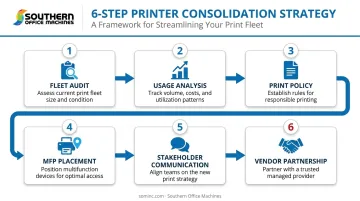
Consolidation works best as a structured project, not a one-off hardware swap. Here's a practical sequence:
- Conduct a full printer fleet audit. Inventory every device: location, age, model, and monthly print volume. You can't fix what you haven't measured.
- Analyze usage data to flag redundant or underused printers. A small handful of devices typically handle the bulk of your print volume, while others sit nearly idle. Find those laggards.
- Establish a simple, one-page print policy. Cover the basics: duplex printing by default, black-and-white as standard, and reasonable walking distance to shared devices.
- Replace scattered single-function devices with strategically placed MFPs. Base placement on actual department needs, not guesswork.
- Communicate the "why" to employees and leadership early. Frame it around cost per department, not abstract company savings — people respond to numbers that touch their own budget.
- **Partner with a local office equipment provider**, such as Southern Office Machines, to right-size the new fleet and evaluate total cost of ownership before signing a purchase or lease agreement.
For scale reference, HP's education case study on the Northern Alberta Institute of Technology shows what's possible with a disciplined process. The institution's results:
- Cut its printer fleet from 700 to 370 devices, a 47% reduction
- Lowered monthly operating expenses by 33%
- Reduced printer power use by 94,000 kWh a year
Results like that don't happen by accident. They come from following steps 1 through 6 in order.
Common Barriers to Successful Consolidation
Even a well-planned consolidation project can stall. The usual culprits:
- Executive skepticism. Leadership underestimates real savings without aggregated cost data, so consolidation reads as a hassle instead of a fix.
- End-user resistance. Employees get attached to the printer near their desk, and losing that convenience—even temporarily—triggers pushback.
- Lack of accountability. When no department owns print cost tracking, spending stays hidden and the initiative loses momentum before it starts.
Getting past these barriers usually comes down to data and communication — show the real cost, explain the plan, and give people a shared device that's genuinely faster and easier than what they had.
Signs Your Office Needs Printer Consolidation
Not sure if your fleet needs attention? Watch for these red flags:
- Running multiple printer brands and models across departments without a consistent replacement or purchasing plan
- Absorbing rising, unpredictable toner, ink, and maintenance costs that nobody can explain department by department
- Lacking a single person or team responsible for tracking total print volume, costs, or device performance
If two or more of these sound familiar, it's probably time for an audit.
Get Expert Help With Printer Consolidation in Metro Atlanta
Southern Office Machines has served Metro Atlanta and Marietta businesses since 1985, and our approach starts with listening first. We call it a Business-to-Technology approach: we learn how your team actually works before recommending anything.
That usually means identifying the smallest, sturdiest machine that fits your exact needs and budget, rather than pushing whatever's easiest to sell. From there, we calculate total cost of ownership so you know the real number before committing to a purchase or lease.
What backs that up:
- Factory-trained technicians who service the full Sharp product line, from MFPs to production printers
- Remote support via LogMeIn Rescue for issues that don't require an on-site visit
- Flexible maintenance agreements on monthly, quarterly, or annual schedules
- A lowest-price guarantee across purchase, lease, and rental options
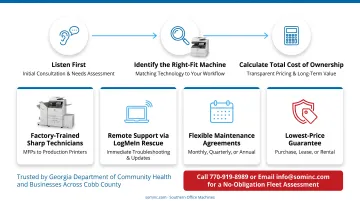
That commitment has played out with organizations like the Georgia Department of Community Health and businesses across Cobb County, each needing a fleet that matched how they work, not just what was in stock.
Ready to see what your current fleet is costing you? Contact Southern Office Machines at 770-919-8989 or info@sominc.com for a no-obligation printer fleet assessment and consolidation recommendation.
Frequently Asked Questions
Should printer pooling be enabled?
Yes, pooling is generally recommended for consolidated fleets. It balances print jobs across shared devices to reduce bottlenecks and improve uptime. Configuration should still account for department proximity and usage patterns.
What's the difference between printer consolidation and print fleet management?
Consolidation is a one-time or periodic project to reduce and optimize your device count. Fleet management is the ongoing monitoring, maintenance, and support of the resulting devices after consolidation is complete.
How much can a business realistically save by consolidating printers?
Savings vary by starting point, but unmanaged print environments can cost over 3% of annual revenue. Real-world cases like Cleveland Clinic's 42% printer reduction show what's achievable with a focused effort.
How long does a printer consolidation project typically take?
Timelines depend on fleet size and business complexity. A small office might complete the process in a few weeks, while a multi-department rollout can take several months.
Will consolidating printers slow down my team's workflow?
When done correctly, workflow typically improves rather than slows. Properly placed shared MFPs add features like scanning and email integration that single-function printers never had.
Is it better to lease or buy printers as part of a consolidated fleet?
Buying or lease-to-own tends to be more cost-effective for long-term, stable needs, while flexible leasing suits businesses expecting change. Southern Office Machines can run a total cost of ownership comparison specific to your fleet.