For Metro Atlanta businesses handling high document volumes, the stakes are practical: paper costs money to store, it's slow to search, and it's a liability if the wrong file lands in the wrong hands. Digitizing document workflows cuts retrieval time, trims printing costs, and closes security gaps that paper simply can't manage.
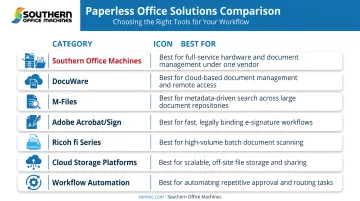
This guide breaks down seven paperless office solutions worth evaluating in 2026, plus how to pick the right one for your business.
TL;DR
- Paperless offices combine document management software, scanning hardware, e-signatures, and workflow automation
- Choose your stack based on company size, compliance needs, and existing IT setup
- Seven strong 2026 options include local partners such as Metro Atlanta's Southern Office Machines
- Weigh total cost of ownership as heavily as feature lists
Overview of Paperless Office Solutions in 2026
A paperless office solution combines hardware, software, and services to digitize, store, and automate document workflows so files move without ever touching a printer tray.
Adoption is still catching up to intent. Back in 2021, Adobe surveyed 500 U.S. small-business leaders and found that 86% still reported handling physical paperwork regularly.
Paper hasn't disappeared from most offices; it's just becoming more expensive to keep around, especially as unmanaged printing can eat up more than 3% of annual revenue.
The seven solutions below cover the full stack, from scanning hardware to metadata-driven search platforms, so you can build a system that fits your workflow instead of forcing your workflow to fit the software.
Top 7 Paperless Office Solutions for 2026
Each solution below was picked for reliability, integration capability, security, scalability, and total cost of ownership, not just brand name recognition.
Southern Office Machines – Document Management & MFP Solutions
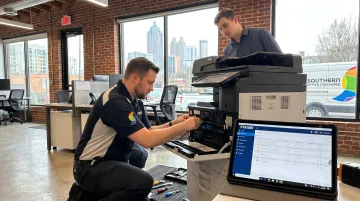
Southern Office Machines has served Metro Atlanta since 1985, offering copiers, printers, scanners, and integrated document management under a Business-to-Technology approach. Instead of leading with a spec sheet, the team learns your actual document processes first, then recommends the smallest, sturdiest machine that fits.
Differentiators:
- Factory-trained technicians for on-site and remote support (via LogMeIn Rescue)
- New and refurbished equipment options for budget flexibility
- Scan-to-workflow integration bundling copying, scanning, printing, and emailing into one process
- Cloud Portal Office for document capture, indexing, and archiving with controlled access
| Criteria | Details |
|---|---|
| Best For | Small-to-midsize Atlanta-area businesses wanting hardware + document management bundled together |
| Key Features | Scan-to-workflow integration, sales/service/rental flexibility, lowest price guarantee, 256-bit AES encryption |
| Pricing Model | Custom quotes based on total cost of ownership assessment |
DocuWare – Cloud Document Management Platform
DocuWare is a cloud-based DMS serving more than 20,000 customers with dedicated tools for invoice processing, HR files, and contracts. It's built for businesses that need department-specific workflows without managing on-premises servers.
Differentiators:
- Intelligent indexing that pulls company, amount, and item data automatically
- Audit trails logging user, timestamp, and action for every invoice step
- E-signature integration through Validated ID and DocuSign
| Criteria | Details |
|---|---|
| Best For | Mid-size to enterprise businesses needing department-specific workflows |
| Key Features | Automated invoice capture, e-signature integration, compliance and retention tools |
| Pricing Model | Subscription-based cloud licensing |
M-Files – Metadata-Driven Document Management
M-Files ditches folder hierarchies in favor of metadata tagging, so documents get found by what they are, not where someone filed them. That makes it a strong fit for knowledge-heavy industries drowning in contracts and case files.
Differentiators:
- AI-powered search and conversational agents (M-Files launched new AI agents, including Aino, in mid-2026)
- Deep integrations with Microsoft 365 and Salesforce
- Built-in compliance and retention controls
| Criteria | Details |
|---|---|
| Best For | Firms managing large volumes of contracts, case files, or research documents |
| Key Features | Metadata tagging, version control, AI-ready search tools |
| Pricing Model | Tiered enterprise licensing |
Adobe Acrobat / Adobe Sign – E-Signature & PDF Workflow Tools
Adobe's PDF and e-signature suite remains the default for businesses that want quick adoption without a training curve. Its AI Assistant now summarizes contracts and surfaces key terms with source-linked citations.
Legal footing matters here. The federal ESIGN Act gives electronic signatures the same legal standing as ink for most interstate transactions, though affirmative consumer consent is required when e-delivery replaces a legally required paper disclosure.
| Criteria | Details |
|---|---|
| Best For | Businesses needing quick e-signature adoption with minimal training |
| Key Features | Electronic signatures, PDF editing, AI document tools |
| Pricing Model | Per-user monthly subscription |
Ricoh fi Series – Production-Grade Document Scanners
If you're facing years of paper backlog, you need hardware built to chew through it. The Ricoh fi-8170, for example, scans up to 70 ppm / 140 ipm in duplex, with a 100-sheet automatic document feeder.
Differentiators:
- OCR indexing built into the fi-8170
- PaperStream Capture Pro for classification, barcode recognition, and zonal OCR
- Jam-detection technology to keep large batch jobs moving
| Criteria | Details |
|---|---|
| Best For | Offices with heavy backlog digitization needs (legal, healthcare, government) |
| Key Features | High-volume scanning, OCR, jam-detection technology |
| Pricing Model | One-time hardware purchase or lease |
Cloud Storage & Collaboration Platforms (Google Workspace/Microsoft 365)
For businesses that don't need a dedicated DMS yet, general-purpose cloud suites cover the basics: shared drives, real-time editing, and mobile access.
| Platform | Starting Price | Storage |
|---|---|---|
| Google Business Starter | $7/user/month (annual) | 30 GB pooled/user |
| Google Business Standard | $14/user/month (annual) | 2 TB/user |
| Microsoft 365 Business Basic | $6/user/month | 1 TB OneDrive/user |
| Microsoft 365 Business Standard | $12.50/user/month | 1 TB OneDrive/user + desktop apps |
Entry pricing is only half the decision—fit matters too:
| Criteria | Details |
|---|---|
| Best For | Small businesses needing basic paperless collaboration without a dedicated DMS |
| Key Features | Shared drives, real-time co-editing, mobile access |
| Pricing Model | Per-user monthly subscription |
Workflow Automation Tools (Juro, Kofax/Tungsten Automation)
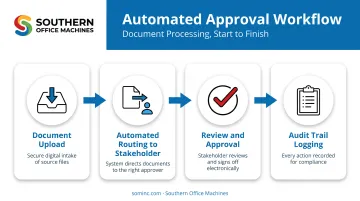
These platforms automate the approval chains that paper used to slow down, routing contracts to the right stakeholder at the right stage.
- Juro captures a tamper-proof trail of every edit, approval, and signature on a contract
- Tungsten Automation adds document classification, extraction, and cross-system workflow automation
- Kofax TotalAgility retains audit records for completed batches and logs interactive events
| Criteria | Details |
|---|---|
| Best For | Legal, procurement, and HR teams with repetitive approval chains |
| Key Features | Automated task routing, deadline tracking, audit trails |
| Pricing Model | Subscription or per-workflow licensing |
How We Chose the Best Paperless Office Solutions
The biggest mistake businesses make is picking a tool based on sticker price alone, then discovering integration costs, training time, or hardware gaps months later. That's why total cost of ownership carried more weight than upfront pricing in this list.
Factors weighed:
- Security/compliance features — reduce breach risk and audit prep time
- Ease of integration — connect with existing systems without costly workarounds
- Scalability — support growth without a full platform switch
- Vendor support quality — cut downtime with factory-trained technicians and responsive service
- Proven client outcomes — favor real usage data over marketing claims
Gartner's document management guidance makes the same case: weigh collaborative and operational content needs, not feature checklists alone.
Conclusion
The best paperless solution is the one that matches your actual workflow, compliance requirements, and growth plans—not the one that simply ranks highest in popularity.
Before signing anything, ask about scalability and ongoing support. A system that works for 10 employees today can buckle at 50 without the right infrastructure behind it.
If you're a Metro Atlanta business ready to map out your document workflow, Southern Office Machines offers a personalized assessment based on how your team actually works, not a generic sales pitch.
Frequently Asked Questions
What are the best paperless office systems?
The best systems combine document management software, scanning hardware, and e-signature tools tailored to your workflow and compliance needs. There's no single "best" platform for every business.
Is it worth going paperless?
Most businesses recoup costs through time savings, lower printing expenses, and improved document security within months. The payback period depends on document volume and current inefficiencies.
How long does it take to transition to a paperless office?
Small-to-midsize businesses often plan around a 90-day rollout for initial digitization and workflow setup. Larger or more complex environments may take longer, depending on legacy paper volume.
What equipment do I need to start going paperless?
The core components are a reliable scanner, a document management system, and secure cloud storage. Many businesses also add e-signature tools to eliminate the last few paper touchpoints.
Can a paperless office still use printers and copiers?
Yes. Multifunction printers remain useful for occasional printing and scanning even within a largely digital workflow. Most offices keep at least one MFP for exceptions like signed originals or client handouts.
How do I choose between cloud-based and on-premises document management?
Cloud-based systems offer lower upfront costs and easier scaling, while on-premises systems give you more direct control over data and infrastructure. The right choice depends on your compliance requirements and IT resources.