This happens more often than most Atlanta business owners realize. Hybrid work schedules and shared multifunction printers (MFPs) have quietly turned the office printer into one of the biggest overlooked data exposure risks in the building.
This guide breaks down what secure print actually means, why it matters for compliance and accountability, how the technology works under the hood, and how to choose the right setup for a Metro Atlanta business.
Key Takeaways
- Secure print holds documents in an encrypted queue until the user authenticates at the device
- 67% of organizations reported a print-related data loss last year, per Quocirca's 2024 study
- HIPAA, GLBA, and NIST-aligned agencies depend on controlled, auditable document output
- Most modern business-grade MFPs support secure print, but older desktop units often don't
- The right solution matches fleet compatibility, compliance needs, and total cost of ownership
What Is Secure Print?
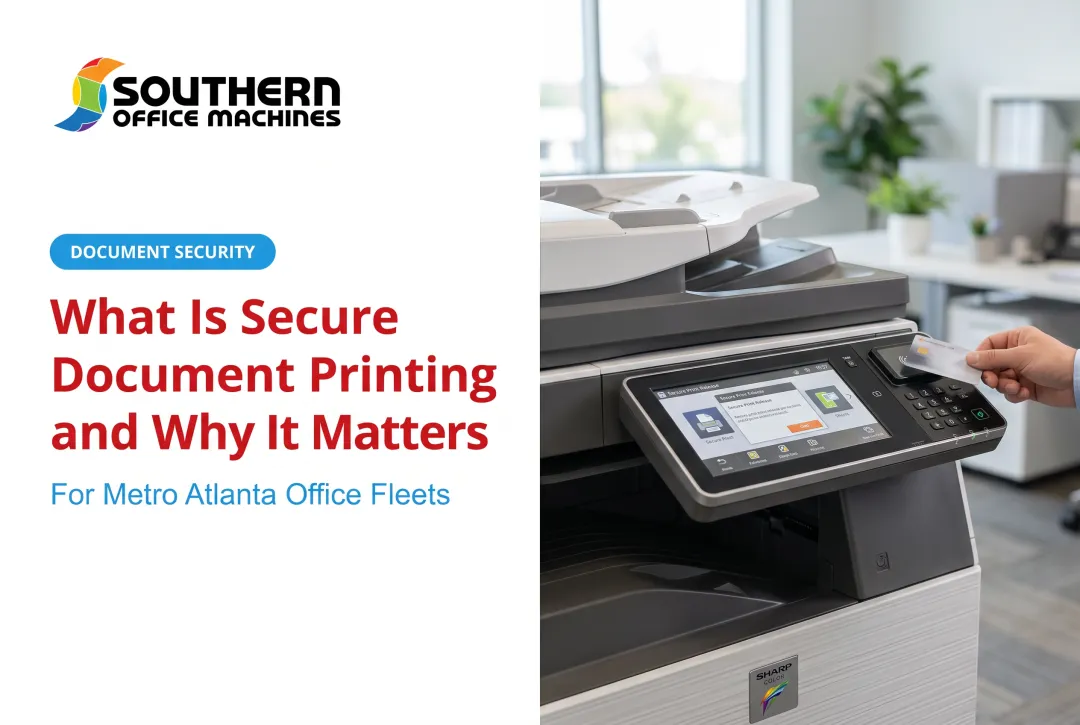
Secure print, sometimes called pull printing, is a feature that holds a document in an encrypted queue instead of sending it straight to the output tray. The job waits until the intended user shows up at the printer and proves who they are.
How the Basic Mechanics Work
When someone hits "print" from a laptop, tablet, or phone, the file doesn't immediately fire out of the machine. Instead, it routes to one of two places: a secure queue stored on the printer's internal memory, or a cloud holding area managed by print management software.
The document sits there, encrypted, until it's claimed. No claim, no printout. Simple as that.
Common Ways to Release a Held Job
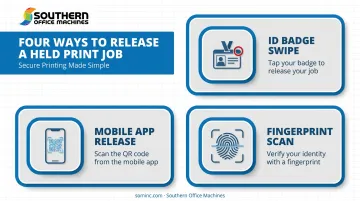
Most business MFPs offer several authentication options, and many devices support more than one at once:
- PIN or passcode entered at the control panel
- ID badge or card swipe using an existing access card
- Mobile app or QR code scan for a touchless release
- Biometric scan on higher-security models
Secure print isn't a brand-specific gimmick. Whether your office runs Sharp, HP, Canon, or Xerox, the underlying concept stays the same. Each manufacturer just configures it a little differently inside the print driver, and on Sharp MFPs, it's built directly into the standard driver interface.
On most modern MFPs, you'll find secure print listed as a selectable "Job Type" setting right in the driver. Select it, and the job sits in the machine's memory until someone claims it, or until it auto-purges after a set time.
Why Secure Printing Matters for Your Business
An "open" printer with zero authentication is running on the honor system. Anyone walking past the output tray can glance at, grab, or accidentally take a document meant for someone else. A client contract. A payroll report. A patient chart.
This isn't a hypothetical risk. Quocirca's 2024 survey of 500 US and European IT decision-makers found that 67% reported a print-related data loss in the prior 12 months, up from 61% the year before. For midmarket organizations, that number jumped to 74%.
The Compliance Angle
For regulated industries, an exposed printer creates real legal exposure, not just an awkward moment.
- Healthcare (HIPAA): The Privacy Rule protects patient health information in any form, including paper printouts
- Finance (GLBA): The Safeguards Rule requires access controls and authentication for systems handling customer data
- Government agencies: NIST's PE-5 control specifically calls out printers and copiers, requiring access restrictions like card readers or keypads
Public health agencies and other government bodies rely heavily on this kind of document control. The standards they're held to don't bend just because a request came through a printer instead of a database.
The Cost Nobody Talks About
Beyond the security angle, there's a quieter cost problem: abandoned print jobs. Forgotten documents waste paper and toner every single day, and it adds up faster than most managers assume. Unmanaged print environments can eat up over 3% of a company's total annual revenue, a figure that catches most business owners off guard.
Without audit logs tied to secure release, there's also no way to trace who printed what. If a leak happens, you're left guessing.
How Secure Print Technology Works
Understanding the mechanics helps when you're evaluating vendors and asking the right questions.
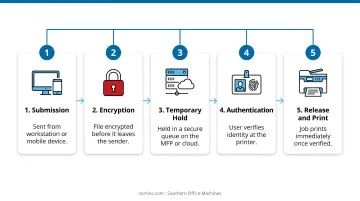
The Job Lifecycle, Step by Step
- Submission – A user sends a print job from a workstation or mobile device
- Encryption – The file is encrypted before it ever leaves the sender's device
- Temporary hold – The job sits in a secure queue, either on the MFP or in a cloud service
- Authentication – The user shows up at the printer and verifies identity
- Release and print – Once verified, the job prints immediately
Release Methods and Behind-the-Scenes Encryption
Modern MFPs, including the Sharp models Southern Office Machines deploys for Metro Atlanta clients, support a mix of release options:
- Enter a PIN at the control panel
- Tap a badge or ID card
- Scan a QR code through a mobile app
- Use touchless proximity release
The method matters less than making sure it's actually enabled and enforced.
Behind the scenes, encryption protocols like TLS protect the job while it's in transit and in storage, meaning an intercepted file can't be read by anyone without proper clearance.
Many systems also support Find-Me (or pull) printing, where a user releases their job at any enrolled device on the network, not just the one they originally sent it to. That's useful for larger offices with multiple floors or buildings.
One more safeguard worth knowing: most systems automatically purge unclaimed jobs from device memory after a set period. This frees up storage and shrinks the window where a forgotten document could be exposed. Exact timing varies by manufacturer and model, so it's worth confirming with your provider rather than assuming a default.
Secure Print vs. Normal Printing: What's the Difference?
The core difference comes down to timing and identity verification.
| Normal Printing | Secure Print | |
|---|---|---|
| Output timing | Prints immediately, sits in tray | Held until user authenticates |
| Access control | None built in | PIN, badge, QR, or biometric required |
| Accountability | No record of who collected it | Logs who released the job and when |
| Unclaimed jobs | Remain exposed in tray | Auto-purged after set timeframe |
There's a small trade-off here. Secure print adds one extra step, maybe five to ten seconds at the panel. But that minor friction is a fair exchange for eliminating the much bigger risk of sensitive paperwork sitting exposed on a machine anyone can walk past.
Choosing the Right Secure Print Solution for Your Business
Not every printer handles secure print the same way, so picking the right setup takes a little groundwork.
Start with a needs assessment:
- How many users and devices need coverage?
- Does your industry carry compliance obligations (healthcare, finance, legal, government)?
- What volume of sensitive material gets printed regularly?
Check MFP compatibility: Not every copier supports the same range of secure print and authentication features straight out of the box. Older desktop printers, in particular, often lack these controls entirely, which makes device selection a real factor, not an afterthought. Southern Office Machines, an authorized Sharp dealer serving Metro Atlanta, walks businesses through this evaluation before recommending equipment.
Weigh total cost of ownership, not just sticker price. That means factoring in:
- Hardware costs (purchase, lease, or rental)
- Software licensing for authentication and job management
- IT management and support time
Choosing on price alone tends to backfire once compliance requirements or fleet limitations surface later.
Why Partner with Southern Office Machines for Secure Print Solutions
Southern Office Machines has partnered with Sharp for decades, offering both new and refurbished MFPs built with secure print and document management capabilities already baked in. Every Sharp device runs on the Sharp Security Suite, which includes:
- 256-bit AES encryption for data in transit and at rest
- Up to 7-times data overwriting to prevent recovery of deleted files
- Print driver security controls that block unauthorized access
- Audit trail logging for compliance tracking
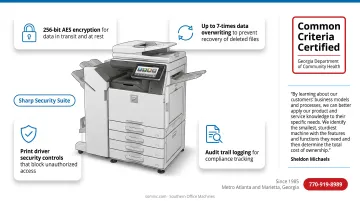
For clients with stricter regulatory needs, Sharp's Data Security Kit is also available in a Common Criteria Certified version, the tier typically expected by government and healthcare organizations.
That level of built-in protection matters only if it's paired with the right guidance for choosing hardware. Sheldon Michaels, who works with clients on the sales side, describes the company's approach this way:
"By learning about our customers' business models and processes, we can better apply our product and service knowledge to their specific needs. We identify the smallest, sturdiest machine with the features and functions they need and then determine the total cost of ownership."
That's the philosophy in practice: understand the workflow first, then recommend hardware, not the other way around. It's also why Southern Office Machines has served Metro Atlanta and Marietta since 1985, with factory-trained technicians and a lowest price guarantee on every quote.
The company's roster includes regulated clients like the Georgia Department of Community Health, where responsiveness and compliance both matter.
If your printer fleet needs a secure print upgrade, call 770-919-8989 for a consultation.
Frequently Asked Questions
What is secure print in a printer?
Secure print is a print driver setting that holds a document in the printer's memory or a cloud queue until the intended user authenticates at the device. Once verified, the job releases and prints.
What is the difference between secure print and normal print?
Normal printing sends a job straight to the output tray with no identity check. Secure print holds the job until the user authenticates, adding accountability and an audit trail.
Is secure print available on all printers and copiers?
Most modern business-grade MFPs support some form of secure print. Older or basic desktop printers often don't, which makes checking device compatibility important before you assume coverage.
Does secure printing slow down office workflows?
The extra authentication step typically adds only a few seconds, especially with fast release methods like card taps or QR scans. Most offices find the security benefit outweighs the minor delay.
How much does implementing secure print cost for a small business?
Costs vary based on existing hardware compatibility, software licensing, and the number of devices involved. Southern Office Machines can walk through your existing fleet and provide an accurate quote tailored to your setup.
Can secure printing help with regulatory compliance like HIPAA?
Yes. Authentication, encryption, and audit logging directly support compliance requirements common in healthcare, legal, and financial industries, though the technology works alongside your broader policies rather than replacing them.