Choosing the right A3 color laser printer affects far more than your upfront budget. It shapes your print quality, your monthly operating costs, and how smoothly documents move through your office.
This guide breaks down what A3 actually means, who really needs one, and how to evaluate your options. We'll also cover how Southern Office Machines helps Metro Atlanta businesses match the right device to their workflow instead of overselling capacity they don't need.
Key Takeaways
- A3 color lasers print ledger/tabloid (11x17") output—about double letter-size capacity.
- Best fit for design, engineering, marketing, and other oversized or color-heavy workflows.
- Total cost of ownership, not sticker price, should drive your buying decision.
- Southern Office Machines backs Metro Atlanta buyers with factory-trained service and a lowest-price guarantee.
What Is an A3 Color Laser Printer?
An A3 color laser printer is a laser printer or MFP that produces full-color output on paper up to A3 size. A3 is an ISO 216 sheet measuring 297 x 420 mm—close to U.S. ledger/tabloid (11 x 17 inches), which most American offices treat as the practical equivalent.
"A3 printer" does not mean the device only prints A3. It means the machine handles stock up to that size. Most A3 color laser MFPs still print letter, legal, A4, and envelopes without missing a beat, so they cover day-to-day jobs plus oversized work.
Which Is Bigger: A1, A2, A3, or A4?
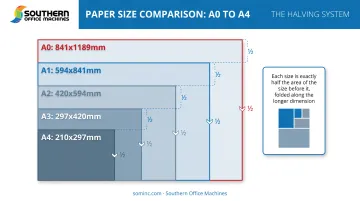
The ISO A-series works on a halving system. Each size is exactly half the area of the one before it:
- A0 (largest) → 841 x 1,189 mm
- A1 → 594 x 841 mm
- A2 → 420 x 594 mm
- A3 → 297 x 420 mm
- A4 (standard letter-equivalent) → 210 x 297 mm
Among the four sizes in the question, largest to smallest is A1 > A2 > A3 > A4 (A0 sits above all of them).
What's the US Equivalent to A3?
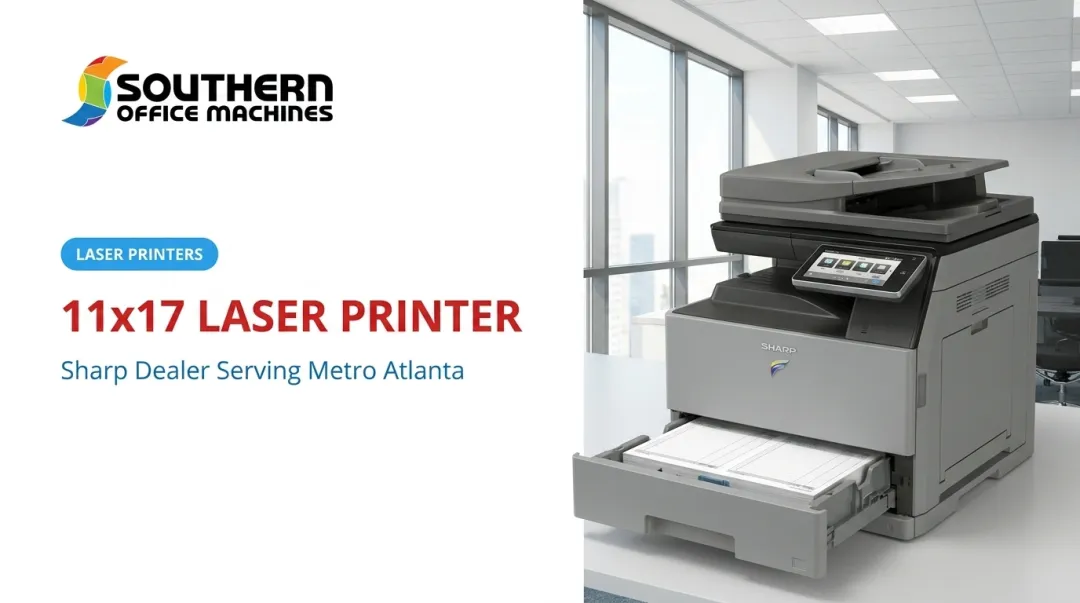
Ledger/tabloid (11 x 17 inches) is what U.S. offices use for oversized documents—spreads, posters, and large diagrams. It is not a perfect metric match for A3, but every A3-class MFP sold in the U.S. supports it.
The "color laser" half of the name matters too. These machines use toner, not ink. Heat fuses toner to the page, so you get sharper text edges and prints that resist smudging, fading, and water damage—useful for client proposals and archived reports alike.
Is an A3 Color Laser Printer Worth It for Your Business?
Who Actually Needs One
A3 color laser printers make sense for businesses with a genuine reason to print oversized or color-intensive documents regularly. Typical use cases include:
- Architecture, engineering, and construction firms printing blueprints and site drawings at full 11x17" scale
- Marketing agencies and corporate communications teams producing posters, brochures, and presentation decks
- Print shops and design studios running frequent color proofs
- Healthcare and financial practices producing large reports, patient materials, or client decks under encrypted, access-controlled workflows
- Government and public-sector offices handling oversized forms, public notices, and secure document requirements
If your office mostly prints letter-size memos and the occasional invoice, an A4 device will likely serve you better and cost less to run.
Cost and ROI Considerations
When oversized or high-volume color work is part of your mix, the next question is whether the economics hold up. A3 machines cost more upfront than standard A4 printers. Their higher-capacity components and heavier-duty construction often lower per-page and long-term operating costs, especially for offices printing a lot of color.
There is no universal break-even page count. Compare your quote on fixed monthly costs and color vs. mono rates against the volume you actually print. A simple way to think about it:
Crossover point = (A3 monthly fixed cost − A4 monthly fixed cost) ÷ (A4 cost-per-page − A3 cost-per-page)
Run this with real numbers from a dealer quote, not assumptions. Also factor in finishing capabilities that add value beyond basic output, such as:
- Stapling and hole-punching
- Saddle-stitch booklet making
- Duplex scanning at high speed (some models scan up to 280 images per minute)
If the upfront cost feels steep, leasing or renting an A3 color laser MFP through Southern Office Machines gets you these capabilities without a full capital outlay.
How to Choose the Best A3 Color Laser Printer
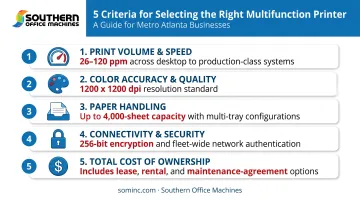
Buying the wrong machine means overpaying for capacity you'll never use, or worse, bottlenecking your team with a device that can't keep up. Focus on five criteria:
- Print volume and speed. Match pages-per-minute output to your actual demand. A3 color models typically range from 26 to 65+ ppm on letter/A4 and roughly 15 to 29 ppm on A3-size output, so speed drops noticeably on larger sheets.
- Color accuracy and print quality. Check resolution specs closely for client-facing design or marketing work. Standard color modes commonly run 600 x 600 dpi, with higher-resolution options available.
- Paper handling. Confirm standard tray capacity (often 650 sheets) versus maximum expandable capacity (up to 6,300 sheets on some models), plus heavier media support and duplexing.
- Connectivity and security. Look for network integration, mobile printing, and layered protections like 256-bit AES encryption and multi-pass data overwriting, especially if you handle sensitive client or patient records.
- Total cost of ownership. Factor in toner yield, maintenance contracts, and service response times. Over five years, these matter more than the day-one purchase price.
At Southern Office Machines, this is the core of what team members like Sheldon Michaels call a Business-to-Technology approach: understand your actual workflow first, then match the smallest, sturdiest machine that meets your needs—not the biggest, most expensive one available.
That approach is what keeps total cost of ownership in check.
A3 vs. A4: Understanding the Difference
The practical difference comes down to paper size, how the device is used, and what finishing it supports:
| Feature | A3-Class MFP | A4-Class MFP |
|---|---|---|
| Max paper size | Up to 11x17" | Up to legal (8.5x14") |
| Typical role | Marketing, design, engineering | General office admin |
| Footprint | Larger; built for higher volume | Compact |
| Finishing options | Booklet-making, stapling, punching | Limited or none |
Many offices don't choose one or the other. They run a mixed fleet, placing an A3 color MFP in the marketing department while general admin staff use compact A4 devices nearby.
You can also buy a single-function A3 color laser printer—print only, with no copy, scan, or fax. Most business buyers still choose multifunction A3 devices, because copy/scan/fax usually adds little cost relative to the productivity gain.
Best A3 Color Laser Printers for Home vs. Business Use
Home printing needs and business printing needs rarely overlap enough to justify the same equipment.
For home use: Lower print volumes and limited space usually mean a compact A3 inkjet or entry-level laser is enough. You don’t need warehouse-scale paper capacity or fleet-level security for occasional personal projects.
Home setups typically prioritize:
- Small footprint and simple setup
- Modest monthly page counts
- Lower upfront cost over heavy-duty duty cycles
For business use: Offices benefit from full A3 color laser MFPs for speed, durability, and finishing options built for shared workflows.
Southern Office Machines carries both new and fully reconditioned Sharp A3 color MFPs for Metro Atlanta businesses, including Sharp MX Series models such as the MX-3071, MX-4071, and MX-6071. That mix helps match capacity to budget without forcing a one-size purchase.
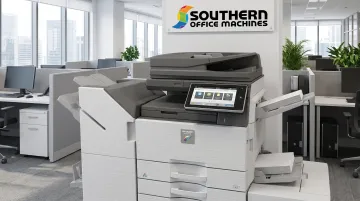
Business-ready options include:
- New and fully reconditioned Sharp A3 color MFPs
- Flexible acquisition across different budget levels
- Maintenance agreements on a monthly, quarterly, or annual basis
- Support from factory-trained technicians (same coverage options on refurbished as on new)
Frequently Asked Questions
What printer can print A3 size?
Dedicated A3 multifunction printers and copiers, including Sharp's BP-70C series, handle A3 printing natively. Some A4 machines also offer limited A3 output through a bypass tray, though at reduced speed and capacity.
Is an A3 printer worth it?
It depends on your print volume, document sizes, and how often you produce oversized or color-heavy materials. Businesses regularly printing blueprints, posters, or marketing collateral typically see the strongest return.
Can I buy an A3 color printer only?
Yes, single-function A3 color printers exist without copy or scan capability. Most business buyers, however, choose multifunction A3 devices for the added value of copy, scan, and fax in one unit.
What is the best A3 printer for home use?
Occasional home printing rarely justifies a dedicated A3 laser. Business-grade A3 color MFPs are built for office volume, security, and finishing—usually more machine than a home setup needs.
Which is bigger, A1 or A2 or A3 or A4?
The order from largest to smallest is A1 > A2 > A3 > A4, following the ISO halving system where each size is half the area of the previous one.
What is the US equivalent to A3?
Ledger/tabloid size (11 x 17 inches) is the closest U.S. equivalent to A3. The dimensions aren't identical to the metric standard, but they're the standard match used across American offices.
Ready to compare A3 color laser options for your Metro Atlanta business? Contact Southern Office Machines at 770-919-8989 for a workflow consultation and pricing backed by our lowest-price guarantee.