That's because "print optimization" isn't one single fix. It's a broad term covering two distinct but related goals: reducing cost and waste across your printing operations, and improving the technical quality of what actually comes out of the machine.
This guide breaks down both meanings, shares strategies you can apply this week, and shows how Metro Atlanta businesses can get started with the right partner.
Key Takeaways
- Print optimization covers two dimensions: operational efficiency (cost, waste) and technical quality (resolution, output)
- Fleet audits and device right-sizing form the foundation of cost-focused optimization, whatever your size
- Higher DPI isn't automatically better; matching resolution to the job is the real goal
- A local Managed Print Services provider simplifies assessing and improving your entire print environment
What Is Print Optimization?
Print optimization is the ongoing process of improving the efficiency, cost-effectiveness, output quality, and environmental impact of an organization's printing operations. Rather than a one-time project, it's an ongoing cycle of assessing, adjusting, and re-checking your print environment as your business changes.
Print Optimization vs. Print Management
There's no formal industry standard separating these two terms, but the distinction is useful in practice. Print management refers to the administration and control of print resources: devices, servers, supplies, and usage policies. Print optimization is the efficiency layer built on top of that management, the decisions you make using the data management provides. A well-managed fleet, for example, can still overspend if no one adjusts default print settings.
Two Dimensions of Print Optimization
Print optimization pulls in two different directions:
- Operational and cost optimization: reducing device count, minimizing paper and toner waste, setting print quotas, and streamlining approval workflows
- Technical and quality optimization: driver-level and hardware settings, like resolution, color correction, and economy print modes, that determine how a printed page actually looks
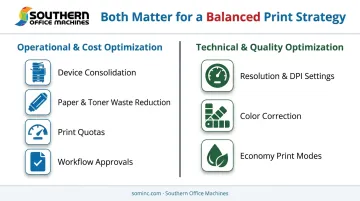
Both matter. A business chasing only cost cuts might end up with blurry client proposals. One chasing only quality might blow through its toner budget printing everything at maximum resolution.
Print optimization applies to any organization with recurring print costs or quality concerns, from a five-person Marietta real estate office to a multi-location enterprise fleet spanning Metro Atlanta.
Why Print Optimization Matters for Your Business
Cost Savings
Unmanaged printing drains budgets quietly. A few extra pages here, an unclaimed color job there, and it adds up fast. Gartner research found that actively managing office printing can cut recurring document-output spending by 10% to 30%, a range that holds up whether you're running five printers or fifty.
Small levers add up:
- Reducing toner density by 10-20% can lower per-page cost by 5-10%
- Default duplex printing can cut annual paper costs by at least 30%, per the same research
- PIN authentication before printing can reduce abandoned, wasted jobs by up to 10%
Productivity Gains
Fewer breakdowns mean fewer interruptions. When a shared multifunction device jams or runs dry at 4:45 PM before a deadline, that's lost time for everyone in line behind it. Right-sizing your fleet so devices match actual demand cuts walk-up congestion and reduces the service calls that pull staff away from real work. Multiply that friction across dozens of employees and hundreds of print jobs each week, and the productivity drain becomes hard to ignore.
Sustainability and Compliance
Paper and energy waste compound across a fleet, but for regulated organizations, the stakes go further. HP estimates that automatic duplex printing can reduce paper waste by 25% or more across a typical fleet.
For healthcare and government organizations, compliance adds another layer. The U.S. Department of Health and Human Services settled with a health plan for $1,215,780 after leased photocopiers were returned without erasing protected health information stored on their hard drives. Copier and MFP storage needs to be part of your risk analysis, not just servers and laptops.
Key Strategies for Effective Print Optimization
Conduct a Print Fleet Audit
Start by counting what you actually have: how many devices, who's using them, and what each one costs to run. A print fleet audit typically assesses device count, usage patterns, and per-department costs to flag which machines are underused and which are overburdened.
For Southern Office Machines clients, this usually starts with usage monitoring across the entire fleet, since unmanaged print environments can cost businesses more than 3% of total annual revenue.
Right-Size and Consolidate Your Device Fleet
Once you know what you're working with, replace outdated single-function printers scattered across desks with fewer, more capable multifunction devices.
HP's own case studies show what this looks like at scale. CSX Corporation consolidated 3,000 non-HP printers into 2,000 HP devices and saved over $100,000 on consumables in a single year. Houston Healthcare trimmed its fleet by nearly 18% and cut printing expenses by 48%.
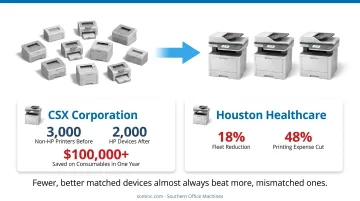
Results vary by organization, but the direction is consistent: fewer, better-matched devices almost always beat more, mismatched ones.
Implement Smart Print Policies
Policy changes cost nothing to implement and start saving immediately:
- Set duplex (two-sided) printing as the default, not the exception
- Make black-and-white the default, restricting color printing to specific users or departments
- Apply print quotas so managers can quickly spot high-volume users
- Use secure release printing so jobs only print once a user authenticates at the device
Encourage Digital Workflows
Every document that never gets printed is a document that costs nothing to print. Document management platforms, scan-to-email, and cloud-based repositories let teams collaborate without generating paper in the first place.
Cloud-based document tools let staff scan, index, and retrieve files from a phone or laptop instead of pulling a printed copy from a cabinet. Teams can also share documents directly to a conference room display instead of printing handouts.
Monitor and Analyze Continuously
Optimization isn't a one-time project. Managed print providers use ongoing usage data for three connected purposes: assessing the current environment, optimizing based on what the data shows, and monitoring results afterward.
That means tracking meter reads, watching for spikes in color usage, and adjusting device placement as teams grow or shift.
Print Quality Optimization: Resolution, DPI, and Settings
DPI, or dots per inch, measures printer resolution: how many individual dots a printer places in a one-inch line. More dots generally mean sharper images, finer detail, and smoother edges, but more dots also mean more processing time and more toner.
Is 600 or 1200 DPI Better for Print Quality?
Neither is "better" across the board. They're suited to different jobs.
- 1200 DPI produces sharper text and finer image detail. It's the right call for photos, marketing materials, and design proofs where a client will actually scrutinize image quality.
- 600 DPI suits everyday business documents best. HP notes 600 dpi fits general documents and higher-volume output, printing faster with less toner and no noticeable quality loss for memos or invoices.
Other Quality Levers Worth Optimizing
Resolution isn't the only setting that affects output. A few others worth checking:
- Ink or toner quality: cheaper cartridges can produce inconsistent density even at the same DPI setting
- Paper quality and weight: the wrong paper stock makes even a well-calibrated printer look mediocre
- Printer calibration: color drift happens gradually, so periodic calibration keeps proofs and marketing pieces accurate
- Driver-level modes: most printers offer economy or draft modes for internal use and higher-quality modes for client-facing work
The real skill in quality optimization is matching settings to the job. A draft-mode internal memo doesn't need the same treatment as a client proposal headed out the door.
Signs Your Print Environment Needs Optimization
Certain patterns show up again and again in print environments that haven't been reviewed in a while:
- Toner and paper costs keep climbing without any increase in actual output
- Desktop printers sit mostly idle while draining budget through supplies and service calls
- Staff queue up at shared multifunction devices during peak hours, losing time waiting
- Supply inventories vary wildly by department, with some overstocked and others always running out
- Service calls for the same aging machines happen more often than they used to
Any one of these on its own might be a minor annoyance. A few of them together usually mean it's time for a fleet assessment rather than another quick fix.
How Southern Office Machines Helps You Optimize Your Print Environment
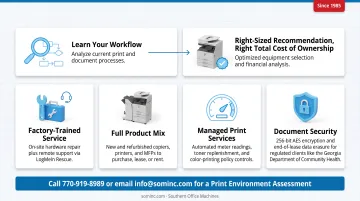
Southern Office Machines takes what we call a Business-to-Technology approach. We learn how a client actually works before recommending anything.
Then we identify the smallest, sturdiest machine with the right features at the right total cost of ownership, rather than defaulting to whatever has the highest price tag or the most unused features.
Since 1985, we've kept Metro Atlanta and Marietta businesses running with:
- Factory-trained technicians for on-site hardware service, plus remote support through LogMeIn Rescue for software and configuration issues
- A full product mix of new and refurbished Sharp copiers, printers, and multifunction devices available for purchase, lease, or rental
- Managed Print Services that track usage, automate meter readings and toner replenishment, and enforce policies like color-printing restrictions
- Document security features built into Sharp devices, including 256-bit AES encryption and end-of-lease data erasure, which matter for regulated clients like the Georgia Department of Community Health
If your printing costs feel out of control, or your output quality isn't matching what your clients expect, contact Southern Office Machines for a print environment assessment. Call 770-919-8989 or email info@sominc.com to get started.
Frequently Asked Questions
What is print optimization?
Print optimization is the process of improving cost-efficiency, waste reduction, and output quality across an organization's printing operations. It covers both operational savings and the technical settings that determine how a printed page looks.
Is 600 or 1200 dpi better for print quality?
1200 dpi offers sharper detail for photos and graphics, while 600 dpi is typically sufficient, and more efficient, for everyday text documents. The right choice depends on the job, not a universal rule.
What's the difference between print optimization and print management?
Print management handles the administration and control of devices, supplies, and policies. Print optimization uses that management data to actively reduce waste and improve efficiency.
How do I know if my business needs a print audit?
Watch for rising toner and paper costs without more output, underused desktop printers, and frequent service calls on aging machines. Any combination of these signals that it's time for a professional assessment.
Does print optimization require special software?
Many organizations use print management software to track usage and enforce policies, but simple changes, like setting duplex as the default, can start manually today. Software becomes more valuable as your fleet grows.
How long does it take to see results from print optimization?
Simple changes like default settings show impact almost immediately. Fleet-wide initiatives, such as consolidating devices or rolling out managed print services, generally take weeks to months to show full results.