Introduction
Ask most office managers how many printers, copiers, and MFPs (multifunction printers) their company owns, and you'll get a shrug. Ask what those devices cost every month, and the answer gets even vaguer.
That's the problem. Unmanaged print environments bleed money through wasted toner, redundant machines, and downtime nobody planned for.
Gartner's research found that actively managing an office print environment can cut recurring document-output spending by 10% to 30%. That range has stayed relevant for over a decade because most businesses still don't manage their fleets.
This guide breaks down what print fleet management actually means, how it works, and whether it's worth pursuing for your Atlanta-area business.
Key Takeaways
- Print fleet management monitors, maintains, and optimizes every printing device your business owns.
- Automated supplies and predictive maintenance cut costs and prevent downtime before it happens.
- Fleet management covers device-level oversight; MPS (Managed Print Services) bundles it into a full-service package.
- Local, factory-trained support matters more than flashy software features.
What Is Print Fleet Management?
Print fleet management is the ongoing practice of monitoring, managing, and optimizing every printing device across your organization — printers, copiers, and multifunction devices alike. It covers performance, usage patterns, consumables, and maintenance oversight for every machine in every office or location.
The goal is simple:
- Eliminate wasted spend on underused or redundant devices
- Minimize downtime through proactive service
- Match device count and type to actual business needs, not guesswork
Why This Gets Complicated Fast
Most businesses don't buy printers strategically. They add a machine here, replace a broken one there, and inherit a few from a merger or office move. Ten years later, you've got a patchwork of Sharp, HP, Canon, and Brother devices from five different vendors, each with its own service contract and supply chain.
Without oversight, nobody can answer basic questions, such as:
- Underused devices sitting idle across multiple locations
- Machines quietly draining the budget each month
- Costs disappearing without any real visibility
That's the gap print fleet management closes. Instead of reacting to breakdowns and toner emergencies, you get continuous visibility into what your fleet is doing and what it's costing you.
Key Features of an Effective Print Fleet Management Program
A real fleet management program isn't just a spreadsheet someone updates twice a year. It runs on software, automation, and scheduled human oversight working together.
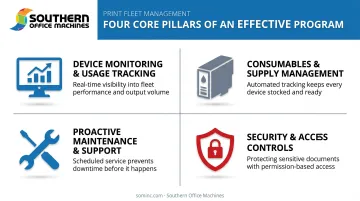
Device Monitoring & Usage Tracking
Monitoring software tracks print volume, page counts, and device status in real time. This shows you which machines are sitting idle and which ones are getting hammered daily.
That data matters because overworked devices break down more often, and underused ones are often just wasted lease payments. Southern Office Machines' MPS platform, for example, delivers fleet-wide usage reporting and even offers device placement recommendations based on where the actual workload is happening.
Consumables & Supply Management
Automated toner and ink tracking triggers reordering before supplies run out — not after someone's mid-print-job with an empty cartridge.
This prevents two costly mistakes: stockouts that halt productivity and overstocking that ties up cash in supplies you don't need yet.
Proactive Maintenance & Support
Predictive maintenance flags wear and usage patterns before they cause a breakdown. Keypoint Intelligence's 2024 research confirms that remote monitoring and service tools genuinely improve device uptime and speed up service response, even if exact percentage figures vary by fleet and provider.
In practice, this means technicians show up for scheduled service based on real usage data, not because a machine has already failed.
Security & Access Controls
Networked printers are entry points, not just output devices. Effective fleet management includes:
- User authentication before print jobs release
- Regular firmware updates to close security gaps
- Access restrictions that limit who can print, scan, or access stored documents
Sharp's Security Suite, for instance, layers AES 256-bit encryption with audit trail logging and document access controls, which matters most for healthcare and government clients handling sensitive records.
Benefits of Print Fleet Management for Your Business
Once a fleet is managed, the benefits show up in the budget fast.
Cost reduction. Eliminating redundant devices, controlling supply waste, and consolidating billing under one vendor lowers your overall print spend. This is where Gartner's 10-30% savings range on document-output costs turns into real, trackable savings on your monthly budget.
Increased productivity. Fewer breakdowns mean fewer employees standing around a broken copier waiting on a service call. Consistent workflows keep work moving.
Stronger security posture. Centralized oversight and access controls reduce the risk of sensitive documents sitting exposed on an unmonitored device.
Sustainability gains. Fewer, more efficient devices use less energy. The EPA's Region 6 office achieved a roughly 12% drop in printer electricity use and a 25% reduction in paper consumption after consolidating its fleet.
Smarter budgeting. Usage data supports real forecasting for upgrades, leases, and equipment lifecycle decisions instead of guessing when a machine "feels" old.
| Benefit | What It Looks Like |
|---|---|
| Cost reduction | Fewer redundant devices, consolidated billing |
| Productivity | Less downtime, fewer service-call interruptions |
| Security | Access controls, encrypted data, audit trails |
| Sustainability | Lower energy and paper use across the fleet |
| Budgeting | Data-driven upgrade and lease planning |
Print Fleet Management vs. Managed Print Services: What's the Difference?
These terms get used interchangeably, but they're not the same thing.
| Aspect | Print Fleet Management | Managed Print Services (MPS) |
|---|---|---|
| Definition | Day-to-day monitoring and optimization of the devices themselves | Broader umbrella: fleet management plus service, security, and strategy |
| What's included | Usage tracking, supply levels, maintenance scheduling | Supplies, service contracts, security updates, strategic consulting |
That distinction matters in practice. Quocirca's 2025 research on MPS adoption found that only 41% of surveyed organizations rated their MPS as effective at reducing consumables costs, even though 52% named that as a top priority. In other words, not all MPS programs deliver equally — the quality of the fleet management underneath the contract matters.
Most businesses receive fleet management as a component of a full MPS agreement, rather than as a standalone service. Southern Office Machines structures it this way: usage monitoring, automated meter readings, toner auto-replenishment, scheduled maintenance, and security updates all bundled into one MPS program, rather than sold piecemeal.
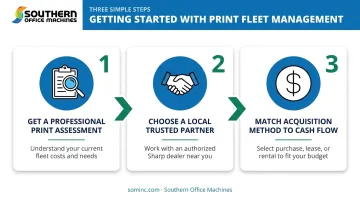
How to Get Started with Print Fleet Management
Getting your fleet under control starts before you sign anything.
- Get a professional print assessment. This catalogs every device you own, current usage patterns, and your true monthly cost — not just the obvious lease payment, but toner, service calls, and downtime.
- Choose a local, trusted partner. Factory-trained technicians can evaluate total cost of ownership and recommend the smallest, sturdiest machine that fits your actual workflow, instead of overselling equipment you don't need.
- Match acquisition method to your cash flow. Purchase, lease, or rental all work: the right choice depends on your budget cycle, not a one-size-fits-all default.
That trusted-partner standard is exactly how Southern Office Machines has served Metro Atlanta and Marietta businesses since 1985, using a Business-to-Technology approach: understanding how you actually work before recommending equipment. That includes Sharp MFPs and copiers, sales, service, and rentals, backed by a lowest-price guarantee and factory-trained on-site support.
If you're not sure what your fleet is actually costing you, contact Southern Office Machines for a print fleet assessment. It's the fastest way to find out where the waste is hiding.
Frequently Asked Questions
What is printer fleet management?
It's the process of monitoring, managing, and optimizing every networked printing device in an organization to reduce costs and improve efficiency. It covers usage tracking, supplies, maintenance, and security across the entire fleet.
Are managed print services worth it?
For most growing businesses, yes. MPS typically pays for itself through reduced waste, predictable billing, and less staff time spent chasing toner or service issues, though results vary by provider quality.
How much does print fleet management cost?
Costs vary based on fleet size and the services included. Most providers, including Southern Office Machines, start with a free assessment to scope accurate pricing for your specific environment.
Can print fleet management work with multiple printer brands?
Modern fleet management tools generally support mixed-brand environments like HP, Canon, Sharp, and Brother. That said, some providers, like Southern Office Machines, focus their full MPS program around a specific manufacturer's hardware, so confirm brand coverage before signing on.
How do I know if my business needs print fleet management?
Watch for frequent breakdowns, unclear monthly printing costs, excess or duplicate devices, and recurring toner shortages or overstock. If you can't answer basic questions about your fleet, you likely need it.
How does print fleet management improve document security?
It adds user authentication before print jobs release, keeps firmware updated against vulnerabilities, and restricts access to sensitive documents. Centralized oversight also prevents printers from becoming unnoticed network entry points.