Introduction
It's 4:45 PM. The proposal is due at 5. And the copier just flashed a jam error for the third time this week.
Sound familiar? Copier downtime is a recurring business cost. Every jam and service call chips away at productivity, morale, and client trust.
Unmanaged print environments can cost businesses more than 3% of total annual revenue, according to Southern Office Machines' internal Managed Print Services data. That's real money leaking out through jams and reactive service calls.
This guide breaks down what actually causes copier downtime, what it costs your business, how to prevent it, and how to know when it's time to repair, replace, or find a better service partner.
Key Takeaways
- Most downtime traces back to preventable issues: low consumables, dust buildup, or skipped maintenance
- True downtime costs extend beyond repair bills: lost hours, admin distraction, and weakened client confidence
- Preventive maintenance and staff training curb most disruptions; backup equipment plans cover the rest
- A local, factory-trained service partner cuts both how often problems occur and how long they last
What Causes Copier Downtime?
Copier downtime rarely comes from one dramatic failure. It's usually a buildup of small, avoidable issues.
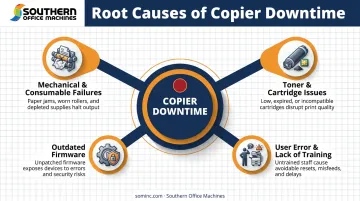
Mechanical and Consumable-Related Failures
Paper jams are the most common culprit. Sharp identifies misaligned paper, overfilled trays, and debris in the paper path as the top jam triggers in office MFPs. Other frequent culprits:
- Dirty feed components: a soiled friction pad or feed roller causes repeated jams even with correctly loaded paper
- Wrinkled or streaked pages: worn rollers or an aging fuser distort output
- Lines on copies or scans: dust on the scan glass or platen glass is almost always to blame
Toner and Cartridge Issues
Low-quality or incompatible cartridges don't just print poorly. They can cause internal damage from leaking toner or improper seating. Southern Office Machines helps clients avoid this entirely through toner auto-replenishment under its Managed Print Services program, so the right supplies show up before anyone has to guess at compatibility.
Outdated Firmware
Skipped firmware updates aren't just a security risk. NIST's Guide to Enterprise Patch Management treats patching as preventive maintenance that helps prevent operational disruptions, not just cyberattacks. Sharp echoes this, noting that outdated firmware can trigger printing and scanning errors.
User Error and Lack of Training
Incorrect paper settings, wrong tray selections, and unfamiliarity with advanced features cause more service calls than most offices realize. A five-minute training session often prevents a week's worth of jams.
The Real Cost of Copier Downtime for Your Business
Downtime costs stack up in layers most businesses never fully calculate.
Lost Productivity and Hidden Administrative Costs
Every jam means a delayed invoice, a stalled proposal, or a contract that misses its window. Multiply that by every employee who touches the machine daily, and the hours add up fast, even if no single incident feels catastrophic.
That drag on productivity doesn't stop with the employees waiting on prints, though.
Someone has to fix the problem, and it's rarely a dedicated technician. Office managers and admin staff get pulled away from their actual jobs to troubleshoot paper jams or hunt for compatible toner. That's an opportunity cost layered on top of the machine downtime itself.
Damaged Client Experience and Rising Operating Costs
For organizations handling sensitive or time-critical paperwork, especially government and enterprise accounts, reliability isn't optional. The Georgia Department of Community Health has worked with Southern Office Machines specifically because responsiveness matters when document turnaround can't slip. As their director put it:
"They are responsive, efficient and professional. Their prices are competitive and their service timely."
Reliability issues don't stay contained to the moment of failure, though.
Aging, poorly maintained copiers consume more toner and power, break down more often, and eventually force teams to outsource print jobs at a rush premium. None of that shows up on the original price tag.
A Simple Framework to Estimate Your Own Downtime Cost
Try this quick calculation:
- Estimate downtime hours per month: count hours the device is unusable, not just fully broken
- Multiply by employees affected: how many people rely on that machine daily?
- Multiply by average hourly wage: use fully loaded labor cost, not just base pay
- Add repair and rush-outsourcing costs: anything spent fixing the issue or covering the gap
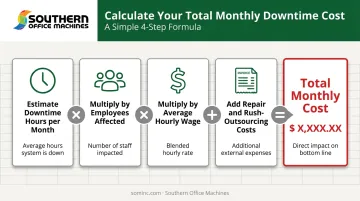
Run this for three months and you'll have a realistic annual downtime figure specific to your office, not a generic industry average.
Proven Strategies to Prevent Copier Downtime
Most downtime is preventable with the right routine. Here's what actually works.
Build a Tiered Maintenance Schedule
- Daily: Quick visual checks for jams, streaks, or error codes
- Weekly: Clean the scan glass, check paper trays for debris
- Quarterly: Professional maintenance visit from a factory-trained technician
Use Quality Consumables
Manufacturer-recommended toner and correct paper weights prevent clogs and reduce wear on rollers and fusers. Southern Office Machines' auto-replenishment service removes the guesswork by keeping approved supplies stocked automatically.
Train Employees on Proper Use
Basic training on paper loading, cartridge swaps, and simple troubleshooting cuts down avoidable service calls. It doesn't need to be formal. Even a quick walkthrough saves real time.
Keep Firmware Current
Enable automatic updates where the device supports it. Firmware updates close documented security gaps and prevent the performance issues that come with outdated software.
Monitor Usage and Balance Workloads
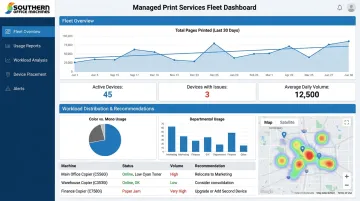
Reviewing usage reports helps you spot which machines are overworked. A device pushed well beyond its rated duty cycle breaks down far more often than one running within spec. Southern Office Machines' Managed Print Services includes fleet monitoring and device placement recommendations, so print jobs get distributed instead of hammering one overworked unit.
Set Up a Backup "Insurance" Machine
For deadline-driven offices, a second device isn't a luxury. Southern Office Machines offers flexible rental and refurbished equipment options, making it affordable to keep a backup MFP on standby. Options range from a rented B&W unit for overflow to a refurbished color copier for a satellite office.
Repair or Replace? Knowing When It's Time for a New Copier
Not every breakdown means it's time to shop for a new machine, but some patterns are clear warning signs.
Signs repair isn't worth it anymore:
- Frequent breakdowns on the same components
- Replacement parts becoming hard to source
- Service costs exceeding 50% of the machine's current replacement value
Evaluate Total Cost of Ownership, Not Just Sticker Price
Once these warning signs appear, the decision should rely on total cost data, not guesswork. A cheap repair bill can be misleading. Factor in downtime cost, energy use, and consumable spending over the machine's remaining life before deciding. A copier that seems "fine" to repair might actually be costing more per month than a newer, more efficient model would.
You Don't Have to Choose All-New or All-Old
Southern Office Machines' Business-to-Technology approach, guided by team members like Sheldon Michaels, starts by learning your workflow before recommending anything. Sometimes that means a mix: new equipment for high-traffic departments, certified refurbished units for lower-volume roles. Both options come with the same factory-trained service standard, so choosing the budget-friendly path doesn't mean sacrificing quality.
Why Your Service Partner Matters More Than You Think
When something does go wrong, how fast it gets fixed depends entirely on who you've hired to fix it.
A strong service contract should include:
- Routine preventive maintenance visits
- Emergency repair coverage
- Clear response-time expectations
- Coverage for parts, labor, and firmware updates
Fast response starts with technicians who already understand your equipment. Southern Office Machines' factory-trained technicians combine on-site visits with remote support through LogMeIn Rescue, often resolving issues without ever needing a truck to roll.
That kind of responsiveness doesn't happen overnight. Southern Office Machines has served Metro Atlanta since 1985, built on a Sharp partnership and a lowest-price guarantee across purchase, lease, and rental options. That local presence and manufacturer-level training are why organizations like the Georgia Department of Community Health keep coming back.
Frequently Asked Questions
What is considered copier downtime?
Copier downtime is any period a device is unavailable due to malfunction, maintenance, or supply shortages, disrupting normal workflow. This includes both full breakdowns and partial issues like poor print quality that force manual workarounds.
How much does copier downtime actually cost a business?
Costs vary by organization but typically include lost labor hours, delayed deliverables, and client impact. Use the hours × employees × wage formula covered earlier to estimate your own figure.
How often should copiers be serviced to prevent downtime?
Pair daily and weekly user checks (jams, streaks, tray issues) with quarterly professional maintenance visits. High-volume offices may need more frequent professional service.
Is it better to repair an old copier or invest in a new one?
It depends on repair frequency, part availability, and total cost of ownership. If service costs are climbing and parts are getting harder to source, replacement usually wins long-term.
What is a backup or "insurance" copier and do I need one?
It's a secondary device kept on standby for when your primary machine goes down. Backup units are especially valuable for high-volume offices or teams working against tight deadlines.
How can Southern Office Machines help reduce our copier downtime?
Southern Office Machines offers factory-trained technicians, flexible maintenance contracts, and rental or refurbished backup equipment throughout Metro Atlanta and Marietta. Call 770-919-8989 or email info@sominc.com to discuss your fleet.