The stakes are bigger than most buyers expect. Printer choice affects your cost-per-page, employee downtime, document security, and the total cost of ownership over the life of the machine. A poor fit doesn't just annoy your staff, it quietly drains your budget.
Industry research backs this up. IDC's 2022 managed print services survey found that businesses reduced print-related costs by an average of 15% and cut page volume by 16% simply by aligning their print environment with actual usage. That's money left on the table for companies that never audit their printer fleet.
This guide breaks down the must-have features to evaluate before you buy or lease your next business printer.
Key Takeaways
- Match printer type (inkjet, laser, MFP) to your actual volume and document needs, not budget alone
- Prioritize speed, resolution, connectivity, security, and total cost of ownership over flashy extras
- The cheapest printer upfront often costs more over three years after factoring in ink, toner, and service
- A local provider like Southern Office Machines helps right-size equipment instead of overselling capacity
What Is a Business Printer?
A business printer is built for higher-volume, more reliable output than the machine you'd buy for a home office. These devices are engineered to handle daily demand from multiple users without breaking down, and many combine printing, scanning, copying, and faxing into a single unit.
Businesses generally choose from three core categories, depending on document type and volume.
Types of Printers Businesses Use
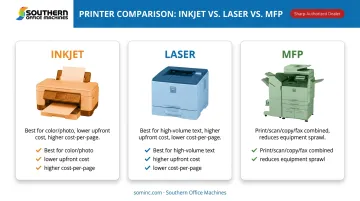
- Inkjet printers: Best for color-heavy or photo-quality documents. Lower upfront cost, but per-page cost climbs at higher volumes.
- Laser printers: Best for high-volume, text-heavy printing. Higher upfront cost, but lower cost-per-page and faster output, according to HP's laser vs. inkjet comparison.
- Multifunction printers (MFPs): Combine printing, scanning, copying, and faxing in one device, cutting equipment sprawl and reducing overall maintenance costs.
Why the Right Printer Features Matter for Your Business
The right feature set translates directly into operational results:
- Reduced downtime from jams, low supply alerts, or firmware issues
- Lower cost-per-page across your fleet
- Faster document turnaround for client-facing teams
- Stronger document security for sensitive files
- Simplified workflows with fewer standalone devices
Southern Office Machines built its Business-to-Technology approach around this exact principle: match features to real workflow needs. Rather than pushing the highest-capacity machine available, the team learns a client's actual workflow first, then matches features to real needs, not theoretical maximums.
What to Consider When Choosing the Best Printer for Your Office
These factors connect technical specs to outcomes that matter: cost savings, uptime, and staff productivity. Priorities shift depending on your office size, document type, and daily print volume, so treat this as a checklist to weigh against your own operation.
Print Speed and Volume Capacity
Pages-per-minute (ppm) and monthly duty cycle determine whether a printer keeps pace with staff demand without bottlenecks.
Manufacturer examples illustrate the range:
| Office Size | Example Rated Speed | Recommended Monthly Volume |
|---|---|---|
| Small team (3-10 users) | 33 ppm | 350-2,500 pages |
| Workgroup (2-15 users) | 40-47 ppm | Up to 20,000 pages |
| Enterprise | Up to 75 ppm | 5,000-30,000 pages |
Match your printer's recommended monthly volume to actual usage, not the maximum duty cycle. Running near the ceiling constantly leads to premature wear and earlier replacement.
Print Quality and Resolution
Resolution, measured in dots per inch (dpi), affects how sharp your contracts, proposals, and marketing materials look on paper. Higher dpi matters more for client-facing businesses producing branded documents.
Here's the trade-off: higher DPI also slows print speed and uses more ink or toner. Most standard office documents (memos, invoices, internal reports) don't need maximum resolution. Save the higher settings for materials that actually go in front of clients.
Connectivity and Mobile Printing
Wireless, cloud, and mobile printing capability keeps hybrid and remote teams moving without workflow delays. This isn't a niche feature anymore.
Cloud print-management adoption jumped from 55% in 2023 to 69% in 2024, according to Quocirca's global print security research, though 74% of organizations still ran a hybrid architecture rather than going fully cloud-based. Dual-band WiFi and cloud integration directly influence how quickly staff get documents into hand.
Security Features
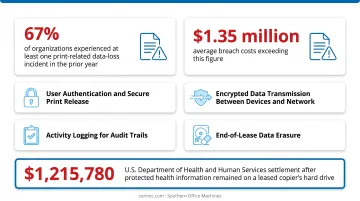
Printers are common entry points for data breaches, and the numbers are stark. Quocirca found 67% of organizations experienced at least one print-related data-loss incident in the prior year, with average breach costs exceeding $1.35 million.
Look for these controls when evaluating any business printer:
- User authentication and secure print release
- Encrypted data transmission between devices and network
- Activity logging for audit trails
- End-of-lease data erasure (critical if leasing)
Regulated industries face added stakes. The U.S. Department of Health and Human Services reached a $1,215,780 settlement after protected health information remained on a leased copier's hard drive, a reminder that MFP storage needs to be part of any healthcare or government risk analysis.
Multifunction Capabilities
Combining print, scan, copy, and fax into one machine reduces equipment sprawl and maintenance overhead. Fewer machines mean fewer service contracts and less floor space dedicated to hardware.
Two features matter most for daily staff time savings:
- Automatic document feeders (ADF): Handle multi-page or double-sided originals without manual page-flipping
- Duplex printing: Cuts paper use automatically and, according to the Department of Energy, remains one of the most effective ways to reduce printer energy costs
- Scan-to-cloud or email routing: Sends completed documents directly into existing workflows without a separate scanning step
Total Cost of Ownership
Purchase price is only one line item. Ink or toner costs, energy use, and service agreements determine the true long-term value of any printer.
ENERGY STAR-certified imaging equipment can save businesses up to 35% in energy costs compared to conventional models, according to ENERGY STAR's product data. Combine that with duplex printing and high-yield cartridges, and the annual savings add up fast.
Before signing anything, calculate:
- Cost-per-page for both black-and-white and color output
- High-yield cartridge compatibility to reduce replacement frequency
- Energy certification status of the model you're considering
- Service agreement terms, including what's covered and how often
How Southern Office Machines Can Help You Choose the Right Printer
Southern Office Machines has helped Metro Atlanta businesses select document management equipment since 1985. The focus has always been function-fit over feature overload.
The company's Business-to-Technology approach starts with understanding a client's workflow before recommending anything. As Sheldon Michaels puts it, the goal is to "identify the smallest, sturdiest machine with the features and functions they need and then determine the total cost of ownership."
That philosophy shows up in results too. The Georgia Department of Community Health, a public-sector client held to strict procurement standards, has called the company's service "responsive, efficient and professional."
What sets the team apart:
- Factory-trained technicians servicing the complete product line, including remote support via LogMeIn Rescue
- New and refurbished equipment across copiers, printers, and MFPs, so budget doesn't limit options
- Partnership with Sharp, covering Color MFPs (25-70 ppm) and B&W MFPs built for regulated industries
- Purchase, lease, or rental options, with end-of-lease data erasure for compliance-sensitive clients
- Lowest-price guarantee for the Atlanta area, applied across all acquisition methods
For a deeper breakdown of matching MFP specs to IT and workflow requirements, check out The IT Pro's Guide to Choosing the Right MFP.

Conclusion
Choose the printer that aligns with your actual print volume, document type, and budget, rather than the most feature-packed model on the market.
Printer needs evolve as businesses grow. What worked for a 10-person office won't necessarily hold up at 40 employees, so review usage patterns and equipment performance periodically rather than waiting for a breakdown to force the conversation.
Before committing to a purchase or lease, talk with a knowledgeable local provider like Southern Office Machines. Our factory-trained specialists can help you avoid overpaying for capabilities your team will never use.
Frequently Asked Questions
What features does a printer have?
Core features include print speed, resolution, connectivity options, and paper handling capacity. Many business printers also add multifunction capabilities like scanning, copying, and faxing in a single device.
What features should I look for in a printer?
Prioritize print speed matched to your team size, resolution suited to your document types, strong security controls, and total cost of ownership. These four factors drive most of the real-world value for business buyers.
What is the difference between inkjet and laser printers?
Inkjet printers suit color-heavy or photo-quality work at a lower upfront cost. Laser printers suit high-volume text printing with a lower cost-per-page once you scale up usage.
How important is print speed for a business printer?
Speed matters more as your team size and daily print volume grow. A slow printer becomes a bottleneck fast once multiple employees are queuing jobs at the same time.
Are multifunction printers worth the investment for offices?
For most offices, yes. Multifunction printers (MFPs) typically deliver better space and cost efficiency than maintaining separate printers, copiers, and fax machines.
How can I reduce my printing costs over time?
Use high-yield cartridges, enable duplex printing by default, and choose equipment with a cost-per-page that matches your actual usage. Skip capacity you won't use.