Introduction
Picture this: an Atlanta-area office manager spends weeks comparing spec sheets, selects a copier with an impressive 150,000-page monthly duty cycle, and feels confident the machine can handle the workload. Twelve months later, the repair bills are piling up, the machine jams twice a week, and the vendor is asking hard questions about how the device was used.
The culprit? Confusing duty cycle with recommended monthly print volume.
Both metrics appear on the same product page and measure pages per month, so it's easy to treat them as interchangeable. They're not. Duty cycle describes the maximum stress a machine can theoretically survive. Recommended monthly print volume describes what it should actually produce, month after month, to stay healthy.
This guide breaks down both metrics, explains how they relate, and shows how to use them together when choosing equipment that genuinely fits your workload.
Key Takeaways
- Duty cycle is an engineering ceiling — the maximum pages a printer can produce in a month, not a usage target
- Recommended Monthly Print Volume (RMPV) is the sustainable operating range that protects components and print quality
- RMPV is typically 10–20% of the duty cycle — far below the maximum for a reason
- Printing consistently near the duty cycle accelerates wear, increases service calls, and shortens equipment life
- Match your machine to your actual monthly output, using RMPV as the benchmark — not duty cycle
Duty Cycle vs. Recommended Monthly Print Volume: At a Glance
| Attribute | Duty Cycle | Recommended Monthly Print Volume |
|---|---|---|
| Definition | Maximum pages a printer can produce in one month | Page count for consistent, healthy monthly use |
| Who sets it | Manufacturer (via stress testing) | Manufacturer (based on wear, supplies, and device life) |
| Intended purpose | Engineering durability benchmark | Operational usage guideline |
| Typical range | 10–20x higher than RMPV | 10–20% of duty cycle |
| Exceeding it | Gradual cumulative damage | Accelerated wear, more frequent failures |
The two figures answer different questions: duty cycle defines the absolute ceiling, while RMPV defines healthy, everyday use.
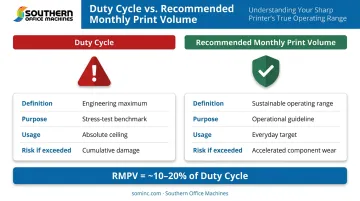
Not every manufacturer publishes an RMPV. When it's missing, use 10% of the listed duty cycle as a working estimate.
What Is a Printer's Duty Cycle?
Duty cycle is the maximum number of pages a printer or copier can produce in a single month, established through manufacturer stress testing under controlled conditions. It demonstrates engineering durability, not a recommended operating level.
Xerox states this directly in its product documentation: duty cycle represents the "Maximum volume capacity expected in any one month" and is "Not expected to be sustained on a regular basis."
How Duty Cycle Scales by Machine Class
Duty cycle rises significantly as machine size and speed increase. Using Xerox's published figures as concrete examples:
| Machine | Speed | Monthly Duty Cycle |
|---|---|---|
| Xerox VersaLink C415 (color MFP) | 42 ppm | Up to 125,000 pages |
| Xerox VersaLink B625 (B&W MFP) | 65 ppm | Up to 300,000 pages |
| Xerox AltaLink C8170 (color MFP) | 70 ppm | Up to 300,000 pages |
These figures give useful context, but not every manufacturer publishes them. Sharp's BP-series office MFPs — the machines Southern Office Machines commonly places with Metro Atlanta clients — do not include duty cycle or RMPV figures in their official specification sheets. For those models, right-sizing relies on the manufacturer's speed ratings and the 10% estimation approach described below.
The Common Misconception
A high duty cycle does not mean a printer handles sustained high-volume printing well. It means the machine survived a stress test. The analogy holds: a car's top speed might be 140 mph, but driving at that speed continuously would destroy the engine. The duty cycle represents what the machine can do under maximum strain. It says nothing about what the machine should do every month.
Ricoh notes that cross-brand duty cycle figures are also not perfectly comparable — each manufacturer uses different ink types, paper sizes, and testing environments. This means a 300,000-page duty cycle from one brand may not reflect the same real-world capacity as an identical figure from another.
Where Duty Cycle Is Actually Useful
- Side-by-side comparisons of two similar-class machines from the same manufacturer, where testing conditions are consistent
- Quick elimination filter — ruling out machines clearly underpowered for high-volume environments
- Service agreement context — some maintenance agreements factor in whether a machine was operated within its rated limits
What Is Recommended Monthly Print Volume?
RMPV is the page count a manufacturer recommends for consistent, healthy monthly use. It keeps internal components running within designed wear parameters, preserves print quality, and reduces the risk of premature mechanical failure.
As HP puts it in its product documentation, RMPV reflects "supplies replacement intervals and device life over an extended warranty period" — it is the documented long-term operating metric, not a conservative suggestion.
The 10–20% Relationship in Practice
The gap between duty cycle and RMPV is steep, but it reflects the real difference between a machine's maximum stress tolerance and its sustainable operating range. Verified manufacturer pairs illustrate this :
| Machine | Duty Cycle | RMPV | RMPV as % of Duty Cycle |
|---|---|---|---|
| Xerox VersaLink C415 | 125,000 pages | 10,000 pages | 8.0% |
| Xerox VersaLink B625 | 300,000 pages | 30,000 pages | 10.0% |
| Xerox AltaLink C8170 | 300,000 pages | 40,000 pages | 13.3% |
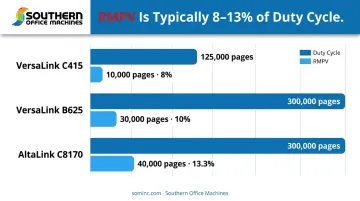
Ricoh's guidance aligns: if a printer's duty cycle is 100,000 pages, the recommended monthly volume is typically 10,000–15,000 pages — around 10–15% of the duty cycle figure.
What RMPV Accounts For That Duty Cycle Doesn't
RMPV factors in real-world operating conditions that stress testing doesn't replicate under sustained daily use:
- Heat buildup across fuser and roller components during sustained jobs
- Toner coverage per page and its effect on cartridge and drum life
- Duplex printing frequency and paper weight variation
- Cumulative component wear across hundreds of print cycles per day
The Practical Trap to Avoid
Businesses that choose equipment based purely on duty cycle often end up with a machine whose RMPV is actually lower than their actual monthly output. The machine looks capable on paper, and the duty cycle dwarfs their volume, but the RMPV tells the real story. That mismatch shows up as premature fuser wear, unexpected service calls, and downtime they didn't budget for.
Where RMPV Guides Day-to-Day Fleet Management
RMPV is the operative number for ongoing operations:
- Benchmark current output against RMPV to determine if equipment is correctly sized
- Catch overutilization before it causes expensive component failures
- Avoid underutilization — paying for capacity you never use ties up budget that could go toward equipment that actually fits your workload
Which Metric Should You Follow — and What Happens When You Don't?
Duty cycle tells you what a machine can theoretically handle. RMPV tells you what it should handle day to day. For operational decisions — how hard to run a machine, when to add capacity, how to size equipment at purchase — RMPV is the number that matters.
Consequences of Ignoring RMPV
Ricoh states that "frequent overuse can accelerate wear on components, increase the risk of breakdowns, and raise maintenance costs over time." In practice, businesses that consistently print near the duty cycle tend to see a predictable pattern of problems:
- Increased paper jams as rollers wear unevenly
- Fuser failures from sustained heat stress
- Toner system issues from higher-than-designed coverage rates
- Minor issues compounding into major repairs that sideline the machine
These failures accumulate gradually. By the time a machine needs significant service, the damage has typically been building for months without visible warning signs.
The Financial Impact
Overworking a machine creates costs on two fronts:
- Toner consumed faster than expected
- Replacement parts for drums, fusers, and rollers
- Technician labor for unplanned service calls
- Workflow downtime while the machine is out of service
- Staff time troubleshooting or routing work to backup equipment
- Productivity losses that ripple across departments
For legal, healthcare, and government environments — segments Southern Office Machines regularly serves in Metro Atlanta — quality degradation can become visible before mechanical failure does. Color consistency and sharp, accurate output matter in those workflows, and a machine operating beyond its RMPV will show print quality decline before it actually breaks down.
The Right Sizing Principle
Choose a machine whose RMPV meets or exceeds your actual monthly output — not simply a machine whose duty cycle sounds large. A high duty cycle number is a ceiling, not a target. Matching RMPV to actual volume is what keeps the machine running reliably and the total cost of ownership predictable.
How to Right-Size Your Printer for Your Actual Monthly Volume
Before comparing any spec sheets, know your actual monthly print volume. Here are three ways to get that number:
- Review your copier or vendor invoice — Most service agreements and leases include monthly impression counts. This is the fastest, most accurate starting point.
- Pull meter reads from the device — Navigate to the machine's settings or print a configuration report. Note the total impressions, then divide by the months the device has been in service. Xerox's fleet assessment guidance recommends taking two readings 2–4 weeks apart and calculating the change; that eliminates distortion from seasonal spikes.
- Track paper ream consumption — One ream is 500 sheets. If your office goes through 20 reams per month, that's roughly 10,000 impressions. A rough estimate, but useful when no other data is available.
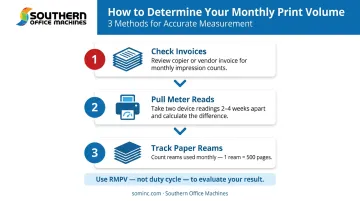
Applying the Right-Sizing Formula
Once monthly volume is established:
- Find machines whose RMPV matches or modestly exceeds that number
- Build in a reasonable buffer for growth — but don't double capacity unnecessarily
- If RMPV isn't published, divide the duty cycle by 10 as a working estimate, and confirm with the manufacturer or dealer
That formula is straightforward on paper — the harder part is applying it accurately to your specific workflow. Southern Office Machines' Business-to-Technology approach starts with understanding each client's actual print demands before recommending any equipment, then identifies the most efficient machine with the right RMPV for the job. The goal is the lowest total cost of ownership without sacrificing reliability.
Metro Atlanta businesses can reach Southern Office Machines at 770-919-8989 to discuss their current print environment and get a right-sized recommendation.
Conclusion
Duty cycle tells you what a machine can survive. RMPV tells you what it should do. Only by knowing your actual monthly volume can you match the right equipment to your real-world needs — avoiding both the cost of overworking a smaller machine and the waste of paying for capacity that sits idle.
That distinction matters practically. For Metro Atlanta businesses — from corporate offices to government agencies — matching equipment to actual volume means fewer unplanned service calls, longer equipment life, and print workflows that run without interruption. It starts with reading the spec sheet correctly and knowing which number actually applies to you.
Frequently Asked Questions
What is the recommended monthly page volume for a printer?
RMPV varies significantly by machine class : from a few hundred pages for personal desktop printers to tens of thousands for office MFPs. It's typically listed in the product specifications, or can be estimated at roughly 10% of the duty cycle when not explicitly published.
What is monthly volume?
Monthly volume is the total number of pages a printer produces in a given month. Matching that figure against the machine's RMPV tells you whether the equipment is properly sized for your workload.
What is a good PPM for a printer?
PPM (pages per minute) measures print speed, not volume capacity and is a separate metric from duty cycle or RMPV. For small offices, 25–35 ppm is typically sufficient. Higher-volume environments often require 45–70 ppm to avoid bottlenecks during peak periods.
What happens if I exceed my printer's recommended monthly print volume?
Consistently exceeding RMPV accelerates wear on internal components, particularly rollers, fusers, and drums. Expect more frequent paper jams, increased service calls, declining print quality, and a shorter machine lifespan.
How is duty cycle different from recommended monthly print volume?
Duty cycle is the manufacturer-tested maximum a machine can produce before risking malfunction. RMPV is the sustainable everyday operating range, typically 10–20% of the duty cycle figure. That gap reflects the difference between stress tolerance and healthy, consistent use.
How do I find out how much my office prints each month?
Check your copier or vendor invoice for monthly impression counts, or pull meter reads directly from the device settings. Tracking paper ream consumption is a useful backup estimate when neither source is available.