Skip maintenance, and you're rolling the dice on:
- Unplanned downtime that stalls entire departments
- Higher repair bills from emergency service calls
- Poor print and copy quality that makes your business look sloppy
- Security vulnerabilities from outdated firmware
This guide breaks down why maintenance matters, the four types you'll encounter, warning signs to watch for, and a general service schedule. We'll also touch on how a factory-trained partner like Southern Office Machines fits into the picture.
TL;DR
- Preventive maintenance protects equipment lifespan and reduces costly emergency repairs
- Maintenance falls into four categories: routine, corrective, predictive, and major/overhaul
- Watch for streaks, unusual noises, error codes, and rising toner use
- Service frequency should scale with your print volume and environment
- Factory-trained technicians ensure maintenance is done right the first time, not just cheaply
Why Copier and Printer Maintenance Is Important
Your copier is a capital investment, and how you treat it determines whether that investment pays off or drains your budget.
Performance and Daily Efficiency
Dirty rollers, clogged nozzles, and outdated firmware slow everything down. HP has documented that worn pickup and separation rollers directly cause misfeeds and jams, while faulty fusers or transfer rollers produce streaking and wrinkled output (HP LaserJet Maintenance Kits guide). A machine limping along on worn parts costs you real productivity every day.
Lifespan and Replacement Cycles
Neglected machines wear out faster. Components have rated yields for a reason. Xerox lists specific replacement thresholds for AltaLink C8100 parts, like a drum rated for 180,000 pages and a waste-toner container rated for just 69,000 (Xerox AltaLink C8100 lab report). Push past those thresholds without service, and you risk a breakdown while accelerating wear on everything downstream.
A well-maintained copier simply lasts longer than one that's ignored until it fails.
Preventive vs. Reactive Costs
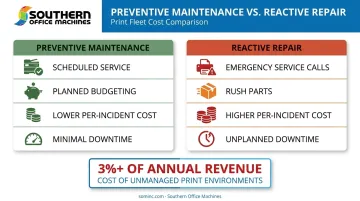
Scheduled servicing from trained technicians is planned and budgeted. Emergency repair calls are neither. They strike at the worst possible time, often requiring rush parts while your team sits idle waiting for a fix.
Southern Office Machines' Managed Print Services notes that unmanaged print environments can cost businesses over 3% of total annual revenue — a substantial leak worth planning around.
Types of Maintenance for Copiers and Printers
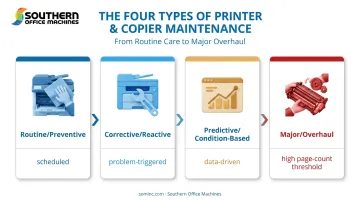
Maintenance isn't one-size-fits-all. What your machine needs depends on its age, how hard it's used, and how severe any current issues are. Most businesses will encounter four categories.
Routine and Preventive Maintenance
This is the baseline. Canon's own documentation for the imageRUNNER C3322L specifies that daily maintenance should include cleaning and consumable checks (Canon imageRUNNER C3322L manual).
Typical routine tasks include:
- Cleaning printheads and platen glass
- Removing dust and debris from paper paths
- Checking rollers for wear
- Replacing consumables on schedule
This level of care is usually enough for machines running within manufacturer specs. Pricing for a standard visit or maintenance kit varies widely by model and provider, so it's worth getting a quote based on your specific equipment rather than relying on a generic number.
Corrective and Reactive Maintenance
This is maintenance triggered by a problem, not a calendar. Common triggers include:
- Paper jams that keep recurring
- Streaking or lines across output
- Error codes on the display
- Sudden shutdowns mid-job
Relying only on reactive fixes is a risky habit. Xerox's own troubleshooting sequence for streaking issues moves through cleaning lenses, reseating drums, inspecting the transfer-belt cleaner, and eventually replacing a drum or fuser if the problem persists (Xerox streak troubleshooting guide).
Each unresolved symptom compounds the next, and reactive repairs tend to cost more per incident than scheduled service. Unplanned fixes are often more complex by the time you call for help.
Predictive and Condition-Based Maintenance
Instead of waiting for a breakdown, this approach uses data such as page counts, toner levels, and meter reads to schedule service before failure occurs.
Southern Office Machines' Managed Print Services program builds on this model with:
- Automated meter reading submission (total, black, and color)
- Toner auto-replenishment before supplies run out
- Fleet-wide usage monitoring to flag devices approaching service thresholds
This data-driven approach is gaining traction across the industry. A 2024 Keypoint Intelligence study covering 200 IT decision-makers found 97% satisfaction among those using fleet management tools, with 99% of dealers and resellers relying on multiple monitoring platforms (Keypoint Intelligence fleet management study). This shift toward monitoring instead of reacting is now standard practice among print providers.
Major and Overhaul Maintenance
Eventually, high-volume machines need deeper servicing: fuser replacement, drum replacement, or transfer belt work. These aren't routine tasks; they're tied to specific page-count thresholds that vary widely by model.
For example, HP's maintenance kits for certain LaserJet Enterprise models are rated for 150,000 pages under standard test conditions (HP LaserJet Enterprise M681/M682 supply guide), while Xerox specifies a 500,000-page rating for the AltaLink C8170's fan filter. These figures aren't interchangeable across models — always check your specific device's counter and service manual.
Overhaul costs run higher than routine service, but they're still typically far less than replacing an otherwise functional machine. If your equipment is structurally sound and just worn from volume, an overhaul is usually the smarter financial move.
How to Check If Your Copier or Printer Needs Maintenance
Catching early indicators before a full breakdown saves you money and downtime. Here's what to watch for.
Visible & Performance Warning Signs
- Slower printing than usual
- Faded, inconsistent, or streaked output
- Lines running across copies
- Warning lights or recurring error codes
- Toner leakage inside the machine
- Visible dust or debris buildup
Unusual Behavior or Operation
Grinding, squeaking, or rattling noises signal parts wearing out—even HP's own maintenance documentation flags these as clear kit-replacement indicators. Unexpected vibration or shutdowns during normal operation fall into this same category.
Escalating Resource Use or Recurring Downtime
Rising toner usage for the same workload, or needing frequent manual resets, both point to underlying wear rather than a one-off glitch. The same goes for repeat breakdowns: if a "quick fix" used to hold for weeks and now only lasts a day, that's your machine telling you it needs professional attention, not another temporary patch.
Copier and Printer Maintenance Schedule (General Guidelines)
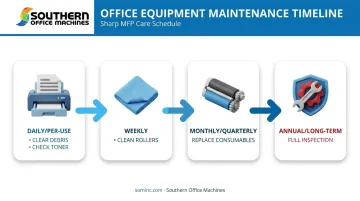
Ideal frequency depends on your print volume, the specific machine model, and your office environment. There's no universal weekly or monthly rule that applies to every device, but here's a general framework based on manufacturer guidance.
| Interval | Typical Tasks |
|---|---|
| Daily/per-use | Verify paper trays are loaded correctly, clear visible debris |
| Weekly | Wipe exterior surfaces, check toner levels |
| Monthly/quarterly | Clean internal components, inspect rollers and glass |
| Annual/long-term | Full technician inspection, part replacement, firmware updates |
Canon explicitly requires daily cleaning and consumable checks on its imageRUNNER series. HP takes a different approach, noting that heavy-use environments may need annual maintenance-kit replacement, while light use can stretch to 2-3 years between kits (HP LaserJet Maintenance Kits guide).
These manufacturer differences point to a broader pattern: high-volume or continuously operating offices need more frequent servicing than low-usage setups. A structured service agreement, like the monthly, quarterly, or annual plans Southern Office Machines offers, standardizes this regardless of your internal staff's bandwidth or attention to detail.
Conclusion
Maintenance isn't optional if you want reliable, cost-effective office equipment. The right approach blends routine upkeep, timely corrective repairs, and occasional major overhauls to keep machines running at their best.
This balance depends on the right service partner. Southern Office Machines has served Metro Atlanta and Marietta, Georgia since 1985 with factory-trained technicians and flexible service plans built around your actual usage. Whether you need a straightforward maintenance agreement or a full Managed Print Services setup, tailored service protects your equipment's value and keeps your office running without surprises.
Frequently Asked Questions
How much does copy machine maintenance cost?
Costs vary based on service type (routine versus major overhaul), your specific machine model, and whether you have a service contract. Southern Office Machines recommends requesting a quote based on your exact equipment and usage volume.
How long does a copy machine typically last?
With regular maintenance, most office copiers handle several years of reliable service across a wide page-volume range. Neglect can shorten that lifespan, since worn parts accelerate damage to other components.
How often should I service my office printer or copier?
Frequency depends on your usage volume; high-print environments need more frequent service than occasional-use setups. Refer to the general schedule above and adjust based on your device's actual page counts.
Can I perform printer maintenance myself, or do I need a professional?
Basic tasks like clearing paper jams, wiping exteriors, and replenishing toner can be done in-house. Internal part replacement or electrical issues should go to a factory-trained technician.
What happens if I skip regular printer maintenance?
You'll face a higher breakdown risk, declining print quality, and more expensive repairs down the line. Small issues that go unaddressed tend to compound into bigger, costlier ones.
Is a maintenance service agreement worth it for a small business?
Service agreements reduce total cost of ownership by replacing unpredictable repair bills with structured, professional upkeep. For small businesses without dedicated IT staff, this predictability alone often justifies the cost.