The answer isn't about which technology is better. It's about which one matches how your business actually prints.
Key Takeaways
- Monochrome laser printers cost less upfront, print faster, and carry a significantly lower cost per page — ideal for text-heavy, high-volume workflows.
- Color laser printers support CMYK output for branded materials but come with higher hardware costs, more consumables, and higher per-page costs.
- Running a color laser printer primarily in black-and-white still triggers color toner maintenance cycles — driving up costs unexpectedly.
- Neither option is universally superior — your print mix and monthly volume determine the right fit.
- Mapping your actual print volume and color usage before buying prevents overspending on the wrong device.
Monochrome vs. Color Laser Printer: Quick Comparison
| Factor | Monochrome | Color Laser |
|---|---|---|
| Hardware Cost | ~$199–$499 | ~$430–$649 |
| Black-Only Cost Per Page | ~1.1–2.4 cents | ~3.1 cents |
| Color Cost Per Page | N/A | ~17 cents |
| Typical Speed | 35–42 ppm | 26–35 ppm |
| Toner Cartridges | One (black) | Four (CMYK) |
| Best For | Reports, invoices, legal docs | Brochures, presentations, branded materials |
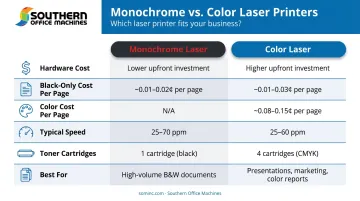
Canon's US pricing places small-office monochrome MFPs between $369–$499, while comparable color MFPs run $430–$649. That gap widens with higher-volume or multifunction configurations.
Some current color laser engines — like the HP Color LaserJet Pro MFP 4301 — are rated at 35 ppm for both black and color output, meaning color and mono output are equally fast on that model. Speed figures vary by model, so always verify the spec sheet before assuming mono is faster.
What Is a Monochrome Laser Printer?
A monochrome laser printer uses a single black toner cartridge and a laser beam to electrostatically transfer black-and-white output onto paper. There is no color capability — not through settings, not through software. It's a fundamentally single-channel system, and that simplicity translates directly into lower operating costs and fewer maintenance headaches.
Core Advantages for Office Use
- Lower cost per page: PCMag testing found monochrome MFPs ranging from 1.1 cents (Brother MFC-L5915DW) to 2.4 cents (Canon MF462dw) per page — well below what color devices charge for black-only output.
- Faster throughput: Monochrome office lasers typically run 35–42 ppm, supporting high-volume environments without delays.
- Simpler toner management: One cartridge to track, one to replace. No juggling four separate color cartridges at different depletion rates.
- Fewer consumable parts: Fewer components means fewer failure points and less frequent service.
Where Monochrome Printers Excel
Monochrome laser printers are the standard choice in industries where document volume is high and color adds no functional value:
- Law firms — contracts, briefs, case files
- Accounting and finance offices — tax documents, financial reports, invoices
- Medical and dental practices — patient intake forms, insurance paperwork, clinical notes
- Government agencies — internal reports, compliance documents, administrative correspondence
- Logistics and operations — shipping documents, inventory reports, work orders
If 90% of your output is text on a page, there's no operational reason to pay for color capability. For offices in Metro Atlanta looking to keep that cost low, Southern Office Machines carries Sharp B&W laser printers and MFPs in both new and refurbished configurations — giving budget-conscious teams a path to reliable monochrome output without a large upfront investment.
What Is a Color Laser Printer?
A color laser printer uses four separate toner cartridges — Cyan, Magenta, Yellow, and Black (CMYK) — to produce full-color output. It can also print black-and-white documents, making it a dual-purpose device. But that versatility has a cost.
Color Laser vs. Inkjet in Business Settings
For office environments, color laser holds real advantages over color inkjet:
- Fuses dry toner directly to paper — no smearing, no drying time, no clogged nozzles from sitting idle
- Produces crisp text alongside graphics, where inkjet can blur at high print volumes
- Handles sustained monthly volumes that business use demands
That said, per-page costs for color output are steep. PCMag's review of the HP Color LaserJet Pro MFP 3301fdw found 3.1 cents per page for black-only output and 17.0 cents per page for color — on the same device. At 500 color pages per month, that's roughly $85/month in toner alone, just for color output.
Color Laser Tradeoffs to Understand
- Higher hardware cost: $200–$300 more than comparable monochrome MFPs
- Four cartridges to manage: CMYK toner plus imaging kits and waste toner bottles
- More service complexity: More consumable components mean more potential service events
- Higher black-only cost per page: Even printing black pages costs more on a color device than on a dedicated monochrome printer
Where Color Laser Makes Sense
Color output justifies the cost when the documents directly serve clients or represent your brand:
- Real estate agencies — property listings, neighborhood guides, presentation packets
- Marketing firms — campaign collateral, proposals, creative briefs
- Retail businesses — promotional materials, product sheets, branded signage
- Healthcare clinics — patient-facing materials, wellness guides
- Educational institutions — course materials, event programs, communications to parents
For Metro Atlanta businesses in these categories, Southern Office Machines carries Sharp Color MFPs ranging from 25 to 70 pages per minute, sized for marketing departments and client-facing teams that produce branded materials at volume.
Which Laser Printer Is Right for Your Business?
This decision comes down to three things: how often you print in color, your monthly print volume, and your total cost of ownership over time — not just what's on the price tag.
Situational Recommendations
Choose monochrome if:
- The majority of your daily output is text-based (invoices, reports, forms, correspondence)
- Color documents are occasional, not routine
- You're managing costs tightly and need predictable per-page expenses
- Your team is large and you need fast, high-volume throughput
Choose color laser if:
- Client-facing or branded documents are part of regular operations — not just a monthly exception
- You produce marketing collateral, presentations, or color-coded materials in-house
- Outsourcing color printing costs more than owning the capability in-house
The Hybrid Approach Worth Considering
Some Metro Atlanta offices benefit from a split setup: a fast monochrome device for everyday internal printing, paired with a color MFP for client-facing output. This approach — similar to what HP documented when Houston Healthcare replaced color printers at nursing stations with monochrome models as part of a broader managed print redesign, contributing to 48% lower print costs — can reduce total fleet costs while preserving color capability exactly where it's needed.
The Hidden Cost Most Buyers Miss
Many businesses buy a color laser printer "just to have the option" — then discover that 80% of their output is black-and-white text. The cost gap adds up fast.
On the HP device tested by PCMag, black-only pages cost 3.1 cents each on the color printer versus 1.1–2.4 cents on dedicated monochrome models. At 3,000 black-only pages per month, that's a difference of roughly $21–$60 per month in toner alone — before accounting for the additional consumables (CMYK cartridges, imaging kits, waste toner) that a color device requires. Over a three-year equipment life, that gap compounds significantly.
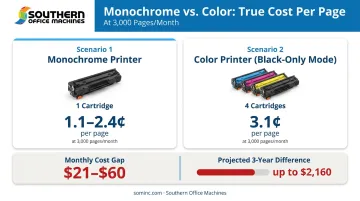
Some color laser printers also draw on color toner during maintenance cycles and drum conditioning routines, even when printing in black-and-white mode. Lexmark's documentation notes that calibration consumes toner across all four cartridges on some models.
Devices with a dedicated black-only mode can disengage color supplies during extended black-only print runs — but how much color toner a given model consumes in black-only operation varies. Confirm this with your dealer before committing.
Southern Office Machines' Approach
That complexity in the numbers is exactly why equipment selection shouldn't start with a product catalog. Rather than defaulting to a recommendation, the team at Southern Office Machines uses a Business-to-Technology approach — learning how a client's business actually operates before suggesting equipment. Questions about print mix, monthly volume, industry requirements, and budget come before any hardware conversation. The goal is identifying the smallest, sturdiest machine with exactly the features needed, then calculating the real total cost of ownership.
For Metro Atlanta businesses unsure about their print mix, a consultation is the right starting point. Reach the team at 770-919-8989 or info@sominc.com.
Conclusion
Monochrome and color laser printers each serve a specific set of needs. The right answer depends on your workflow, not the technology itself. A law firm printing 4,000 pages of contracts monthly has very different requirements than a real estate agency producing weekly property packages. Getting the hardware wrong in either direction costs real money over time.
The smarter path starts with an honest look at what your office actually prints, how often it prints in color, and what that capability is truly worth at your volume. Southern Office Machines has helped Metro Atlanta businesses work through exactly that analysis since 1985 — matching the right equipment to actual usage, budget, and workflow before any purchase decision is made.
Frequently Asked Questions
Should I get a color or monochrome laser printer?
Evaluate your typical document types first. If the majority of your printing is text-based and high-volume, monochrome is more economical. If color documents are a regular business need — not just occasional — color laser is the better long-term investment.
Can a monochrome laser printer print color?
No. Monochrome laser printers are mechanically designed for black-and-white output only. There is no software setting or workaround that enables color output — a color laser printer is required for any color printing.
What is the cost per page difference between monochrome and color laser printing?
PCMag testing found monochrome MFPs ranging from 1.1–2.4 cents per page. On the same color laser device, black-only output costs around 3.1 cents and color output reaches 17.0 cents. The gap becomes very significant at high monthly volumes.
Which laser printer is better for high-volume office printing?
Monochrome laser printers are better suited for high-volume environments. They print faster (35–42 ppm), cost less per page, and require only one toner cartridge — making supply management and service scheduling far simpler.
Are color laser printers harder to maintain than monochrome?
Yes. Color laser printers require four separate CMYK toner cartridges, plus imaging kits and waste toner components depending on the model. More consumable parts means more frequent replacements and a higher likelihood of service events compared to single-cartridge monochrome devices.
Can I use a color laser printer in black-and-white mode to save toner?
Partially. Color laser printers can be set to print in black-and-white mode, but some models still consume color toner during maintenance and calibration cycles. Devices with a dedicated black-only mode can disengage color supplies entirely — but the savings are model-dependent.