Introduction
It's 4:45 PM, and your office printer just choked on a 200-page contract, spitting out paper faster than the recycling bin can handle it. Reports pile up on desks. The supply closet runs low on paper by Thursday, every week.
Auto duplex printing solves this specific headache. It lets a laser printer print both sides of a page automatically, no manual flipping, no reloading the tray halfway through a job.
This guide breaks down what auto duplex printing actually is, how the mechanism works inside your printer, and what it means for your paper budget.
We'll also cover how to pick the right duplex-capable laser printer for a Metro Atlanta office, whether you're outfitting a small firm in Marietta or a multi-department operation across the metro area.
Key Takeaways
- Auto duplexers flip and print both sides automatically, unlike manual duplexing by hand
- Paper costs can drop by 30% to 50% when offices switch to two-sided printing
- Not every laser printer includes a duplexer by default; some require an add-on unit
- Choosing a duplex-capable printer depends on volume, document type, and total cost of ownership, not just price
What Is Auto Duplex Printing?
Duplex printing simply means printing on both sides of a sheet. Simplex printing means one side only. That's the entire distinction, though the technology behind it has a longer history than most people assume.
Double-sided printing isn't new. Britannica documents an 1818 Koenig and Bauer double press that printed one side of a sheet under one cylinder, then passed it to a second cylinder for the other side. Modern office duplexing works on a similar principle, just miniaturized and automated inside a single machine.
The Duplexer: What Makes It "Automatic"
The part responsible for the flip is called a duplexer. It's a hardware component that reroutes the sheet internally after the first side prints, flips it, and feeds it back through for the second pass.
Here's where buyers get tripped up:
- Some laser printers and MFPs include the duplexer as a standard feature built into the base unit
- Others treat it as an optional accessory you have to buy and install separately
- Consumer-grade printers are far more likely to skip duplexing entirely or offer it only through manual driver workarounds
- Business-grade laser printers and MFPs typically build automatic duplexing in as a default setting
This matters because "supports two-sided printing" in a spec sheet isn't the same as "includes an automatic duplexer." Always check whether the listing says standard or optional before assuming a machine can duplex out of the box.
Documents That Benefit Most From Two-Sided Printing
Once you've confirmed a machine duplexes automatically, the next question is which documents actually benefit from it. Certain document types are practically made for duplexing:
- Multi-page reports and internal memos
- Contracts and legal agreements
- Employee handbooks and onboarding packets
- Brochures and marketing collateral
- Invoices and billing statements
- Training materials and reference guides
Two-sided output looks more polished for client-facing documents, and it cuts the physical bulk of anything that gets filed, mailed, or bound.
How Does Automatic Duplex Printing Work?
Once you send a duplex job to the printer, the machine handles a specific sequence without any input from you.
The Mechanical Process
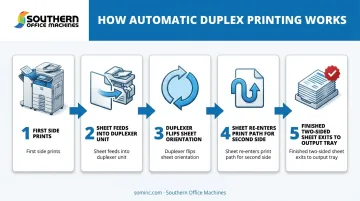
- The printer prints the first side of the sheet as normal
- The sheet feeds into the duplexer unit instead of exiting the output tray
- The duplexer flips the sheet and reverses its orientation
- The printer feeds the sheet back through the print path and prints the second side
- The finished, two-sided sheet exits to the output tray
Higher-volume commercial presses sometimes skip this back-and-forth entirely. According to Xerox's documentation on its 495 Continuous Feed Duplex Printer, production-grade machines can use two imaging drums to print both sides in a single pass.
That's a production-press architecture, though, not something you'll find in a standard office laser printer or MFP.
Long-Edge vs. Short-Edge Binding
Your driver settings will usually ask you to pick a binding style:
- Long-edge binding orients pages for flipping like a book, best for standard portrait reports and contracts
- Short-edge binding orients pages for flipping like a notepad or tablet, better suited to landscape layouts like presentation handouts
Picking the wrong one leaves your second page upside-down when bound. Test with a short document before running the full job.
Enabling Duplex Printing
Most drivers put this setting in the same general spot:
- Open the Print dialog from your application
- Look for Two-Sided Printing or Print on Both Sides
- Select your binding orientation (long-edge or short-edge)
- Confirm and print
One trade-off worth knowing: duplex jobs run slower than single-sided jobs, because each sheet travels through the print path twice.
HP's data sheet for the LaserJet Enterprise MFP M430f rates it at 38 ppm simplex versus 31 ipm duplex on A4 paper, and 40 ppm versus 33 ipm on Letter. That gap is model-specific, so check the manufacturer's duplex rating separately rather than assuming your simplex speed carries over.
Benefits of Auto Duplex Printing for Your Business
The case for auto duplex printing comes down to money, materials, and image.
Lower Paper Costs
The EPA's Federal Electronics Challenge fact sheet found that duplexing can save 30% to 50% of paper costs. That range depends on how many of your print jobs are actually suited to two-sided output, so a marketing-heavy office might see different results than a data-entry department.
The same EPA resource notes these savings extend beyond the paper itself into purchasing and mailing costs. For an office printing 10,000 pages a month, that range could put a few hundred dollars back into the budget every year.
Practical and Environmental Perks
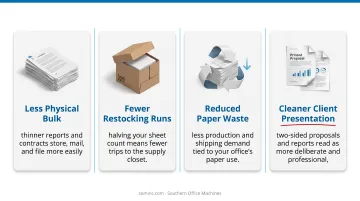
- Less physical bulk: thinner reports and contracts store, mail, and file more easily
- Fewer restocking runs: halving your sheet count means fewer trips to the supply closet
- Reduced paper waste: less production and shipping demand tied to your office's paper use
- Cleaner client presentation: two-sided proposals and reports read as more deliberate and professional
Weighing the Full Cost, Not Just the Paper
Paper savings are only part of the picture. A printer's price, duplex speed, toner consumption, and maintenance needs all factor into what it actually costs to run over several years.
This is the kind of total cost of ownership analysis Southern Office Machines walks through with Metro Atlanta businesses before recommending equipment. Rather than starting with a spec sheet, the approach looks at your actual document volume and workflow first, then matches a machine, and its duplexing efficiency, to that reality.
Auto Duplex vs. Manual Duplex: Which Is Better?
For any office running regular print jobs, auto duplex wins. It's not close.
Manual duplexing, as Brother's own documentation describes, requires printing all the even-numbered pages, then prompting you to physically remove the stack, flip it, reorient it, and reload it before the odd pages print. Miss the orientation, and you're reprinting the whole job.
That workflow can be fine for:
- Home users printing the occasional two-sided document
- Very low-volume situations where buying duplex-capable equipment isn't justified
- Temporary workarounds while an auto duplexer is out for service
It becomes impractical fast in any office running dozens or hundreds of pages a day.
One honest caveat: auto duplexers are moving mechanical parts. Rollers wear down. Sensors misalign. A malfunctioning duplexer is a genuinely common service call, not a rare edge case.
That's exactly why maintenance agreements matter. Factory-trained technicians checking rollers and sensors on a scheduled basis (monthly, quarterly, or annual) help avoid mid-job jams down the road.
Choosing & Setting Up the Right Auto Duplex Laser Printer
Before you buy, confirm the machine actually does what you need.
Confirm Duplex Support First
- Check the spec sheet for language like "automatic two-sided printing: standard," not just "supports duplex printing"
- Open the print driver and look for a Two-Sided Printing option
- Consult the manufacturer's manual if the spec sheet is ambiguous about built-in versus optional hardware
What to Look for When Buying
| Factor | Why It Matters |
|---|---|
| Built-in vs. optional duplexer | Optional units add cost and installation time |
| Duplex print speed (ipm) | Often noticeably slower than the headline simplex ppm |
| Recommended monthly volume | Matches the machine to your actual workload, not just its max duty cycle |
| Compatible media | Not every duplexable printer can duplex envelopes, labels, or heavy cardstock |
Matching these factors to your real workflow, rather than the fastest simplex number on the box, is where a Business-to-Technology approach pays off. Southern Office Machines applies this same logic, identifying the smallest, sturdiest machine that fits a client's document volume and budget, then pricing out the full cost of ownership.

If your Marietta or Metro Atlanta business needs help selecting the right auto duplex laser printer, Southern Office Machines' factory-trained technicians can walk through the options. They can also help set up sales, service, or rental terms that fit your workflow. Call 770-919-8989 or reach out at info@sominc.com.
Frequently Asked Questions
What is auto duplex printing?
Auto duplex printing is a printer feature that automatically prints on both sides of a page using a built-in duplexer. No manual paper flipping required.
Is automatic duplex printing better?
For most offices, yes. It saves handling time and cuts errors from manual flipping, though it requires duplex-capable hardware and runs slower per page than single-sided printing.
Does auto duplex printing use more toner?
Not inherently. Duplexing doesn't use more toner per page, but the longer reversing path can add mechanical wear that affects cartridge life over time, according to HP's guidance on toner usage.
Can all laser printers do automatic duplex printing?
No. Some laser printers include a duplexer standard, while others require purchasing an add-on unit. Always check the exact model's spec sheet before assuming.
What is the difference between long-edge and short-edge duplex binding?
Long-edge binding suits portrait documents like reports, flipping like a book. Short-edge binding suits landscape content like presentation handouts, flipping like a notepad.
How do I know if my printer supports automatic duplex printing?
Check the printer's spec sheet for "automatic two-sided printing," look for a Two-Sided Printing option in your print driver, or check the manufacturer's manual directly.