Introduction
Architectural drawings that need to fit on one sheet. Marketing spreads that look cramped on letter paper. Multi-page reports that lose readability when shrunk down.
If any of this sounds familiar, your office has already outgrown standard 8.5x11 printing.
That demand shows up in the numbers: the global A3 laser-printer market is projected to hit $4.3 billion in 2026, according to Persistence Market Research, growing to $6.3 billion by 2033. Government offices are the fastest-growing buyer segment.
For Metro Atlanta businesses, that means fewer trips to the print shop and tighter control over document costs. This guide breaks down the top 11x17 printers for 2026, how to pick the right one, and why local support matters more than the spec sheet.
TL;DR
- 11x17 (tabloid) printers handle documents nearly double letter-size, ideal for plans and presentations
- Choose based on ink/toner economy, paper handling, scanning support, and true cost-per-page
- 2026's top picks span Sharp, HP, Brother, Epson, and Ricoh, each suited to different volume, budget, and workflow needs
- Working with a local, factory-trained partner beats buying blind online for long-term savings
Overview of 11x17 Printers in the Office Equipment Market
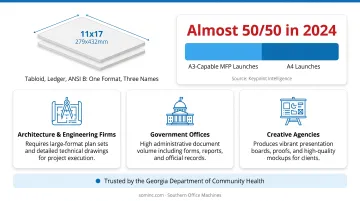
Tabloid, ledger, and ANSI B all refer to the same 11x17-inch sheet, roughly 279x432mm. It's the standard format for architectural drawings, wide spreadsheets, brochures, and presentation boards that letter paper simply can't accommodate.
Demand for this format isn't shrinking, especially in Europe, where A3-capable multifunction printer launches matched A4 launches almost 50/50 in 2024, reversing years of A4 dominance, according to Keypoint Intelligence. The firm ties this shift to office consolidation, sustainability goals, and businesses standardizing around fewer, more capable devices.
Metro Atlanta reflects that same pattern, with demand for 11x17-capable equipment spanning:
- Architecture and engineering firms printing plan sets and detail drawings
- Government offices managing high-volume administrative documents
- Creative agencies producing spreads, mockups, and presentation boards
Southern Office Machines has served government clients directly, including the Georgia Department of Community Health, backed by the responsive service and competitive pricing public-sector procurement demands. That reliability matters when an office needs consistent large-format output without downtime.
With demand this broad, the equipment options vary widely too. Below are the models worth evaluating for 2026.
Top 5 Best 11x17 Printers for Businesses in 2026
Not every "A3-rated" printer performs the same way in daily use. We evaluated each model against criteria that actually affect office workflow:
- Print and scan format support: does it handle 11x17 originals, or just A3 output?
- Ink or toner economy: what's the real cost-per-page at business volume?
- Duplex capability: for both printing and scanning
- Duty cycle: can it survive the monthly volume you'll actually throw at it?
- Workflow fit: office documents versus creative or drawing-heavy work
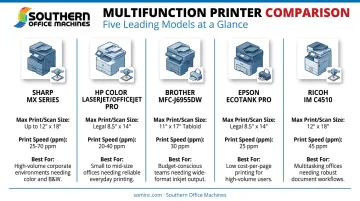
Sharp MX Series A3 Color MFP
Sharp has built its reputation on durable, toner-based multifunction copiers designed for high-volume business environments. Southern Office Machines has partnered with Sharp since 1985, and every service technician is factory-trained and certified on the full product line.
The MX Series stands out through pure reliability: dual-component developer systems, magnetic-brush development, and belt fusing built for years of daily use. The 150-sheet duplexing feeder scans originals up to 11x17 at speeds up to 220 images per minute, making it a strong fit for scan-to-email and network archiving workflows.
| Specification | Details |
|---|---|
| Max Print/Scan Size | 11x17 in scan; up to 12x18 in output |
| Print Technology & Speed | Toner-based laser; 30–40 ppm depending on model |
| Best For | High-volume offices needing durable, serviceable equipment |
Best for: Offices that run heavy daily volume and need a machine backed by local, factory-trained service.
HP Color LaserJet / OfficeJet Pro (A3 Series)
HP's A3-capable line balances print, scan, copy, and fax functionality for small-to-midsize offices that need moderate wide-format output without a production-grade footprint.
There's a catch worth knowing before you buy. The OfficeJet Pro 9730e prints A3 documents just fine, but its automatic document feeder tops out at legal size (216x356mm). Scanning an actual 11x17 original means using the flatbed instead, according to HP's official specifications. That's a meaningful limitation if you're digitizing stacks of oversized documents regularly.
| Specification | Details |
|---|---|
| Max Print/Scan Size | A3 print; flatbed scan to 297x432mm; ADF limited to legal |
| Print Technology & Speed | Thermal inkjet; up to 22 ppm black, 18 ppm color |
| Best For | Moderate-volume offices printing occasional wide-format documents |
Best for: Offices comfortable using the flatbed for oversized scans instead of relying on the ADF.
Brother MFC-J6955DW
Brother fills a gap most competitors miss: a true A3 all-in-one with a 50-sheet automatic document feeder built for scanning oversized originals, not just printing them.
Here's the nuance. Single-sided ADF scanning supports full A3, but two-sided ADF scanning is limited to A4, per Brother's official specification sheet. If you need to duplex-scan large contracts or drawings automatically, verify this before purchasing. Automatic duplex printing, however, works reliably at up to 30 ppm.
| Specification | Details |
|---|---|
| Max Print/Scan Size | A3/11x17 print and flatbed scan; ADF to A3 (simplex) |
| Print Technology & Speed | INKvestment Tank inkjet; up to 30 ppm ISO |
| Best For | Offices digitizing and archiving oversized documents regularly |
Best for: Businesses that need to scan large originals more than they need to duplex-scan them.
Epson EcoTank Pro (A3+ Series)
Epson's supertank system was built to solve one specific pain point: the cost of running cartridge-based printers at wide-format volume. Refillable pigment ink tanks cut cost-per-page dramatically compared to traditional cartridges.
The ET-16650 prints up to 13x19 inches, with borderless output and scanning through 11x17. It uses four-color, all-pigment ink through Epson's PrecisionCore Heat-Free print system, rated at 25 ISO ppm in both black and color.
| Specification | Details |
|---|---|
| Max Print/Scan Size | Prints to 13x19 in; borderless and scan through 11x17 in |
| Print Technology & Speed | All-pigment ink, PrecisionCore; 25 ISO ppm |
| Best For | High-volume offices prioritizing low operating cost |
Best for: Businesses printing large volumes who want laser-level reliability without laser toner costs.
Ricoh IM Series Multifunction Printer
The Ricoh IM C4510 is built for document-heavy environments where downtime isn't an option: enterprise offices, healthcare systems, and government document centers.
Its second paper tray handles everything from A6 through A3, with output up to 12x18 inches. Print speed reaches 45 ppm, and the scanner processes up to 300 images per minute in duplex mode.
Ricoh rates the unit at a 50,000-page maximum monthly volume, per Ricoh's official product page, a figure worth comparing against your actual monthly output before assuming you need a machine this large.
| Specification | Details |
|---|---|
| Max Print/Scan Size | A3/11x17 print and scan |
| Print Technology & Speed | Color laser; 45 ppm; 50,000-page max monthly volume |
| Best For | Government, healthcare, and enterprise document centers |
Best for: High-volume operations that need production-grade uptime and managed print integration.
How We Chose the Best 11x17 Printers
We built this list from documented manufacturer specifications, not marketing brochures. Every claim here traces back to an official spec sheet, covering:
- Format support
- Duty cycle
- ADF limitations
- Rated speeds
That distinction matters because it's exactly where buyers get burned. The most common mistake we see: choosing a printer based on sticker price alone, without checking recommended monthly volume against actual usage.
A machine rated for 5,000 pages a month will break down fast in an office printing 20,000. Conversely, an enterprise-grade unit sitting mostly idle wastes money on capacity nobody uses. Southern Office Machines evaluates total cost of ownership, not just the price tag, before recommending equipment. That's how you avoid a mismatch that costs you a service call down the road.
Choosing the Right 11x17 Printer Partner for Your Business
Choosing the right 11x17 printer means matching a machine to your actual workflow. Look at your document volume, your scanning needs, and your budget instead of specs or brand names alone.
This is where a local, factory-trained provider earns its keep. Southern Office Machines takes a Business-to-Technology approach, learning how a client's business actually operates before recommending equipment. As Sheldon Michaels, one of the company's office equipment professionals, puts it, the goal is to identify "the smallest, sturdiest machine with the features and functions they need." The team then evaluates the total cost of ownership.
That process (outlined further in The IT Pro's Guide to Choosing the Right MFP) helps avoid the over-buying and under-buying mistakes covered above.
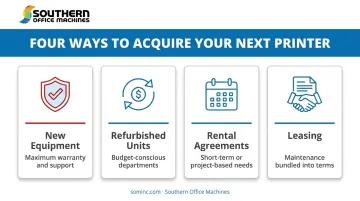
Acquisition flexibility matters too. Metro Atlanta businesses can lower upfront costs through:
- New equipment for maximum warranty and support
- Refurbished units for budget-conscious departments
- Rental agreements for short-term or project-based needs
- Leasing with maintenance bundled into monthly, quarterly, or annual terms
Conclusion
Choosing an 11x17 printer for 2026 depends more on operational fit than headline specs. The fastest machine on paper won't help if its scanner can't handle your drawings, and the cheapest unit won't stay cheap once toner costs and service calls pile up.
Before you commit to a purchase or lease, weigh scalability, ink or toner economy, and the strength of your vendor's support. Skipping that step often means costly downtime and repair bills down the road.
Metro Atlanta businesses ready to talk through their options can reach Southern Office Machines at 770-919-8989 for a free consultation on the right 11x17 printer or MFP for their office.
Frequently Asked Questions
What is tabloid size on a printer?
Tabloid size measures 11x17 inches (about 279x432mm), also called ledger or ANSI B. It's the standard format for drawings, spreadsheets, and posters that exceed letter paper.
Can a regular printer print a tabloid?
No. Standard letter/A4 printers can't accept 11x17 sheets. You need a printer or MFP specifically rated for A3/tabloid paper trays.
What is the difference between 11x17 and A3 paper?
A3 measures roughly 11.7x16.5 inches, slightly different from the 11x17-inch tabloid size. Most A3-rated printers handle both formats without issue.
How much does an 11x17 printer cost to lease or buy?
Costs vary widely by print technology and monthly volume, ranging from a few hundred dollars for desktop inkjet units to quote-based pricing for production laser MFPs. Leasing through a local provider like Southern Office Machines typically lowers upfront investment.
Do 11x17 printers support duplex printing and scanning?
Most modern 11x17 AIOs support automatic duplex printing. Duplex scanning at full 11x17 size is model-dependent, so verify this specification before purchasing.
Should I buy or lease an 11x17 printer for my Atlanta business?
Leasing reduces upfront costs and often includes maintenance, while buying suits businesses with steady, predictable print volume. Southern Office Machines can help evaluate total cost of ownership for your specific situation.