Introduction
Picking a copier for your business sounds straightforward until you're three sales pitches deep, staring at a spec sheet that lists 47 features you may never use. Metro Atlanta businesses run into this constantly: too many models, overlapping capabilities, and prices that only make sense after you've signed something.
This guide focuses on what actually matters for your office. Here's what it covers:
- Key functions and specs that affect day-to-day performance
- How five major brands — Sharp, Canon, Kyocera, Ricoh, and Konica Minolta — compare
- What drives total cost of ownership beyond the sticker price
There is no universally "best" copier. The right machine depends on how many pages you print monthly, which functions your team actually uses, and what the device will cost you over its full lifecycle — not just what's on the price tag.
Key Takeaways
- Monthly print volume is the most important factor — get that wrong and every other spec is irrelevant
- Multifunction printers (MFPs) handle print, copy, scan, and fax in one device — the standard choice for most modern offices
- Brand matters less than matching the machine's strengths to your specific workload and workflow
- Leasing gives businesses predictable monthly costs and the flexibility to upgrade as needs change
- Total cost of ownership — not sticker price — determines the real value of any machine
What Type of Copier Does Your Business Actually Need?
Single-Function vs. MFP
A traditional copier duplicates documents. That's it. A multifunction printer (MFP) combines printing, copying, scanning, and often faxing into one device, according to Fujifilm's comparison of single-function and MFP devices. For most businesses, the MFP wins on three fronts:
- Space: One device replaces two or three separate machines
- Cost: Consolidated supplies and maintenance contracts lower total spend
- Efficiency: Scan-to-email, copy, and print from a single workflow without switching equipment
A3 vs. A4 Paper Handling
A4 measures 210 × 297 mm (standard letter-size equivalent) and A3 measures 297 × 420 mm — roughly equivalent to 11×17 inches in the US. Ricoh identifies common A3/11×17 use cases as spreadsheets, engineering drawings, booklets, and folded brochures.
If your team regularly outputs any of those formats, you need an A3-capable device. Otherwise, an A4 MFP covers most standard business needs at a lower price point.
Volume Tiers: Match the Machine to the Workload
Once you've settled on format and features, volume is the variable most buyers overlook. Choosing a machine based on brand or price before calculating actual monthly page output is the most expensive mistake businesses make. Ricoh's guidance on duty cycles explains why: sustained overuse accelerates wear, breakdowns, and maintenance costs.
Use these volume tiers as a starting benchmark:
| Volume Tier | Monthly Page Range | Typical Fit |
|---|---|---|
| Low | Under 2,000 pages | Small teams, home offices |
| Mid | 2,000–10,000 pages | Most busy offices |
| High | 10,000+ pages | Document-heavy departments, production environments |
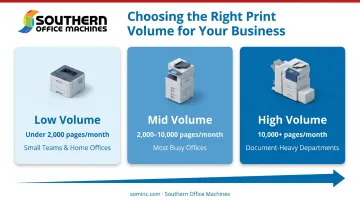
Note that duty cycle and recommended monthly volume are different specs. A machine rated for a 100,000-page duty cycle may only be recommended for 10,000–15,000 pages per month under everyday conditions — always check both figures.
Copier Comparison Chart: Top Brands and Models
Selection across these five brands is based on reliability, feature breadth, total cost of ownership, and suitability for typical business environments. Speed ranges below reflect verified official model data, not asserted ceilings for entire product lines.
Sharp
Speed range: 26 ppm (BP-50C26) to 120 ppm (BP-1200S production system)
Sharp is a versatile all-rounder with MFPs ranging from compact desktop units to high-volume floor models. The lineup is particularly strong in cloud connectivity and built-in security. Sharp officially documents support for Google Drive and OneDrive for Business via Cloud Connect and SharePoint uploads through its SharePoint Connector. On the security side, it includes 256-bit AES data-at-rest encryption with AD/LDAP and Kerberos SSO authentication.
| Spec | Details |
|---|---|
| Print Speed | 26–120 ppm (entry-level to production) |
| Key Features | Cloud Connect (Google Drive, OneDrive, SharePoint), 256-bit AES encryption, user authentication, intuitive touchscreen |
| Best Fit | Professional services, healthcare, government, and any office needing strong security with local dealer support |
Canon
Speed range: 25 ppm (imageRUNNER ADVANCE DX 4925i) to 105 ppm (iR ADVANCE DX 8905i)
Canon's imageRUNNER ADVANCE DX and imageCLASS lines are strong performers in document-heavy environments. The imageRUNNER ADVANCE DX family spans mid-volume (10,000–50,000 pages/month) up to high-volume (50,000+ pages/month) recommended monthly bands — meaning speed alone doesn't determine the right Canon model; recommended volume is the better guide.
| Spec | Details |
|---|---|
| Print Speed | 25–105 ppm across business-grade MFPs |
| Key Features | Canon Cloud Connector (Google Drive, OneDrive), SharePoint Online integration, advanced scan-to-workflow routing, exceptional image quality |
| Best Fit | Law firms, medical practices, educational institutions, and high-output offices where image quality and document routing are priorities |
Kyocera
Speed range: 25 ppm (TASKalfa 2554ci) to 90 ppm (TASKalfa 9003i)
Kyocera's main differentiator is total cost of ownership. Its long-life components are well-documented: the official contract catalog documents maintenance kit yields ranging from 100,000 pages on ECOSYS models to 600,000 pages on selected TASKalfa models. EcoPrint mode lets users adjust toner consumption across five levels, reducing per-page supply costs on black-and-white output.
| Spec | Details |
|---|---|
| Print Speed | 25–90 ppm |
| Key Features | EcoPrint mode (5-level toner adjustment), long-life drum and developer components, durable hardware |
| Best Fit | Budget-conscious businesses, manufacturing, logistics, and any office with high B&W print volume where low per-page cost matters most |
Ricoh
Speed range: 25 ppm (IM C2510) to 90 ppm (IM 9000)
Ricoh's IM series stands out for its Smart Operation Panel — a customizable interface that lets users configure the device's home screen to match their specific workflows. The @Remote fleet management platform centralizes meter data, usage reporting, service requests, and supply monitoring across multiple devices or locations. For multi-location operations managing several devices, that kind of centralized visibility is hard to replicate elsewhere.
| Spec | Details |
|---|---|
| Print Speed | 25–90 ppm |
| Key Features | Customizable Smart Operation Panel, @Remote fleet management, optional stapling and booklet finishing |
| Best Fit | Mid-to-large offices, multi-location operations, and document-heavy departments needing centralized fleet oversight |
Konica Minolta
Speed range: 25 ppm (bizhub C251i) to 95 ppm (bizhub 950i)
The bizhub series balances color output, security, and cloud integration. bizhub SECURE covers encryption, secure overwrite, and access controls. The Workplace Hub platform extends beyond the device itself — it operates as a managed IT platform with monitoring, service-desk support, workflow tools, and collaboration features. Organizations looking to consolidate IT and print management under one umbrella will find it particularly useful.
| Spec | Details |
|---|---|
| Print Speed | 25–95 ppm |
| Key Features | bizhub SECURE (encryption, secure overwrite, access controls), Workplace Hub IT platform, strong color accuracy |
| Best Fit | Financial services, accounting firms, and compliance-sensitive industries needing strong color output alongside data security |
Southern Office Machines in Marietta is an authorized Sharp dealer, giving Metro Atlanta businesses direct access to Sharp's full product line. Factory-trained technicians handle installation and ongoing service, and equipment is available to purchase, lease, or rent — including Color MFPs from 25–70 ppm suited to demanding workgroup environments.
How to Choose the Right Copier for Your Business
Start with Volume, Not Brand
Calculate your actual monthly page output before looking at a single spec sheet. Undersizing leads to premature wear and frequent breakdowns. Oversizing wastes budget on capacity you'll never use. A good starting point: track your current output for 30 days, then size up one tier to account for growth.
Print Speed (PPM) as a Practical Benchmark
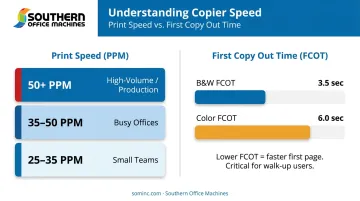
While ppm doesn't map perfectly to office size — Canon places both 25 ppm and 35 ppm models within overlapping volume descriptions — it's still a useful shortlisting tool:
- 25–35 ppm: Small teams with moderate print needs
- 35–50 ppm: Most busy offices
- 50+ ppm: High-volume departments and production environments
Ppm only tells part of the speed story. Also check first copy out time (FCOT): how quickly the machine produces its first page after receiving a job. Kyocera's ECOSYS M4125idn delivers a first print in 5.8 seconds for black-and-white, while the M8124cidn takes 10.2 seconds for color vs. 7.5 for B&W. In a fast-paced office, those gaps add up across dozens of jobs a day.
Color vs. Black-and-White: The Cost Reality
Color MFPs carry higher lease rates and per-page costs than comparable B&W machines. If most of your output is invoices, reports, contracts, or internal documents, a B&W-optimized machine will almost always deliver better total cost of ownership.
Ricoh defines TCO as equipment cost plus per-page print costs plus administration costs. Toner-only comparisons leave out the costs that often matter most:
- Paper and consumables
- Maintenance and service fees
- Administrative overhead
Compare these full figures across brands, not just device prices.
Features Worth Prioritizing vs. Features to Skip
Broadly useful for most offices:
- Automatic duplex (double-sided) printing
- Scan-to-email and scan-to-cloud
- Mobile print support
Worth adding only if regularly used:
- Advanced finishing (stapling, hole-punching, booklet-making)
- A3/11×17 paper handling
- Fax capability (assess actual fax volume first)
Southern Office Machines takes a Business-to-Technology approach: before recommending any model, the team assesses each client's actual workflow. The goal is to identify the smallest, sturdiest machine that covers exactly what the business needs — protecting budget by avoiding unnecessary features and matching the right capacity tier from day one.
Conclusion
The best copier is the one sized correctly for your volume, equipped with the functions you'll actually use, and backed by reliable service when something goes wrong. A machine that checks every feature box but sits in the wrong volume tier will cost you more in repairs and downtime than one that's simply well-matched to the job.
Service infrastructure matters as much as the device itself. Factory-trained technicians, responsive local support, and clear maintenance agreement terms are the difference between a copier outage that costs an hour and one that costs a day.
Metro Atlanta businesses can contact Southern Office Machines (1555 Williams Dr. #110, Marietta, GA 30066) to discuss their specific needs. The dealership offers:
- New and refurbished Sharp equipment across a full range of speeds and configurations
- A lowest-price guarantee covering purchase, lease, and rental options
- Factory-trained technicians backing every maintenance agreement
That combination of equipment selection, pricing transparency, and in-house service support makes it easier to find a well-matched machine rather than settling for whatever's available.
Phone: 770-919-8989 | Email: info@sominc.com | Hours: Monday–Friday, 9am–5pm
Frequently Asked Questions
What are the best copiers for business use?
The right copier depends on monthly print volume, color requirements, needed functions (print, copy, scan, fax), and total cost of ownership. Sharp, Kyocera, Canon, Ricoh, and Konica Minolta all offer strong business-grade options — Southern Office Machines specializes in Sharp MFPs for Metro Atlanta businesses across those exact use cases.
What is the difference between a copier and a multifunction printer (MFP)?
A traditional copier duplicates documents only. An MFP combines printing, copying, scanning, and often faxing in one device. Most modern businesses benefit from an MFP — it consolidates equipment, reduces desk footprint, and supports digital document workflows.
How many pages per month should my copier handle?
Calculate your actual monthly output, then choose a machine rated above that number to allow for growth and prevent premature wear. General tiers: under 2,000 pages (low volume), 2,000–10,000 (mid), and 10,000+ (high). Always check recommended monthly volume — not just maximum duty cycle.
Is it better to lease or buy a copier?
Leasing suits businesses that want predictable monthly costs, bundled maintenance, and the ability to upgrade when technology changes. Buying outright makes more sense for very low-volume users planning to keep the same device long-term without service contract complexity.
What copier functions does a small business actually need?
Most small businesses need print, copy, and scan-to-email at minimum. Color output, mobile printing, and advanced finishing are worth adding only if regularly used — otherwise they increase cost without real day-to-day benefit.
How do I calculate total cost of ownership for a copier?
TCO covers the device cost or lease payment, per-page toner costs, maintenance fees, and software integration expenses. A lower-priced machine with higher per-page costs often ends up more expensive over a three-to-five year term, so comparing full TCO across options always tells a clearer story than sticker price alone.