Introduction
Most Metro Atlanta businesses have spent real money locking down their networks, encrypting cloud storage, and training staff to spot phishing emails. Then a client's tax return sits face-up in a printer tray for two hours because nobody claimed it.
That's the disconnect. Cybersecurity budgets rarely account for the printer sitting in the hallway, even though it's often the easiest place for sensitive data to walk out the door.
Unattended printouts, unsecured print queues, and networked multifunction devices create real, everyday vulnerabilities. 61% of organizations reported at least one print-related data loss in the prior year, according to Quocirca's 2023 Print Security Landscape report.
This guide breaks down what secure document printing actually is and how it works. Healthcare providers, law firms, financial offices, schools, and government agencies across Metro Atlanta can't afford to ignore it.
Key Takeaways
- Secure printing holds each job until the right person authenticates, preventing unattended pickups
- Printers are networked computers; an unsecured one can expose your entire office network
- HIPAA, FERPA, and GLBA protect printed records the same as digital files
- Combining device features with print management software closes most security gaps
- A print security assessment shows exactly where your current setup is exposed
What Is Secure Document Printing?
Secure document printing is a process that holds a print job in a queue instead of sending it straight to the output tray. The document only prints once the intended user shows up at the device and proves who they are.
That's the entire concept in one sentence, but the mechanics matter.
How Secure Printing Works
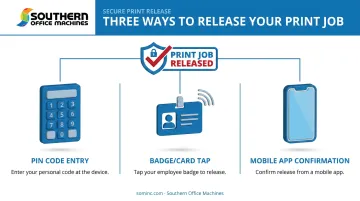
When someone sends a print job to a secure-enabled device, the file sits in a protected queue rather than printing on command. To release it, the user typically does one of the following at the printer itself:
- Enters a PIN code assigned to their account
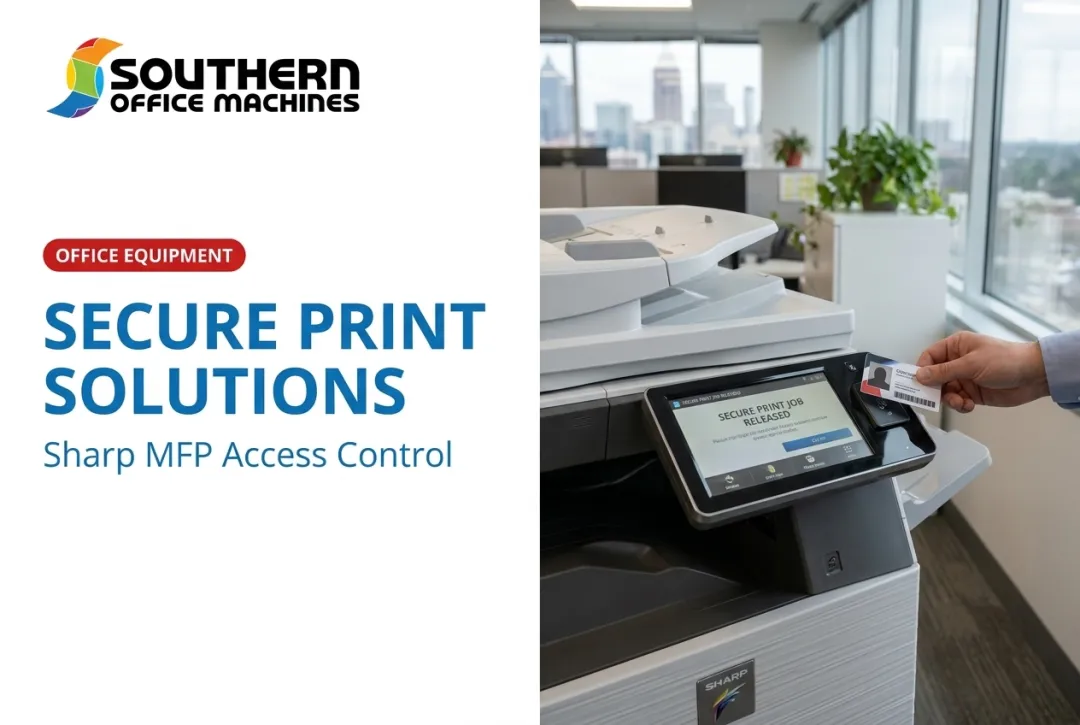
- Taps an ID badge or access card against a reader
- Confirms release through a mobile app tied to their credentials
Each method links one specific print job to one specific person. If that job never gets released, it never prints, and it never sits exposed for a coworker, visitor, or cleaning crew to see.
Two terms get used interchangeably here, but they aren't quite the same: Secure printing ties a job to a single device: send it to the third-floor MFP, and that's the only place it can be released. Pull printing is more flexible—the job waits in a shared queue and can be pulled from any authenticated printer on the network. Both close the same basic gap, but pull printing adds convenience for staff who move between offices.
Secure Printing vs. Traditional Printing
Traditional printing sends a document the instant someone hits "print." It lands in the tray immediately, available to anyone who walks by before the intended recipient arrives. For a birthday flyer, that's fine. For a patient chart or a settlement agreement, it's a liability.
Secure printing changes the workflow just enough to matter:
| Traditional Printing | Secure Printing |
|---|---|
| Prints instantly on command | Holds job until authenticated release |
| Anyone nearby can grab the output | Only the authorized user can release it |
| No record of who printed what | Creates an audit trail |
| Data sits unencrypted in queue | Encrypts data in transit and at rest |
Good secure printing software also encrypts the print data as it travels from the sending device to the printer. It can automatically wipe the job from printer memory once it's released or after a set time. Even if someone compromises the printer itself, there's little sitting there to steal.
Why Secure Document Printing Matters
Printers aren't standalone machines anymore. They're networked endpoints with hard drives, IP addresses, and often default passwords nobody ever changed.
HP has flagged this directly, noting that business printers store, process, and transmit sensitive data and should be treated with the same scrutiny as any other endpoint on the network. Outdated firmware and exposed services can give an attacker a foothold into everything else connected to that network, as HP's own security team has warned.
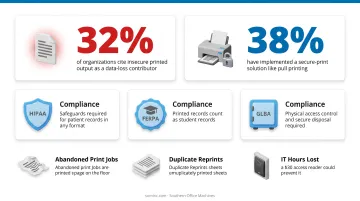
The numbers back this up. Quocirca's print security research found that 32% of organizations pointed to insecure handling of printed output in the office as a direct contributor to data loss, while only 38% had actually implemented a secure-print solution like pull printing. That's a lot of exposure sitting in plain sight.
The compliance angle is where this gets expensive. Businesses operating under HIPAA, FERPA, or GLBA don't get a pass just because the leaked record was on paper instead of a server:
- HIPAA requires reasonable safeguards against improper disclosure of patient information, in any format
- FERPA explicitly defines student "records" to include anything recorded by print
- GLBA's Safeguards Rule covers customer information in paper form and requires physical access controls, activity logging, and secure disposal
Operational costs add up too. Consider what unsecured printing actually costs day to day:
- Abandoned print jobs waste paper and toner
- Duplicate reprints happen when the first copy goes missing
- IT staff lose hours chasing incidents a $30 access reader could have prevented
Then there's reputation. One leaked HR file, one exposed legal filing, one financial statement left on a shared printer: that's the kind of thing clients remember long after the apology email goes out.
Industries That Rely on Secure Document Printing
Some sectors don't have the option to treat print security as optional. Regulatory pressure and client trust make it a baseline requirement.
Healthcare and Government Agencies
Healthcare providers protect patient records under HIPAA, and the penalties for getting it wrong are steep. Affinity Health Plan learned this the hard way: the company returned leased photocopiers without wiping the hard drives, exposing protected health information for up to 344,579 individuals.
The result was a $1,215,780 settlement with HHS, which cited a risk analysis that never accounted for electronic PHI stored on copier hard drives, according to HHS's own case summary.
Government agencies handling citizen or health data face the same expectations. Southern Office Machines has worked directly with public sector clients, including the Georgia Department of Community Health, where state-level service and security expectations mirror what private-sector clients demand.
Legal and Financial Services
Law firms handle case files, contracts, and discovery documents that clients expect to stay confidential. The ABA's Model Rule 1.6(c) requires attorneys to make reasonable efforts to prevent unauthorized access to client information—print included.
Financial firms face a similar bar under GLBA, which requires logging of authorized-user activity and secure disposal of physical records. Both sectors need restricted print access and a clear audit trail if a regulator or client ever asks who saw what.
Secure print release and pull-printing (where jobs sit in a queue until the sender authenticates at the device) cover both requirements without adding friction to daily filing.
Education
Schools and universities print transcripts, financial aid documents, and disciplinary records constantly, often on shared campus printers. FERPA requires consent or a valid exception before disclosing these records, plus reasonable methods to verify who's receiving them.
A badge- or PIN-based release system on a shared MFP is a practical way to meet that standard without slowing down a busy registrar's office.
Key Features to Look for in a Secure Printing Solution
Not every "secure" printer claim delivers the same protection. Look for these specific capabilities before you buy, lease, or upgrade:
- User authentication confirms identity before a job prints, using PIN codes, badge/card readers, or mobile release apps
- Encryption in transit and at rest protects data both as it travels to the printer and while it sits in device memory or on the hard drive
- Audit trails and print logs: a record of who printed what and when, ready for internal review or a compliance audit
- Automatic queue clearing deletes unclaimed jobs after a set time, so stale documents don't pile up unseen
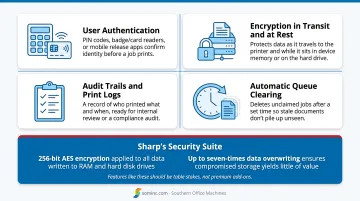
Sharp's Security Suite, for example, applies 256-bit AES encryption to all data written to RAM and hard disk drives. Up to seven-times data overwriting further ensures that even compromised storage yields little of value. Features like these should be table stakes, not premium add-ons.
How Southern Office Machines Helps Atlanta Businesses Print Securely
Southern Office Machines doesn't start with a product catalog. The team takes a Business-to-Technology approach, learning how a client actually works before recommending anything—what documents get handled, who touches them, and what regulations apply.
That matters because a small dental office and a county health department don't have the same print security needs, even if they're both buying an MFP with the same base features.
As a Sharp-authorized dealer, Southern Office Machines configures security directly into each device:
- Authentication, encryption, and audit-trail features built into the Sharp Security Suite
- Data Security Kits available in Commercial and Common Criteria Certified versions for regulated environments
- The same protections applied to refurbished units, not just new equipment
Budget-conscious offices get the same level of security as a brand-new fleet, whether they buy new or refurbished.
Ready to see where your print environment stands? Call Southern Office Machines at 770-919-8989 for a print security evaluation tailored to your industry, workflow, and budget.
Frequently Asked Questions
What does "secure printing" mean?
Secure printing holds a print job in a queue until the intended user authenticates at the printer, usually with a PIN or badge. This prevents anyone else from grabbing the document off the output tray.
How can I print documents securely?
Use your printer's built-in secure print or PIN-release feature, which comes standard on most Sharp MFPs, or add secure printing software if your device doesn't include one. Then authenticate at the printer to release the job.
What is the difference between secure printing and pull printing?
Secure printing ties a job to one specific device you selected when printing. Pull printing lets you release that same job from any authenticated printer on the network, which is handy in larger offices.
Do small businesses really need secure printing?
Yes. Any business handling client, employee, or financial data benefits, especially since small offices often share a single printer with no access controls in place.
Does secure printing slow down office workflows?
Barely. Authentication adds only a few seconds, and modern options like mobile release apps make the process just as fast as walking up and hitting print.