Introduction
Picture this: it's 4:45 PM, a client deadline looms, and the office printer is grinding out page 12 of a 40-page proposal. The pace is so slow it makes you question every purchasing decision your company has ever made. Print speed is one of the most misunderstood specs on any printer data sheet, buried in fine print like "up to 42 PPM" without much context.
That number matters more than most buyers realize. Print speed determines how many pages a device outputs per minute, and it directly shapes office productivity, workflow planning, and total cost of ownership.
This guide breaks down what print speed actually means, the ranges you can expect across different office tiers, the properties that affect real-world performance, and the buying mistakes that trip up even experienced office managers.
Key Takeaways
- PPM and IPM measure output speed under standardized test conditions, not guaranteed daily performance
- Real-world speed usually falls below the advertised "up to" rating due to document complexity and quality settings
- Monochrome printing outpaces color due to lighter processing and single-toner layering
- Match speed to your actual print volume, not just the fastest machine on the showroom floor
What Is Print Speed?
Print speed is the rate at which a printer or copier produces finished pages. Manufacturers typically express it in PPM (pages per minute) for standardized black-and-white text jobs, or IPM (images per minute) for more complex or color documents.
Here's the catch: PPM isn't standardized the same way across every manufacturer. PPM refers to the number of pages a printer can produce in one minute, but the testing conditions behind that number can vary by brand.
IPM, on the other hand, generally follows ISO/IEC test standards. This makes it a more consistent basis for comparing devices across manufacturers.
Think of print speed like a car's top speed rating. It tells you what the print engine is capable of under ideal conditions, not what you'll experience in daily stop-and-go office traffic. It's a rated performance spec, not a promise.
This is exactly why print speed sits near the top of the list when businesses compare printers, copiers, and multifunction devices. It's an easy number to point to, which is also why it's easy to misread.
Factors That Influence Real-World Print Speed
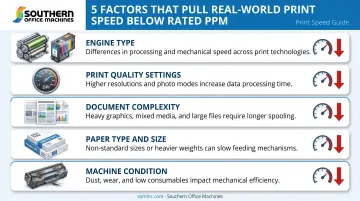
Manufacturer-listed speeds reflect best-case lab conditions, usually draft mode with simple text. Daily office use rarely looks like that. Several variables pull real-world speed downward:
- Engine type — laser engines fuse toner onto paper and generally outpace inkjets, which spray liquid droplets through microscopic nozzles
- Print quality settings — higher DPI/resolution settings slow output, since more data gets processed per page
- Document complexity — graphics, images, and heavy color coverage add processing time compared to plain text
- Paper type and size — non-standard media takes longer to feed and print than standard letter or A4 stock
- Machine condition — low toner and dust buildup can gradually chip away at speed over time
Range of Print Speed: What's Normal for Different Office Needs
There's no single "good" PPM number. What counts as fast enough depends on print volume, device category, and how your business actually uses the machine.
Typical PPM Ranges by Use Case
Manufacturer benchmarks show just how wide this spread gets:
| Use Tier | Example Benchmark Range |
|---|---|
| Home/light-use inkjet | 7.5–10 ISO PPM (black) |
| Small office desktop laser | 36–42 PPM |
| Workgroup MFPs and copiers | 25–90 PPM |
These figures are illustrative examples pulled from published specs, not universal category ceilings. Sharp's color MFP lineup, for instance, spans 25 to 70 PPM, covering everything from a small satellite office to a high-volume corporate print room within one product family.
HP's own comparison of engine types puts typical inkjet speeds around 5–15 PPM against 20–40 PPM for laser devices, reinforcing that engine choice alone shifts your baseline significantly.
Rated vs. Real-World Speed
Benchmarks tell you what's possible under ideal test conditions, not what happens during a typical workday. The gap between an "up to X PPM" rating and what you'll see on a Tuesday afternoon comes down to job type, especially duplex (double-sided) printing. On some machines, duplex output runs only slightly behind simplex; on others, the drop is substantial.
There's no universal rule here, so check simplex and duplex specs separately before assuming they're close. Ask your dealer for both numbers before signing a lease or purchase agreement — the difference can mean an extra hour of waiting on a busy Monday.
Safe Buying Margin
Buying a device rated exactly at your average daily volume is a common mistake. Machines that run near their capacity ceiling for hours on end tend to show:
- Workflow bottlenecks during peak periods
- Employee downtime waiting on jobs to clear
- Premature wear from sustained heavy use
A safer approach: choose a device with headroom above your typical daily output, not one that's maxed out just meeting it.
Key Properties of Print Speed
Print speed isn't one fixed number. It shifts depending on job type, color mode, and how long the machine runs continuously.
Speed Consistency and First Page Out Time
First Page Out Time (FPOT) measures how long it takes the first page to emerge, not the sustained rate after that. A printer with a blazing FPOT can still have a mediocre PPM average over a 50-page run, since internal components cycle and heat up during long jobs.
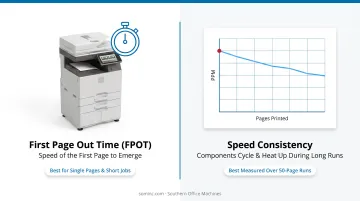
If your office prints mostly single pages or short jobs, FPOT often matters more than headline PPM.
Color vs. Monochrome Speed Differences
On many inkjets, color output runs noticeably slower than black-and-white because the printer processes four ink layers (CMYK) instead of one. That means more data to process and often more page coverage overall.
That said, this isn't universal. Some current color laser MFPs rate black and color output at identical speeds, since their engines are built to process both simultaneously without a penalty. Engine design, not just color mode, determines the gap.
Speed vs. Quality Trade-Off
Maximum-rated speeds are frequently draft-mode numbers. Bump up the resolution for a client-facing proposal or contract, and speed drops accordingly. This creates a real trade-off:
- Draft mode: fastest output, best for internal drafts and everyday paperwork
- Standard mode: balanced speed and clarity for routine business documents
- High-quality/best mode: slowest setting, but necessary for client proposals, contracts, or regulatory submissions
How Print Speed Is Measured and Common Misconceptions
Manufacturers test print speed using standardized methods so buyers can compare across brands more fairly. ISO/IEC 24734:2021 governs how digital printing productivity is measured for both laser and inkjet devices, covering simplex, duplex, and various media sizes under consistent conditions.
Spec sheets list "rated" speeds achieved under these optimal lab conditions. Treat that number as a ceiling, not a daily guarantee.
Common Misconceptions to Avoid
- Assuming advertised PPM applies to every job: complex documents, high-res images, and heavy color coverage all slow things down
- Believing higher PPM is always the better buy: paying for speed you'll never use wastes budget
- Overlooking scanning speed (IPM): for scan-heavy workflows like document digitization, scan speed often matters more than print speed
Choosing the Right Print Speed for Your Business
Mismatched print speed hurts you either way. Too slow, and you get bottlenecks. Too fast, and you're overpaying for capacity that sits unused most of the day.
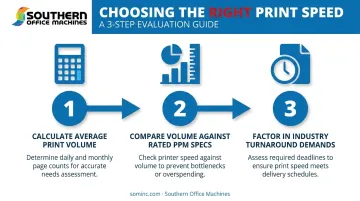
Start with your actual numbers, not the spec sheet:
- Calculate your average daily or monthly print volume across your team or department
- Compare that figure against rated PPM specs, allowing margin for growth
- Factor in your industry's turnaround demands — legal, healthcare, and government offices typically need higher sustained speeds than general administrative work, given compliance deadlines and document volume
Getting these numbers right often comes down to local expertise. Southern Office Machines has worked with Metro Atlanta businesses since 1985, and the approach has stayed consistent: learn how a customer actually works before recommending equipment.
Their Business-to-Technology method focuses on identifying the smallest, sturdiest machine that fits real workflow needs. From there, they weigh total cost of ownership rather than chasing the fastest or cheapest option on paper.
Print speed is a governing spec that decides whether your office keeps pace or stalls. Understanding what's behind that PPM number is what keeps you from overpaying for capacity you don't need, or worse, underbuying and creating a bottleneck every afternoon.
Frequently Asked Questions
What is a good speed for a printer?
It depends entirely on volume and use case. Small offices generally do fine with lower PPM ranges, while busier workgroups need higher sustained output. Size your purchase to actual print volume, not headline speed.
What does PPM mean on a printer?
PPM stands for pages per minute, the standard measure of how many pages a printer can output under test conditions. It's a rated ceiling, not a guaranteed daily average.
Is a higher PPM always better?
No. Faster isn't always necessary, and overbuying speed often means paying for capacity that goes unused. Match the machine to your workload instead.
Does print speed affect print quality?
Yes. Maximum speeds are often achieved in draft mode, and switching to higher-quality settings for client-facing documents will reduce output speed.
Why is color printing slower than black-and-white?
On many devices, color jobs require processing four ink or toner layers (CMYK) instead of one, adding data processing load. Some color laser engines close this gap, but it's still common on inkjets.
How do I know if a printer's speed matches my office's needs?
Calculate your average daily print volume and compare it against a device's rated PPM or IPM specs, leaving room for growth. This beats guessing based on advertised top speed alone.