Introduction
Shopping for a business copier shouldn't feel like defusing a bomb, but for many office managers, it does. Specs pile up, sales reps push different brands, and pricing models seem designed to confuse rather than clarify.
You're not imagining it. A 2024 survey of 738 U.S. SMB technology decision-makers found that 45% struggle to identify which tech solutions fit their business. That ranks among the top purchasing headaches reported (SMB Group, 2024).
Copiers aren't simple "copy machines" anymore, either. Today's models handle printing, scanning, faxing, and document routing, shaping how fast your team gets work done and how much it costs you every month.
This guide breaks down copier types, must-have features, acquisition options, and the real cost of ownership. It also covers how working with a local partner like Southern Office Machines takes the guesswork out of the decision.
Key Takeaways
- Match your machine to your workload: A4 desktops differ from A3 floor systems.
- Security, connectivity, and finishing features matter as much as speed and price.
- Click charges and maintenance fees often cost more than the equipment itself.
- A local, factory-trained dealer sizes your copier right and fixes issues fast.
Types of Copiers: Finding the Right Fit for Your Business
Every copier on the market today falls into one of two broad camps: single-function copiers or multifunction printers (MFPs). Most businesses now choose MFPs, and for good reason: according to Xerox's guide to multifunction printers, an MFP consolidates printing, copying, scanning, and faxing into a single device — functions that once required separate machines entirely.
Single-Function Copiers vs. Multifunction Printers (MFPs)
Single-function copiers still make sense in specific situations, like a dedicated print room churning out high volumes of duplicated documents all day. But for most offices, an MFP wins on practicality:
- Smaller footprint — one device instead of four separate machines
- Lower combined cost compared to buying a copier, printer, scanner, and fax machine separately
- Built-in workflow tools like scan-to-email and cloud storage integration
That last point matters more than people expect. Scan-to-cloud functionality alone can eliminate a surprising amount of manual filing and paper shuffling.
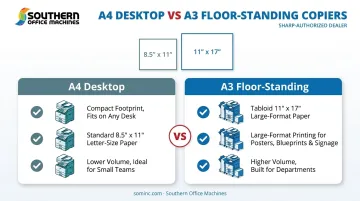
A4 Desktop vs. A3 Floor-Standing Copiers
The other major decision is size class. A4/letter-size desktop units handle standard 8.5" x 11" documents and suit small teams with lighter volume. A3 systems step up to tabloid-size output, up to 11" x 17" or larger, and they support features like large-format printing, spreadsheets, and posters, according to Xerox's printer size guide.
Before you pay extra for A3 capability, ask a simple question: does your team actually produce oversized documents regularly? If the answer is "rarely," an A4 desktop model likely covers your needs at a lower cost. Southern Office Machines carries both Sharp A4 desktop and larger multifunction systems, so equipment gets matched to real usage rather than guesswork.
Must-Have Copier Features for Modern Offices
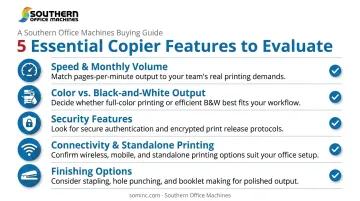
Size gets most of the attention during copier shopping, but a handful of features determine whether the machine actually fits your daily operations. Skipping this checklist is the most common buying mistake we see.
Speed & Monthly Volume
Pages per minute (PPM) tells you top speed, but recommended monthly volume matters more for long-term reliability. Ricoh distinguishes between maximum duty cycle (a peak stress-test number) and recommended volume (the sustainable range for daily operation), warning against sizing a machine off the peak figure alone.
| Example Device | Speed | Recommended Monthly Volume | Max Duty Cycle |
|---|---|---|---|
| Compact MFP | 34 ppm | 1,750–3,500 pages | 35,000 pages |
| High-Volume MFP | Up to 52 ppm | Up to 20,000 pages | Up to 150,000 pages |
These figures illustrate the gap between "can handle" and "should handle." Always size to your average month, not your busiest one.
Color vs. Black-and-White Output
According to Ricoh, color printing costs meaningfully more per page than black-and-white, largely because color jobs draw from multiple toner cartridges instead of one. Before choosing a color MFP, be honest about how much of your output actually needs color. Internal memos and spreadsheets? Black-and-white is fine. Client-facing marketing materials? Color earns its keep.
Security Features
Networked copiers store scanned data on internal hard drives, which makes them a genuine data security risk if ignored. In one case reported by HHS, a health plan that returned leased copiers without wiping their hard drives ended up with a $1,215,780 HIPAA settlement affecting over 344,000 individuals.
Look for:
- User authentication before device access
- Data encryption on stored and transmitted files
- Secure/pull printing to prevent documents sitting exposed in output trays
- End-of-lease data erasure
Sharp devices offered through Southern Office Machines include 256-bit AES encryption, up to seven-pass data overwriting, and optional Data Security Kits certified for government and defense-level use. End-of-lease erasure is included too, a detail that matters especially for healthcare and legal clients.
Connectivity & Standalone Printing
Can you use a copier without a computer? Yes. Most modern MFPs support walk-up copying and scanning directly from a touchscreen panel, along with mobile printing and cloud document retrieval, so a networked computer isn't a requirement for basic use.
Finishing Options
Stapling, hole-punching, and booklet-making save your team from manual document prep. They're worth the added cost only if your office produces bound reports or multi-copy packets regularly. If not, skip it and save the budget for something you'll actually use.
New, Used, or Leased? Choosing How to Acquire Your Copier
Buying new gets you the latest features and the longest expected lifespan. Buying used or refurbished equipment lowers the upfront cost. Southern Office Machines offers both new and refurbished Sharp equipment, which means the acquisition method can match your budget instead of forcing a compromise on features.
Leasing and renting solve different problems:
- Leasing suits businesses wanting predictable monthly costs and an easy upgrade path when a lease term ends
- Renting fits short-term or seasonal needs, like an accounting firm gearing up for tax season
Before signing anything, do a bit of homework:
- Ask for client references: a dealer with a track record should have satisfied customers willing to talk
- Confirm manufacturer partnerships: an authorized relationship with a brand like Sharp typically means better parts access and factory training
- Compare full contract terms, not just the monthly payment, including maintenance inclusions and buyout options
Skipping this step is how businesses end up locked into equipment that doesn't fit or service that doesn't show up.
Understanding the True Cost of Ownership
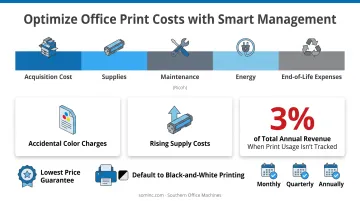
The price tag on a copier is only part of the story. Total cost of ownership (TCO) adds equipment cost to click charges (per-page toner and maintenance fees) across the full lease or ownership term. Ricoh's TCO framework breaks the sticker price into five components (Ricoh):
- Acquisition cost
- Supplies
- Maintenance
- Energy
- End-of-life expenses
A few hidden costs catch businesses off guard:
- Accidental color charges — one colored logo on an otherwise black-and-white page can trigger the full color click rate
- Rising supply costs as toner and parts pricing shifts over a multi-year contract
- Unmanaged print environments, which can consume over 3% of a company's total annual revenue when nobody's tracking usage
Defaulting devices to black-and-white printing settings is a simple fix that controls a surprising amount of spend. Southern Office Machines pairs that kind of guidance with a lowest price guarantee. Invoicing can be structured monthly, quarterly, or annually to match how your business actually pays, keeping TCO predictable without sacrificing equipment quality.
Why Professional Installation & Ongoing Service Matter
A copier is only as reliable as the dealer standing behind it. What actually prevents costly downtime is the service model behind the machine, not just its spec sheet:
- Factory-trained technicians who diagnose problems correctly the first time
- Fast on-site and remote response when issues arise
- Proactive maintenance scheduled before small problems become breakdowns
Southern Office Machines builds this into what they call a Business-to-Technology approach, learning a customer's workflow before recommending equipment.
"By learning about our customers' business models and processes, we can better apply our product and service knowledge to their specific needs. We identify the smallest, sturdiest machine with the features and functions they need and then determine the total cost of ownership." — Sheldon Michaels, Southern Office Machines
That philosophy, combined with remote troubleshooting through LogMeIn Rescue, means equipment gets sized correctly the first time and issues get resolved without weeks of back-and-forth.
If you're a Metro Atlanta business ready to stop guessing on copier specs, contact Southern Office Machines at 770-919-8989 for a free equipment assessment and consultation.
Frequently Asked Questions
Can I use a copier without a computer?
Yes. Most modern MFPs support standalone use through touchscreen controls, USB direct print, and walk-up copying and scanning. No connected computer is required.
How do I know what size copier my business needs?
Look at your monthly print volume, whether you need oversized paper output, and how many departments will share the device. These factors point toward an A4 desktop unit or a larger A3 system.
Is it better to lease or buy a copier?
Leasing offers predictable monthly costs and an easy upgrade path. Buying suits businesses wanting long-term ownership with lower total spend over time. Both are worth comparing against your cash flow.
How often should I service my office copier?
It depends on your print volume, but factory-trained technicians typically recommend regular preventative check-ins to avoid downtime and extend the equipment's life.
What's the difference between a copier and a multifunction printer (MFP)?
A traditional copier only duplicates documents. An MFP combines copying, printing, scanning, and faxing into a single networked device, covering far more of your daily document workflow.
How much does a business copier cost?
Costs vary widely based on size, features, and whether you buy, lease, or rent. Request a free print assessment from Southern Office Machines for an accurate quote tailored to your business.