Introduction
Metro Atlanta offices don't have room for four different machines doing four different jobs anymore. In 2026, the all-in-one laser printer has become the default workhorse, handling printing, scanning, copying, and often faxing from a single unit.
Many small businesses still juggle standalone printers, scanners, and fax lines, then watch toner, paper, and service costs pile up across each device. A well-matched AIO laser printer collapses that sprawl into one machine, one service contract, and one predictable cost per page.
This guide breaks down the top all-in-one laser printers of 2026 and the factors that matter when comparing them. It also covers how a local partner like Southern Office Machines helps Metro Atlanta businesses match the right machine to their real workflow, not just a spec sheet.
Key Takeaways
- AIO laser printers combine printing, scanning, copying, and faxing in one reliable machine for busy offices
- Print speed, paper handling, cost-per-page, and connectivity matter more than price alone
- Sharp's BP-C series, Brother's MFC-L3780CDW, and HP's Color LaserJet Pro MFP 4301fdw stand out as strongest 2026 picks
- Total cost of ownership (toner, maintenance, and paper capacity) determines your real long-term spend
- Buying, leasing, and renting each suit different print volumes and cash flow needs
Overview of All-in-One Laser Printers in the Office Equipment Market
An all-in-one (AIO) laser printer is a multifunction device that uses toner-based laser technology to print, scan, copy, and in many cases fax, all from one unit. Unlike inkjet multifunction printers, which spray liquid ink onto the page, laser AIOs fuse powdered toner using heat. That produces crisper text and handles higher volumes without drying out between print runs.
The category keeps growing, even as buyer behavior shifts.
Market projections show:
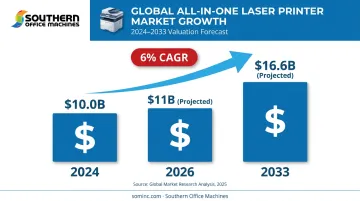
- $10.0 billion: 2024 market valuation
- $11 billion: Projected 2026 valuation
- $16.6 billion: Projected 2033 valuation, a 6% annual growth rate, according to Grand View Research
At the same time, market analysts have noted softer U.S. laser MFP shipment numbers in early 2026, a sign that buyers are getting more selective about which machines earn a spot in the office.
Metro Atlanta and Marietta businesses have long turned to Southern Office Machines, a local dealer serving the region since 1985, for sales, service, and rental of these systems. Working with a local dealer means someone actually reviews your print volume and workflow before recommending a machine, rather than pointing you toward whatever happens to be in stock at a big-box store.
With that context, here's how the top all-in-one laser printers of 2026 stack up on speed, reliability, and value.
Top All-in-One Laser Printers of 2026
Our comparison weighs five factors: print speed, paper handling, cost-per-page, connectivity, and real-world reliability for growing businesses and busy offices.
Brother MFC-L3780CDW
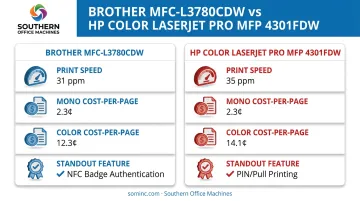
Brother built its reputation on dependable, budget-friendly color laser AIOs, and the MFC-L3780CDW keeps that streak going with print, scan, copy, and fax in one compact unit. It stands out for its fast rated speed, competitive toner cost, single-pass duplexing ADF, and NFC badge authentication for offices handling sensitive paperwork.
| Category | Details |
|---|---|
| Print Speed & Paper Handling | Up to 31 ppm in black and color; 250-sheet standard tray plus 30-sheet multipurpose tray; 50-sheet single-pass duplex ADF for two-sided scanning and copying |
| Cost Per Page & Toner | PCMag independently measured 2.3 cents mono and 12.3 cents color using Brother's super-high-yield toner, rated up to 4,500 black pages |
| Connectivity & Security | Dual-band 2.4/5 GHz Wi-Fi, Wi-Fi Direct, Gigabit Ethernet, and an integrated NFC reader for badge-based secure access |
HP Color LaserJet Pro MFP 4301fdw
HP remains a trusted name for small-to-midsize office AIOs, largely thanks to strong mobile ecosystem support. The 4301fdw stands out for reliable connectivity, sharp print quality, expandable paper trays, and running costs that hold up against faster rivals.
| Category | Details |
|---|---|
| Print Speed & Paper Handling | Up to 35 ppm Letter / 33 ppm A4; 300-sheet standard input (250-sheet tray plus 50-sheet multipurpose tray), expandable to 850 sheets with an optional 550-sheet tray |
| Cost Per Page & Toner | PCMag measured 2.3 cents mono and 14.1 cents color using HP's high-yield 210X cartridges, rated up to 7,500 black pages |
| Connectivity & Security | Dual-band Wi-Fi, Wi-Fi Direct, AirPrint, Mopria, and the HP Smart app; PIN/pull printing holds jobs at the machine until an authorized user is present |
What Happened to Canon, Xerox, and Kyocera's 2026 Contenders?
A few models that show up in older buying guides no longer qualify for a current 2026 list. Canon's original imageCLASS MF753Cdw has been discontinued in favor of the MF753Cdw II, and Xerox has retired the VersaLink C405 in favor of the VersaLink C415.
Kyocera's ECOSYS P5026cdw, meanwhile, is a single-function color printer, not a true all-in-one. It can't scan, copy, or fax at all.
This is exactly where working with an established local dealer like Southern Office Machines pays off. Buying a discontinued model, even at a discount, often means shorter support windows and harder-to-source toner a year or two down the road.
How We Chose the Best All-in-One Laser Printers
The most common mistake in printer shopping is fixating on purchase price and ignoring everything that happens after checkout. A $250 machine that burns through $40 toner cartridges every few weeks isn't actually cheap.
We weighed print speed, paper handling, duplexing and ADF capability, connectivity, and cost-per-page against real business outcomes: uptime, staff productivity, and how well a machine fits into an existing workflow.
This mirrors the "right-sized machine" philosophy Southern Office Machines applies through its Business-to-Technology approach. The company learns how a business actually operates, then identifies the smallest, sturdiest machine with the features it truly needs rather than the biggest or flashiest option on the shelf.
That same approach also factors in:
- Industry-specific requirements, since healthcare, legal, and government clients often need stricter document security
- Total cost of ownership, including maintenance, toner, and service agreements
- Whether the equipment scales with the business or gets outgrown within a year
Conclusion
Choosing the right all-in-one laser printer comes down to matching your actual print volume and workflow, not chasing a brand name or the lowest number on a price tag. A machine that's too small becomes a bottleneck; one that's oversized wastes money every month it sits underused.
Before you commit to a purchase, lease, or rental, weigh scalability, ongoing toner and maintenance costs, and reliability just as heavily as upfront price.
If your Metro Atlanta business wants a second opinion, including how a comparable Sharp multifunction system might fit your budget, reach out to Southern Office Machines. We offer a no-hassle consultation on sales, service, or rental to help you land on a machine that actually fits your workflow.
Frequently Asked Questions
What is the best all-in-one color laser printer for a small office?
The Brother MFC-L3780CDW is a strong fit for small offices thanks to its compact footprint, 31 ppm speed, low mono cost-per-page, and dual-band wireless printing that works well on a busy office network.
What's the difference between a laser and inkjet all-in-one printer?
Laser AIOs use toner and heat, making them faster and cheaper per page for everyday text documents. Inkjet AIOs use liquid ink, which typically produces better photo quality but can dry out with infrequent use.
How much does an all-in-one laser printer cost to run per page?
Independent testing puts mono costs around 2.3 cents per page and color around 12 to 14 cents per page for current business laser AIOs, depending on the toner cartridge size used. Higher-yield cartridges generally lower your per-page cost.
Can all-in-one laser printers scan and fax as well as print?
Most modern laser AIOs include scanning and copying through an automatic document feeder, and many still support faxing directly or through a cloud-based fax service. Always confirm fax is included, since some machines marketed as "AIO" are print-and-scan only.
How long do laser toner cartridges last compared to ink cartridges?
Toner cartridges typically yield far more pages than ink, often 1,000 to 10,000-plus pages per cartridge, and unopened toner can sit on a shelf for years without degrading. Ink, by contrast, can dry out and clog print heads within months of inactivity.
Is it better to buy, lease, or rent an all-in-one laser printer for a small business?
Buying suits low-volume, steady use where you want full ownership. Leasing or renting through a local provider like Southern Office Machines offers more predictable monthly costs and flexibility as your print volume grows.