Introduction
Print costs are climbing, offices are half-empty on any given day, and IT teams are stretched thin. For Metro Atlanta businesses, managed print services (MPS) has moved from a nice-to-have to a necessity.
MPS often gets pitched as a way to cut costs, and that's part of the story. The bigger payoff shows up in the daily grind.
Fewer jammed printers interrupt your morning. Budgets stop swinging wildly month to month. IT staff stop fielding toner emergencies and get back to real projects.
This article breaks down what MPS actually delivers, with the data to back it up, not just the sales pitch.
Key Takeaways
- MPS replaces scattered print costs with one predictable monthly agreement
- Automated toner and maintenance cut IT and staff troubleshooting time
- Secure print release and audit logs close common data-exposure gaps
- Skipping MPS tends to mean rising costs and reactive firefighting later
- Southern Office Machines applies 40+ years of Metro Atlanta MPS experience to right-size your print fleet
What Is Managed Print Services
Managed print services is an outsourced arrangement that consolidates the management of your printers, copiers, and multifunction devices (supplies, maintenance, monitoring, and security) under one agreement instead of a dozen separate vendor relationships.
It's typically deployed in:
- Multi-device offices juggling several printer brands and vendors
- Hybrid workplaces where devices sit half-used on some days and overloaded on others
- Government agencies and healthcare organizations with strict data-handling rules
- Any business managing more than a handful of printers, copiers, or MFPs
MPS delivers value beyond simply outsourcing device management: costs become predictable, uptime improves, and document security tightens across every device on the network.
Key Advantages of Managed Print Services
These advantages tie directly to metrics businesses already track: cost, efficiency, security, and how well the print environment scales as the company grows.
Advantage 1: Predictable Cost Control and Savings
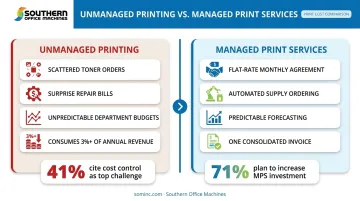
Unmanaged printing means unpredictable toner orders, surprise repair bills, and paper costs scattered across departmental budgets. MPS replaces that mess with a consolidated, flat-rate agreement.
Here's how it works in practice: a provider audits the existing fleet, removes redundant or underused devices, and automates supply ordering so nothing runs out or gets over-ordered unexpectedly.
Why this matters for budgeting:
- Eliminates guesswork in monthly print spend, so finance teams can forecast accurately
- Frees up capital that would otherwise sit in emergency toner runs or duplicate service contracts
- Gives leadership one clear invoice instead of reconciling charges across multiple vendors
Cost control ranks high on that list, too. In Quocirca's 2025 survey of 400 organizations already using MPS, 41% named controlling costs as their top print-management challenge, and 71% expected their MPS investment to increase over the next year. Current users keep expanding their programs because the savings are already proven.
Southern Office Machines has also seen this internally: unmanaged print environments can consume more than 3% of a company's total annual revenue once toner, paper, service calls, and idle devices are all tallied. That's the kind of hidden cost MPS is built to expose and eliminate.
KPIs impacted: cost per page, monthly print spend, toner/paper waste, number of devices in the fleet.
When it matters most: Multi-location or multi-department businesses fielding invoices from several vendors, with usage that varies wildly between departments, see the fastest payoff here.
Advantage 2: Increased Operational Efficiency and Reduced Downtime
Every hour your staff spends untangling a paper jam or hunting down a spare toner cartridge is an hour not spent on actual work. MPS shifts that burden away from your team entirely.
Proactive maintenance, remote fleet monitoring, and just-in-time supply delivery catch problems before they become full-blown breakdowns. Southern Office Machines handles this through automated meter readings and toner auto-replenishment, paired with remote diagnostics via LogMeIn Rescue, resolving many issues before a technician ever needs to drive out.
Why this matters operationally:
- Recovers staff hours that translate directly into faster turnaround on client and internal deliverables
- Reduces bottlenecks in document-heavy workflows like billing, HR onboarding, or compliance reporting
- Frees IT staff from first-line print support so they can focus on core infrastructure work
The disruption is real and measurable. Epson's 2022 survey of 3,000 IT decision-makers found 64% observed employees working extra hours because of printer downtime or poor device serviceability, according to Epson's State of the Market survey. That's a direct hit to productivity that most businesses never trace back to their printer fleet.
KPIs impacted: downtime per incident, IT ticket volume, staff hours reallocated, device uptime percentage.
When it matters most: Growing businesses without a dedicated in-house print technician, a common gap for small-to-mid-sized offices across Marietta and Metro Atlanta, see the biggest efficiency gains.
Advantage 3: Stronger Document Security and Compliance
Standalone office printers usually lack the authentication, encryption, and tracking layers that sensitive documents require. MPS closes that gap with features like secure print release and audit logs.
Southern Office Machines' Sharp MFP lineup, for instance, includes 256-bit AES encryption, up to 7-times data overwriting, audit trail logging, and end-of-lease data erasure, all designed to prevent a document from sitting unclaimed in an output tray or being pulled off a decommissioned hard drive.
Why this matters for risk management:
- Reduces the chance of a data breach tied to unsecured print output
- Helps meet regulatory obligations relevant to healthcare, legal, and government clients
- Limits exposure to compliance penalties and the reputational fallout of a breach
The risk is real and quantifiable. Quocirca's 2025 Print Security Landscape study found 56% of surveyed organizations reported at least one print-related data-loss incident in the past year, per Quocirca's Global Print Security Landscape 2025. That's more than half the organizations surveyed dealing with a preventable exposure.
KPIs impacted: security incident rate, compliance audit pass rate, unauthorized print attempts flagged.
When it matters most: Regulated industries and organizations handling sensitive records feel this most acutely — similar to Southern Office Machines' work with agencies like the Georgia Department of Community Health, where vendor accountability isn't optional.
What Happens When Managed Print Services Is Missing or Ignored
Skip MPS, and the consequences don't show up all at once. They compound quietly over months. Here's what tends to surface in your print environment:
- Inconsistent print quality and monthly costs that swing without explanation
- Higher error rates from outdated or mismatched equipment nobody's tracking
- Reactive firefighting: your staff or IT team scrambling to fix jams, refill toner, or troubleshoot on the fly
- Rising costs over time from waste, redundant devices, and last-minute service calls
- Difficulty scaling print infrastructure as your business adds staff or opens new locations
This tracks with what Epson found in its 2022 hybrid-work survey: 53% of IT decision-makers saw self-sourced printers proliferate, and 63% said IT was losing control of the print fleet entirely. Left unmanaged, fleet sprawl typically keeps expanding across your organization.
How to Get the Most Value from Managed Print Services
MPS delivers the strongest return when your print needs are assessed accurately first, not assumed. Southern Office Machines' Business-to-Technology approach starts by learning a client's actual workflow : how documents move, who prints what, and where bottlenecks happen, before recommending any equipment.
A few things separate a well-run MPS agreement from one that underdelivers:
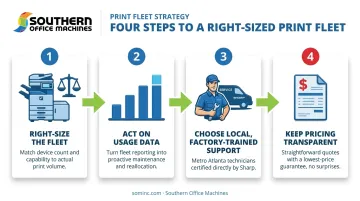
- Right-size the fleet first. Match device count and placement to real usage, not guesswork or legacy habits.
- Act on the usage data. Ongoing value depends on regular reviews of the reporting your provider surfaces, not a one-time setup and forget.
- Choose local, factory-trained support. A provider with technicians who actually know your equipment, rather than a distant call center reading from a script, means faster response and fewer repeat visits.
- Keep pricing transparent. Flexible monthly, quarterly, or annual agreements should be structured around your actual needs, not a rigid national template.
Right-sizing isn't a one-time device removal exercise, either. As hybrid attendance patterns and departmental needs shift, the fleet should be revisited regularly, not left on autopilot.
Conclusion
The real value of managed print services lies in cost control, operational clarity, and consistent uptime working together, day after day.
These advantages compound over time. Costs stabilize, staff move from firefighting to planning, and security gaps close before they escalate. That's why MPS works best as an ongoing partnership between provider and client.
If your Metro Atlanta business is ready for a tailored print assessment, Southern Office Machines has been doing this work since 1985. Reach out at 770-919-8989 or info@sominc.com to start the conversation.
Frequently Asked Questions
Why use managed print services?
MPS reduces unpredictable costs, minimizes downtime, and strengthens document security. That lets your team focus on core operations instead of print maintenance and troubleshooting.
How much do managed print services cost per page?
Cost-per-page varies by device type, print volume, and color versus black-and-white usage. Request a tailored assessment for an accurate rate specific to your fleet.
Is managed print services worth it for a small business?
Yes. Small businesses reduce waste and gain predictable billing, avoiding costly emergency repairs along the way. These advantages scale with your operation size, not just larger companies.
What's included in a typical managed print services agreement?
Most agreements cover device monitoring, supply replenishment, maintenance, security features, and periodic usage reporting. Specifics vary by provider and by your fleet's needs.
How long does it take to set up managed print services?
Setup timelines depend on fleet size and complexity. Most providers start with a needs assessment before installing or reconfiguring any devices.
Can managed print services work with my existing printers and copiers?
Often, yes. Many providers integrate existing devices where feasible, though older or inefficient machines may get flagged for replacement during the initial assessment.