Introduction
The "best printer" question looks different in 2026 than it did five years ago. AI-assisted document workflows, hybrid-work printing demands, and climbing ink and toner costs have reshaped what businesses actually need from their hardware.
For Metro Atlanta companies, the stakes are higher than picking a device off a shelf. The right printer affects daily office efficiency, document security, and total cost of ownership for years to come.
This guide breaks down the top printer picks for 2026 and the factors that matter most for offices. It also flags the buying mistakes that drain budgets over time.
Key Takeaways
- Laser and tank-style inkjets beat cartridge inkjets on long-term cost-per-page
- Duty cycle, security features, and total cost of ownership matter more than brand name
- Local, factory-trained service support is often the real deciding factor for businesses
- Right-sizing equipment to actual print volume prevents costly breakdowns and overspending
Overview of the Printer Market in 2026
"Best printer" no longer means highest resolution or fastest single spec. In 2026, it means faster print speeds paired with AI-assisted workflows, cloud connectivity, and lower per-page costs across the device's lifetime.
That shift is showing up in the data. According to Keypoint Intelligence's research on workflow automation and AI use in business:
- 95% of businesses are actively exploring AI-driven print and document workflows
- 80% now use a document management system to automate scanning, routing, and approvals
Small and midsize businesses are driving much of this change. As hybrid work sticks around, more companies are consolidating single-function devices into multifunction printers (MFPs) that handle print, scan, copy, and secure fax from one machine — cutting down on both footprint and IT overhead.
Below, we break down the top printers for 2026 across categories relevant to SMBs, corporate offices, and growing enterprises alike.
Best Printers of 2026
We evaluated printers on five criteria: reliability, print speed, cost-per-page, security features, and suitability for office versus home use. Each pick below fits a distinct business need, from light home-office use to high-volume enterprise printing.
HP OfficeJet Pro 9125e — Best Overall All-in-One Printer
The 9125e is an inkjet all-in-one built for home offices and small teams that need print, copy, scan, and fax in a single compact unit. It runs on HP's integrated smart app, giving users mobile printing and cloud access without extra setup.
What makes it stand out:
- Delivers consistent color and text quality across everyday document types
- Dual-band Wi-Fi for stable wireless printing in shared office spaces
- HP Wolf Security features baked into the firmware for basic document protection
One caveat: HP's rated duty cycle sits around 25,000 pages per month, and the device leans on ink subscription plans to hit its best per-page economics. Factor this in if your print volume fluctuates.
| Category | Details |
|---|---|
| Key Features | Print, copy, scan, fax; 250-sheet tray; touchscreen display |
| Technical Specs | Up to 22 ppm black / 18 ppm color; wireless and mobile printing; 4 ink cartridges |
| Best For | Small offices and remote workers needing quality color and mobile flexibility |
Brother MFC-L8905CDW — Best Color Laser MFP for Growing Businesses
This is a business-class laser MFP built for offices that have outgrown inkjet and need consistent, multi-user output. It's designed for teams printing regularly throughout the day, not just occasionally.
Key strengths:
- Fast print speeds keep queues from backing up during busy periods
- Reduces refill frequency with large-capacity paper trays
- Advanced document security protocols protect sensitive files in shared environments
| Category | Details |
|---|---|
| Key Features | Print, scan, copy, fax; 70-page auto document feeder |
| Technical Specs | Up to 33 ppm; large paper tray capacity; advanced security protocols |
| Best For | Offices needing consistent, high-quality color output at scale |
Canon imageCLASS MF455dw — Best Monochrome Laser for High-Volume Printing
Text-heavy offices prioritize speed and reliability over color. The MF455dw is a compact monochrome laser built specifically for high-volume black-and-white output.
Standout features:
- Handles large documents at rapid print speeds without slowing down
- Expandable paper capacity supports growing print demands
- Low cost-per-page makes it efficient for daily contract, invoice, and report printing
| Category | Details |
|---|---|
| Key Features | Wi-Fi Direct, cloud printing, expandable paper tray |
| Technical Specs | Up to 40 ppm; 250-sheet standard tray; rated for an 80,000-page duty cycle |
| Best For | Professionals and offices prioritizing fast, reliable black-and-white output |
Sharp Business MFP Series — Best for Local Service, Support, and Total Cost of Ownership
Sharp's business-grade MFPs are built for durability and integrate directly into document management workflows, handling scanning, routing, and archiving alongside standard printing.
As a Sharp-authorized dealer, Southern Office Machines pairs these MFPs with factory-trained technicians and tailored total cost of ownership evaluations for Metro Atlanta businesses.
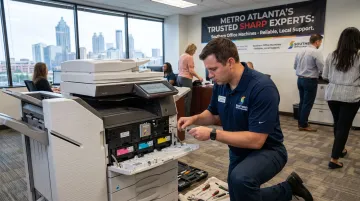
That combination matters: a machine is only as reliable as the service behind it. Remote diagnostics through LogMeIn Rescue mean many issues get resolved before a technician even needs to drive out.
| Category | Details |
|---|---|
| Key Features | Print, scan, copy, fax with workflow automation and secure printing options |
| Technical Specs | Configurable speed (up to 70 ppm color), paper capacity, and finishing options based on business size |
| Best For | Businesses wanting a scalable device backed by local sales, service, and rental support |
Brother HL-L2460DW XL — Best Budget, Reliable Laser Printer
Not every office needs color, scanning, or fax. Sometimes you just need a printer that works, every time, without a maintenance headache. That's this device.
Why it stands out:
- Fast single-sided and duplex speeds for a budget-tier machine
- Minimal maintenance requirements over its lifespan
- Cuts down on reorder frequency with high-yield toner cartridges
| Category | Details |
|---|---|
| Key Features | Automatic and manual feeders; basic LCD display |
| Technical Specs | Up to 36 ppm; up to 4,200-page toner yield; wireless connectivity |
| Best For | Budget-conscious offices that only need dependable black-and-white printing |
Key Factors to Consider When Choosing a Business Printer
Picking the right printer means matching a machine to how your office actually works, not chasing the flashiest spec sheet.
Print Volume and Duty Cycle
Every printer has a rated duty cycle: the maximum number of pages it's built to handle monthly. Consistently printing near or beyond that ceiling leads to more breakdowns, more service calls, and shorter equipment life.
A better metric than duty cycle alone is "true capacity" — the volume a device can reliably sustain without excess wear, which typically runs well below the manufacturer's maximum rating according to Keypoint Intelligence's analysis on duty cycle limitations.
Inkjet vs. Laser vs. Tank-Style
Duty cycle numbers matter, but the print technology itself drives day-to-day cost just as much.
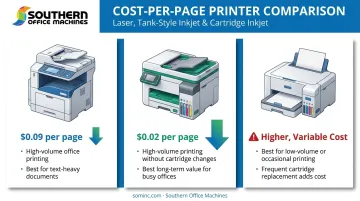
- Laser printers handle high-volume text printing at a lower cost-per-page and hold up better under heavy daily use
- Tank-style inkjets reduce long-term color printing costs compared to traditional cartridge inkjets, since ink refills cost far less per page than replacement cartridges
- Cartridge inkjets work fine for low-volume, occasional printing, but costs climb fast at higher volumes
Laser printers typically run around $0.09 per page, while some tank-style inkjets can drop closer to $0.02 per page for comparable output, based on cost-per-page research from BDS Document Solutions. That gap adds up fast across thousands of pages a month.
Security, Total Cost of Ownership, and Local Support
Beyond print technology and cost-per-page, most offices also need to protect what's printed and understand the full cost behind it. Business documents carry sensitive data: client records, financials, HR files. Look for:
- PIN-protected printing to keep documents from sitting exposed in output trays
- Encrypted data transmission between devices and networks
- Secure boot processes that prevent firmware tampering
Upfront price is the easiest number to compare and the least useful one. A full TCO picture includes:
- Toner or ink cost per page
- Scheduled maintenance and service agreements
- Energy consumption over the device's lifespan
Specs on paper only tell part of the story. Southern Office Machines' Business-to-Technology approach starts by learning a client's actual workflow, then identifies the smallest, sturdiest machine that fits, rather than upselling more capacity than needed. That right-sizing step alone often saves businesses from years of paying for capability they'll never use.
How We Chose the Best Printers
We evaluated printers using three sources: manufacturer specifications, independent lab test data, and real-world business use cases — not marketing claims alone.
That same real-world testing also surfaced common buyer mistakes we watched for:
- Choosing a printer based on upfront price while ignoring cost-per-page
- Overlooking duty cycle mismatches that lead to premature breakdowns
- Skipping service availability, then facing long downtime when something breaks
Conclusion
There's no single "best" printer for every business. The right choice depends on aligning device capabilities with your actual print volume, security requirements, and budget, not brand reputation alone.
Before finalizing that purchase or lease, evaluate ongoing performance and scalability, plus total cost of ownership, not just the price tag on day one.
If you're a Metro Atlanta business weighing your options, Southern Office Machines offers a no-obligation consultation and price comparison — with a lowest-price guarantee across purchase, lease, and rental options. Reach the team at 770-919-8989 or info@sominc.com.
Frequently Asked Questions
What is the best all-in-one printer for an office?
The best all-in-one office printer balances print speed, paper capacity, and security. For higher-volume needs, a business-class color laser MFP typically outperforms consumer-grade inkjet all-in-ones.
What is the most reliable copier?
Reliability comes down to build quality, factory-trained service support, and matching usage to duty cycle. Brands like Sharp and Kyocera consistently rank well in business copier reliability surveys.
Is it better to lease or buy a printer for a business?
Buying means a larger upfront cost but full ownership; leasing offers predictable monthly expense and easier upgrades as your business grows. Leasing often suits growing businesses better since it keeps cash flow flexible.
What's the difference between inkjet and laser printers for office use?
Laser printers suit high-volume text printing with lower cost-per-page over time. Inkjets, especially tank-style models, work better for lower-volume color printing needs in smaller offices.
How long do commercial printers and copiers typically last?
Most commercial printers and copiers last 3 to 7 years, depending on usage volume and maintenance frequency. Regular servicing and staying within rated duty cycle extend that lifespan significantly.
How much does it cost to print in-house versus outsourcing?
In-house laser printing typically costs a few cents per page, making it economical for regular volume. Outsourcing makes more sense for occasional specialty jobs like large-format printing or high-end finishing.