Without any tracking in place, three things happen almost every time: paper and toner get wasted on jobs nobody needed, monthly costs creep upward with zero warning, and sensitive documents sit unclaimed in printer trays where anyone can grab them.
This article breaks down what a print quota actually is, what printing really costs your business, how to roll out quotas without frustrating your team, and how Southern Office Machines helps Atlanta organizations get their print environment under control.
Key Takeaways
- Print quotas limit pages, jobs, or costs per user, department, or device.
- Unmanaged printing can become one of the largest hidden costs for growing businesses.
- Managed print services typically cut costs by 15% and volume by 16%, per IDC research.
- Combining quotas with duplex and B&W defaults multiplies savings beyond quotas alone.
- A short audit period before setting limits keeps quotas realistic.
What Is a Print Quota?
A print quota is a preset limit, on pages, print jobs, or a dollar amount, that a user, department, or device can print within a set period. Print management software tracks usage against that limit and takes action once it's reached.
Here's how the mechanism actually works: software installed at the print server or embedded on the device itself intercepts every job before it prints. It checks the sender's remaining allowance, then allows, blocks, or flags the job. PaperCut-style platforms handle this in real time, so employees see their balance the moment they hit print.
Page-Based vs. Cost-Based Quotas
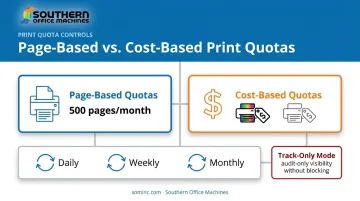
There are two dominant quota structures, and most businesses land on one or the other:
| Quota Type | How It Works | Best Fit |
|---|---|---|
| Page-based | Sets a fixed page count per period (for example, 500 pages a month) | Offices with predictable, consistent print volume |
| Cost-based (monetary) | Sets a dollar budget that automatically weights color jobs higher, since they cost more per page | Businesses with mixed color and B&W printing |
Cost-based quotas track actual spend rather than raw page counts, which matters once color printing enters the mix.
Reset Periods and Rollover
Quotas reset daily, weekly, or monthly depending on how granular you want control to be. Many platforms also support rollover, letting unused allowance carry into the next cycle instead of disappearing. This matters for departments with uneven printing patterns, like finance teams that print heavily at month-end but barely touch the printer otherwise.
Not every quota has to restrict anyone. Track-only quotas simply log usage without blocking a single job. That still gives leadership audit-level visibility into company-wide printing habits, which is often the first real data a business has ever had on this cost center.
Why Your Business Needs Print Quotas
Cost Control That Actually Works
Quotas cap runaway spending before it happens rather than reacting after the invoice arrives. Unmanaged, untracked print environments routinely push costs past 3% of a company's total annual revenue, a pattern Southern Office Machines sees often among Atlanta-area businesses. That's a real, recoverable number for most growing businesses.
Waste Reduction and Sustainability
Fewer unnecessary print jobs mean less paper and toner heading to the recycling bin (or the landfill). This isn't a hypothetical benefit either. A PaperCut case study of Colchester Royal Grammar School found that pairing quotas with usage monitoring cut student paper waste by 90%. Office environments won't necessarily hit that exact figure, but the direction is consistent.
Accountability and Security, Together
Department- and user-level quotas make it obvious who's printing what. That single change simplifies internal cost allocation across teams—no more guessing which department is driving the toner bill.
Pair quotas with secure print release, and you also solve a lingering security gap: sensitive documents no longer sit unclaimed at shared printers waiting for the wrong person to walk by.
Behavior Change and Budget Predictability
When usage becomes visible, employees think twice before hitting print. Many shift toward digital-first workflows and default duplex printing on their own, without a single policy memo. That shift, plus the tracking data itself, makes monthly print costs far easier to forecast, which directly supports better total cost of ownership planning as a business scales.
How Much Does Printing Really Cost?
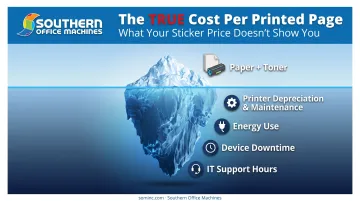
Cost-per-page sounds simple until you actually break it apart. The real number includes:
- Paper — often overlooked but adds up fast at volume
- Toner or ink — the single biggest line item on most CPP calculations
- Printer depreciation and maintenance — the device itself wears down and needs service
- Energy use — small per-unit, but constant across a fleet
IDC's analysis of business printing environments describes typical black-and-white cost-per-page as less than one cent, with color running a few cents per page on standard office laser MFPs. Run the math on volume and the gap becomes obvious:
| Output | Cost per page | Cost for 100 pages |
|---|---|---|
| Black and white | Less than $0.01 | Less than $1.00 |
| Color | A few cents | A few dollars |
That gap is exactly why cost-based quotas that weight color more heavily make sense for most offices.
The Hidden Costs Most Estimates Miss
Per-page math rarely captures everything. Device downtime alone can disrupt invoicing and internal workflows. Add in the IT support hours spent troubleshooting jams or driver issues, plus the toner that gets tossed half-used when a cartridge is swapped early. The "real" cost per page climbs well above any sticker figure.
Total cost of ownership matters more than the purchase price on a spec sheet. Evaluating hardware, supplies, energy, service, and downtime together—typically over a 3-, 5-, or 7-year horizon—helps a business choose equipment sized correctly for its workload.
Southern Office Machines' technicians apply this approach when sizing a fleet, matching the smallest, sturdiest machine to a customer's actual needs before comparing full TCO. That process helps avoid overbuying capacity that goes unused or settling for a device that becomes a bottleneck within a year.
How to Implement Print Quotas in Your Office
Rolling out quotas works best in three deliberate steps, not one sweeping policy change.
- Audit before you limit. Run print management reporting for two to three weeks to establish a real baseline of volume and cost by user and department. Southern Office Machines' Managed Print Services reporting tools can generate this data automatically, removing the guesswork before you set limits.
- Set quotas by role, not a blanket number. A receptionist and a finance director have wildly different printing needs. Build in higher allowances (or unrestricted access) for roles like finance, admin, and legal that legitimately print more.
- Communicate clearly and offer a request-more process. Quotas should never block an urgent client deliverable. A simple, fast way to request additional allowance keeps the policy from becoming an obstacle.
Print Quotas vs. Other Cost-Control Methods
Quotas aren't the only lever available, but they're usually the most flexible one.
- Vs. blunt restrictions: Disabling color printing entirely solves the problem, but it also blocks legitimate business use. Quotas cap usage instead of banning it, so a marketing team can still print color proofs within its allowance.
- Vs. managed print service agreements: MPS bundles equipment, supplies, and monitoring into one predictable fee. Quotas often run alongside an MPS agreement, adding granular control over who's printing what.
- Compounding with defaults: Setting duplex and black-and-white as the default stacks additional savings on top of quotas. Default duplex printing alone can cut paper use, and pairing it with B&W defaults for internal documents pushes savings even further.
Partnering with Southern Office Machines for Smarter Print Management
Southern Office Machines has served Metro Atlanta and Marietta businesses since 1985, including government clients like the Georgia Department of Community Health. That kind of longevity comes from a straightforward approach: understand how a client actually works before recommending anything.
The company's Business-to-Technology philosophy starts with learning a customer's business model and processes, then matches that understanding to the smallest, sturdiest equipment that fits, rather than upselling capacity nobody needs. The company calculates total cost of ownership before sending a quote, not after.
For print quota needs specifically, Southern Office Machines' Managed Print Services (MPS) program provides:
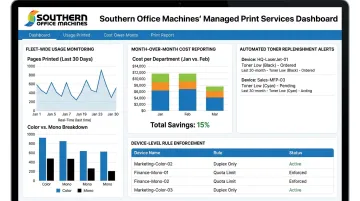
- Fleet-wide usage monitoring and month-over-month cost reporting
- User-level rule enforcement, including color restrictions by individual or department
- Automated meter readings and toner auto-replenishment
- Device placement recommendations for better fleet efficiency
You can access equipment through purchase, lease, or rental, all backed by a lowest-price guarantee and factory-trained technicians for on-site and remote support.
If uncontrolled printing is eating into your budget, a print environment assessment is the fastest way to find out where. Contact Southern Office Machines at 770-919-8989 or info@sominc.com to see what quota-ready equipment and MPS could save your business.
Frequently Asked Questions
What is a print quota?
A print quota is a set printing allowance, measured in pages or dollars, assigned to a user, department, or device. Print management software tracks usage and enforces the limit automatically.
How much do 100 pages cost to print?
Based on IDC's business printing analysis, 100 black-and-white pages typically cost less than $1.00, while 100 color pages run a few dollars on standard office laser equipment.
Can print quotas be set per department instead of per employee?
Yes. Quotas can apply to individual employees, groups, or entire departments depending on how granular a business wants its cost tracking to be.
Do print quotas work differently for color versus black-and-white printing?
Color jobs draw down a cost-based quota faster because they cost more per page than black-and-white output. Many businesses set separate allowances or weighting for color specifically.
What happens if an employee exceeds their print quota?
Depending on the software configuration, the job gets blocked, held for manager approval, or the employee can submit a quick request for additional allowance.
Is special software required to enforce print quotas?
Yes. Dedicated print management software integrated with your printers and MFPs is required to track usage and enforce limits automatically. Southern Office Machines' MPS program provides this capability across its equipment lineup.