The stakes are real. The global multifunction printer market was valued at $32.09 billion in 2024 and is projected to reach $55.54 billion by 2033, according to Grand View Research. That kind of growth means more options, more marketing noise, and more room for buyers to make an expensive mistake.
This guide breaks down exactly what to weigh before you sign a purchase order, lease, or rental agreement — from print volume and total cost of ownership to security and vendor support.
Key Takeaways
- Match your copier to actual print volume, not flashy specs
- Toner, service, and financing costs often outweigh the sticker price
- Security features are essential for handling sensitive documents
- Buying, leasing, and renting fit different cash flow needs
- A local dealer who knows your workflow beats guesswork
What is a Copier?
A business copier today is really a multifunction device (MFP) that combines printing, copying, scanning, and often faxing or emailing into one workflow tool. It functions as a document hub sitting at the center of how your team creates and shares information.
These machines range dramatically in size and capability. A five-person law office and a 500-employee logistics company have almost nothing in common when it comes to their document needs, and that's reflected in the equipment available.
Types of Copiers by Business Need
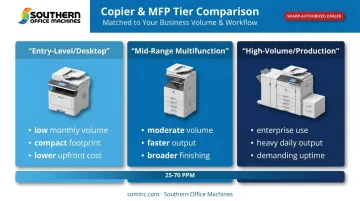
- Entry-level/desktop copiers — Built for low monthly volume in small offices or single departments. Compact footprint, simpler feature sets, lower upfront cost.
- Mid-range multifunction copiers — Designed for moderate volume across multiple departments. Faster output, more paper capacity, broader finishing options.
- High-volume/production copiers — Made for enterprise environments or in-house print shops with heavy daily output and demanding uptime requirements.
Southern Office Machines' color MFP lineup spans 25 to 70 pages per minute. That range covers everything from a small satellite office to a corporate headquarters needing fast, high-volume color output daily.
What to Consider When Buying a Copier
There's no single "best" copier. The right machine depends on your print volume, budget, workflow, and industry-specific requirements. The factors below help you translate manufacturer specs into real business outcomes, instead of getting swayed by a glossy brochure.
Print Volume and Speed
Pages-per-minute (PPM) gets all the marketing attention, but it's the wrong starting point. Manufacturers rate machines by duty cycle (the maximum pages a device can handle in a month), and that number is almost always inflated compared to what you should actually run through it.
Ricoh's own guidance states that a healthy, sustainable print volume is generally only 5% to 10% of a machine's maximum duty cycle, according to Ricoh's printer duty cycle explainer. Buy based on the top-line duty cycle number, and you'll likely overwork the machine and shorten its life.
Before shopping:
- Pull your last 3-6 months of print, copy, and fax volume from your current device's meter readings.
- Calculate a monthly average, and note any seasonal spikes.
- Add a growth buffer — enough headroom for 12-24 months out, not just today.
This single step prevents both outcomes buyers dread: overpaying for capacity you'll never use, or shopping again in two years because you undersized the fleet.
Total Cost of Ownership and Financing Method
The purchase price is just the entry point. Toner, maintenance, parts, and how you finance the equipment all shape your real monthly cost, and this is where a lot of buyers get surprised after the fact.
| Method | Best for | Trade-off |
|---|---|---|
| Buy | Businesses with capital available who plan to keep the machine long-term | Higher upfront cost, but full ownership and no lease restrictions |
| Lease | Businesses prioritizing cash flow and predictable budgeting | Lower monthly payments, typically 36-60 month terms, upgrade flexibility |
| Rent | Short-term, seasonal, or project-based needs | No ownership, generally a higher monthly cost than leasing |
Current market estimates put small-office copiers around $1,500 to $5,000, while high-volume commercial machines can run $10,000 to $25,000 or more, per industry pricing data from BDS. Use these ranges to set realistic expectations before you request a quote.
Maintenance agreements add another layer. Southern Office Machines structures theirs on monthly, quarterly, or annual terms, with factory-trained technicians, toner auto-replenishment, and automated meter reading built in — turning an unpredictable expense into a fixed one.
Features and Functionality
Duplex printing, collating, finishing, image editing, advanced paper handling: the feature list on a modern MFP can run for pages. Most businesses use a fraction of it.
Before you get talked into a fully-loaded machine, separate your needs into two columns:
- Must-haves: Functions your team uses every single day (duplex printing, scanning to email, basic finishing)
- Nice-to-haves: Functions that sound useful but rarely get touched (booklet-making, advanced image editing, high-capacity envelope feeding)
Paying for capability you'll never use is one of the fastest ways to blow a copier budget without gaining anything in return.
Security Capabilities
Networked copiers with WiFi and internal document storage are convenient. They're also a genuine cybersecurity risk if you're not paying attention.
Quocirca's 2024 print security research found that 67% of surveyed organizations reported at least one print-related data-loss incident in the prior year, with the average breach cost topping $1.3 million, up sharply from the year before, according to the Quocirca Global Print Security Landscape report.
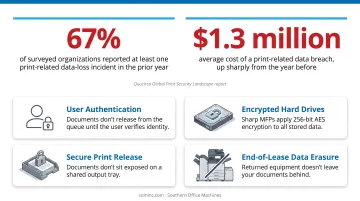
For regulated or sensitive industries, these features should be non-negotiable:
- User authentication before a job releases from the queue
- Encrypted hard drives (Sharp MFPs, for instance, apply 256-bit AES encryption to all stored data)
- Secure print release so documents don't sit exposed on a shared output tray
- End-of-lease data erasure so returned equipment doesn't leave your documents behind
Reliability, Brand, and Vendor Support
A copier's expected lifespan and uptime depend on more than the spec sheet. Brand reputation matters, but the quality of your servicing dealer matters just as much, if not more, once the machine is out of the box.
Ask any vendor these questions directly:
- Are your technicians factory-trained and certified, or generally trained across multiple brands?
- What's your average on-site response time in my area?
- Do you offer remote diagnostics before dispatching a technician?
Southern Office Machines, for example, resolves many issues remotely through LogMeIn Rescue before ever sending someone on-site, cutting downtime for Metro Atlanta customers before it starts.
Energy Efficiency and Mobile Connectivity
Two increasingly important, and often overlooked, considerations:
- Energy efficiency: ENERGY STAR-certified imaging equipment can save up to 35% over its lifetime, with automatic sleep modes and default duplex printing, per ENERGY STAR's product guidance.
- Mobile and cloud connectivity: Direct mobile printing and cloud access, like Sharp's Cloud Portal Office, let hybrid teams retrieve and print documents without walking to a shared device.
Common Mistakes to Avoid When Buying a Copier
Even careful buyers fall into predictable traps. Watch for these three.
- Underestimating future needs. Buying exactly for today's volume, with zero room to grow, often forces an expensive upgrade within just a couple of years. Build in a growth buffer from the start.
- Choosing solely on price. The cheapest machine on the lot often costs more over time in repairs and downtime, while an overly expensive one may be loaded with features nobody uses. Neither option serves your budget well.
- Partnering with the wrong provider. A vendor focused on closing the sale, rather than understanding your workflow, tends to recommend equipment that fits their inventory better than it fits your business.
How Southern Office Machines Can Help
Southern Office Machines has served Metro Atlanta and Marietta since 1985, building a reputation as a document management leader through its Business-to-Technology approach — understanding a customer's actual workflow before recommending any hardware.
What sets the SOM team apart:
- Factory-trained technicians who service the full product line, not just a narrow subset of models
- A complete product mix of new and refurbished Color MFPs, B&W MFPs, laser printers, and production printers
- Partnership with Sharp, giving customers access to a proven document security suite and cloud tools
- A lowest-price guarantee for the Atlanta area
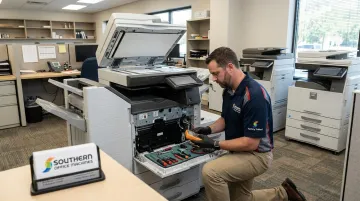
Sheldon Michaels leads that discovery process personally, translating each customer's workflow into a shortlist of realistic options. The goal is always the smallest, sturdiest machine that meets real needs, while protecting total cost of ownership over the life of the equipment.
If you're unsure whether you need a desktop MFP or a full production system, browse the product library or request a consultation directly rather than guessing from a spec sheet.
Conclusion
Finding the right copier means matching print volume, budget, and daily workflow, not chasing the flashiest model on the market.
Factor in where your business will be in two or three years, not just where it is now. And once you've made your choice, don't set it and forget it — revisit the fit periodically, since both your needs and the technology itself keep evolving.
Southern Office Machines has helped Metro Atlanta and Marietta businesses navigate this exact decision since 1985, matching Sharp equipment to real-world print needs with a lowest-price guarantee.
Frequently Asked Questions
How much does it cost to buy a copier?
Small office copiers typically start in the low thousands, while high-volume commercial machines can run into the tens of thousands. Lease and rental options are available for a lower upfront cost.
What is the most reliable copier?
Reliability comes down to matching build quality to your actual workload and choosing a brand backed by responsive, factory-trained local service — not chasing a single "best" model.
What is the average lifespan of a copier?
Most business copiers are built to handle roughly five years of normal use, though well-maintained machines running lower volume can last considerably longer.
Should I lease or buy a copier for my business?
Leasing suits businesses that prioritize cash flow and want easy upgrade paths. Buying suits those with capital available who plan to keep the machine long-term.
What features do I actually need in a business copier?
List your daily must-have functions first, such as duplex printing, network scanning, security controls, and cloud document storage, then add extras only if your budget has room left over.
How do I know which copier size or model fits my office?
Start by auditing your current monthly print and scan volume, then consult a local dealer who can match machine capacity and speed to that number.