Businesses often overspend on printers in one of two ways: buying a machine rated far above their actual volume, or underbuying and burning through consumables while the printer jams under pressure it wasn't built for. Either mistake costs money.
This guide covers the top black and white laser printers worth considering in 2026, the features that actually matter, and how to size a machine to your real print volume instead of guessing.
Key Takeaways
- Monochrome laser printers remain the most cost-effective choice for text-heavy office workflows
- Match your printer to recommended monthly volume, not the advertised maximum duty-cycle figure
- Pick a business model in the 36 ppm to 65+ ppm range that matches your real workload tier
- Refurbished units can save 30–50% when backed by proper warranty and service support
- A local partner assessing your actual workflow beats guessing from an online spec sheet
Why Black and White Laser Printers Still Make Sense for Business in 2026
Most day-to-day office printing, meaning invoices, contracts, internal reports, and forms, doesn't need color. Paying for color capability and color toner on documents nobody needs in color is money down the drain.
The honest cost-per-page picture is more nuanced than the "monochrome is always cheapest" claims you'll see online. HP's own data puts cartridge inkjets at 4-10 cents per black page and 8-20 cents per color page. Tank-based inkjets can drop black-page costs to under a cent (HP cost-per-page comparison).
Laser’s real edge on high-text workloads is speed, durability, and consistent output—not a magic universal CPP number.
Where monochrome laser wins:
- Delivers faster first-page-out times on time-sensitive document runs
- Keeps parts simpler than color multifunction devices
- Stretches toner yields further per cartridge on text-heavy jobs
- Avoids color drum and developer components to service or replace
If your office prints mostly black text, four toner colors and their upkeep rarely pencil out.
Top Black and White Laser Printers to Consider in 2026
Here is a snapshot of business monochrome models across four common office profiles. Third-party units below are useful speed and volume benchmarks; Southern Office Machines matches Sharp B&W printers and MFPs—new or refurbished—to the same bands. Duty cycle is the short-term maximum; recommended volume is the number to plan around.
Best for Small Offices or Low Volume
A common benchmark in this tier is the Brother HL-L2460DW: up to 36 ppm, dual-band Wi-Fi, Ethernet, and USB, with a 35,000-page maximum duty cycle and a recommended volume of about 2,500 pages per month (Brother HL-L2460DW specs). Solid for a small team without heavy daily demand. Southern Office Machines sizes compact Sharp monochrome units to this same low-volume band when you want local setup, supply, and service.
Best for Mid-Size Offices or Higher Volume
The HP LaserJet Pro 4001dw is a typical mid-office reference point: 42 ppm, 350 sheets standard (expandable to 900), Gigabit Ethernet plus Wi-Fi, and a recommended 750–4,000 pages monthly against an 80,000-page maximum duty cycle. Size by the lower number, not the headline. SOM can align a Sharp desktop or small workgroup monochrome system to that monthly range so capacity and service levels stay in step.
Best Multifunction Monochrome Option
When scan, copy, and fax need to sit on the same device, market MFPs such as the Canon imageCLASS MF455dw (up to 40 ppm, 350-sheet main tray, optional expansion) show what this tier usually delivers.
For that same document-capture role, Southern Office Machines offers Sharp options such as the BP-B550WD—up to 50 ppm in a compact desktop footprint (A4/letter-class). That keeps print, scan, and copy in one workflow without a separate single-function fleet.
Best for High-Volume Business Use
High-volume benchmarks include units like the Xerox VersaLink B620: up to 65 ppm, input expandable to about 3,850 sheets, and a ~30,000-page recommended monthly volume.
Departments at or above that load often need faster engines and broader paper support. Southern Office Machines supplies Sharp BP-70M75 and BP-70M90 systems (70–90 ppm, A3/ledger-capable), including refurbished paths, for busy groups that outgrow desktop boxes.
| Tier | Speed | Recommended monthly volume |
|---|---|---|
| Small office | 36 ppm | Up to 2,500 pages |
| Mid-size office | 42 ppm | 750–4,000 pages |
| Multifunction | 40–50 ppm | 750–4,000 pages |
| High-volume | 65–90 ppm | Up to 30,000 pages |
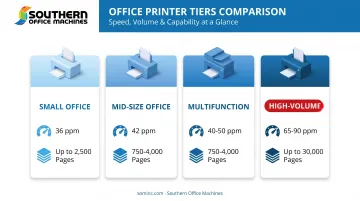
The takeaway: match your actual monthly page count to the recommended-volume column, not the price tag or the maximum duty cycle printed in bold on the box.
Key Features to Evaluate Before Buying
Print Speed and What "Fast" Actually Means
Print speed (pages per minute) matters for anyone running month-end reports or batch document jobs. For most small-to-mid offices, 35–45 ppm covers daily needs without paying for enterprise throughput you will not use.
Higher-volume floors need more headroom. The Xerox VersaLink B620 hits 65 ppm, HP Enterprise black-only systems advertise up to 70 ppm, and Southern Office Machines' Sharp BP-70M90 reaches 90 ppm for departmental workloads.
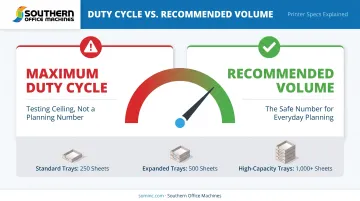
Duty Cycle and Paper Capacity
Underestimating volume is the fastest way to burn through a printer early. Watch these two numbers:
- Maximum duty cycle — the ceiling a manufacturer tests to, rarely a realistic monthly target
- Recommended volume — the number that actually protects the machine's lifespan
Buying based on the bigger number alone leads to premature wear, more service calls, and higher long-term costs.
Paper capacity sits beside duty cycle. A 250–550 sheet main tray means frequent reloads on busy floors; 1,000+ sheet capacity or optional towers keep long jobs from stalling at an empty cassette.
Connectivity and Total Cost of Ownership
Wi-Fi, Ethernet, and USB matter differently depending on your network. Ethernet is the most stable choice for shared office printers; Wi-Fi adds flexibility where you lack wired drops.
How the device connects is only half the decision. Sticker price rarely tells the real story—total cost of ownership also includes:
- Toner yield per cartridge (cost divided by page yield)
- Drum, fuser, and maintenance kit replacement costs
- Service agreement fees
- Downtime cost if support response is slow
Southern Office Machines' maintenance agreements—monthly, quarterly, or annually—fold factory-trained service and genuine Sharp parts into that TCO so support cost is planned, not improvised.
New vs. Refurbished: Choosing the Right Fit for Your Budget
Refurbished monochrome laser printers can stretch a tight office budget without giving up laser speed and text quality. HP's own guidance pegs refurbished savings at 30%–50% versus new equipment, often with a comparable one-year limited warranty (HP refurbished printer guide).
New still wins in some cases. Choose new when you need the latest security firmware path, a longer primary warranty, higher monthly duty headroom, or a clean lease schedule for finance and IT standards.
"Refurbished" is not a standardized grade. Before you buy, confirm:
- Total page count on the engine and prior service history
- Component status: whether the drum, fuser, and toner are new or only inspected
- Warranty terms: parts, labor, and onsite vs. depot service
- Return window plus a print-quality test before final sign-off
Southern Office Machines supplies both new and refurbished Sharp black-and-white printers and MFPs for Metro Atlanta and Marietta offices. Reconditioned units are built with genuine Sharp parts, toner, drums, and developer.
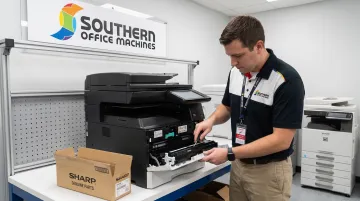
- Same maintenance agreement options as new equipment
- Factory-trained technicians for install and ongoing service
- Purchase, lease, and rental paths matched to monthly volume and budget
Why Buy From a Local Office Equipment Partner Instead of Online
Buying a printer online off a spec sheet is a guessing game. You don't know your actual workflow demands until the machine is already jamming under too much volume or sitting idle because you overbought.
A Business-to-Technology approach flips that process: a local provider learns your business model and workflow first, then recommends equipment, rather than starting with a product catalog.
Southern Office Machines has served Metro Atlanta and Marietta since 1985, matching black-and-white laser printers to real office volume—not a generic SKU list:
- Sales, service, and rental options across new and refurbished Sharp equipment
- Factory-trained technicians for on-site and remote (LogMeIn Rescue) support
- A lowest price guarantee for the Atlanta area
- Managed Print Services for fleet monitoring and automated meter readings
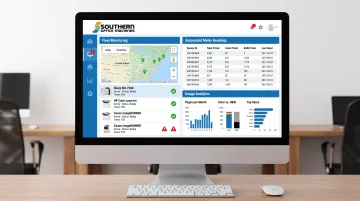
Unmanaged print fleets quietly drain budget through waste, downtime, and machines that never matched the workload. A local partner who reviews your usage data first is the difference between a printer that fits and one you replace in eighteen months.
Frequently Asked Questions
Which laser printer is the fastest?
High-end monochrome business laser printers currently reach 65-90 ppm. Speeds vary by model line, so confirm current specs before you buy.
What is the fastest black and white printer available?
Among common office options, monochrome lasers win on black-text speed. Office-grade models typically run 35-90 ppm, while most inkjets stay well below 30 ppm for black text.
Are laser printers being phased out in 2026?
No. Major manufacturers, including HP, Xerox, and Sharp, continue producing and marketing business monochrome laser printers at 65-90 ppm. Some brands invest more in ink tank lines, but that is a product-mix choice—not an industry-wide move away from laser.
Is it cheaper to run a black and white printer than a color printer?
Generally yes for text-heavy printing, since you avoid paying for color toner and components you don't use. Exact savings depend on the specific model, so compare toner cost per page across your finalists.
How do I know what printing volume my office needs?
Track your monthly page counts for a few months across the whole office, then compare that number to a printer's recommended volume, not its maximum duty cycle. Managed Print Services can automate that tracking and flag when you are over- or under-equipped.
Should a small business buy or lease a black and white laser printer?
Leasing or renting lowers upfront costs and suits offices still scaling their print needs. Buying makes more sense once your volume and workflow are stable and predictable long-term.