Sound familiar? Many businesses struggle with this exact fragmentation, and it's costing more than anyone realizes.
A multifunction copier (MFP) consolidates printing, copying, scanning, and faxing into a single machine built for real business volume. This guide breaks down what MFPs actually are, how they differ from standard printers, and what to consider before buying.
Southern Office Machines has helped Metro Atlanta businesses select the right document solutions since 1985, working across government, healthcare, and corporate offices throughout Cobb County and beyond.
Key Takeaways
- MFPs combine printing, copying, scanning, and faxing into one machine, cutting equipment and supply costs
- Higher-volume offices gain finishing and document management features standard printers lack
- Size your copier by actual volume and total cost of ownership, not sticker price
- A local, factory-trained provider ensures a properly sized machine with real support behind it
What Is a Multifunction Office Copier?
A multifunction office copier (MFP) is a device that combines copying, printing, scanning, and often faxing or emailing into one connected unit. Xerox defines the modern office copier this way: a printer, copier, scanner, fax, and all-in-one device rolled into a single footprint.
Today's MFPs are digital, networked document hubs. They scan documents into searchable PDFs, print directly from cloud storage, and route files to specific folders or email addresses with a single touchscreen tap.
Common Capabilities of Modern MFPs
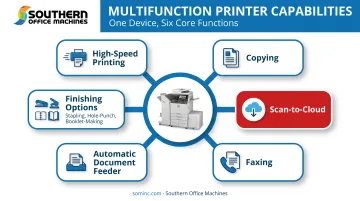
Most business-grade MFPs share a core set of functions:
- High-speed copying and network printing across departments
- Scan-to-email or scan-to-cloud functionality for instant document sharing
- Faxing, still relevant for healthcare, legal, and government sectors
- Automatic document feeders (ADFs) that scan multi-page documents without manual page-flipping
Speed and capacity still vary widely by model. Southern Office Machines' Sharp lineup shows that spread clearly: the BP-70C color series runs from 31 to 65 ppm, while the BP-70M monochrome series spans 26 to 90 ppm, enough for a five-person office or a 200-employee headquarters.
Beyond those core jobs, many models add finishing: stapling, hole-punching, saddle-stitch booklet-making, and folding. That turns a copier into a small in-house print shop for reports, training materials, and client presentations—without a trip to an outside vendor.
Multifunction Copier vs. Standard Printer: What's the Difference?
A printer is a single-purpose, digital-to-paper device. An MFP is a duplication-first, high-volume document center. For busy offices, that gap shows up in uptime, cost-per-page, and how many machines you need on the floor.
Speed and Duty Cycle
Standard printers are built for modest workloads. HP's LaserJet Pro 4001dn, for example, lists an 80,000-page maximum duty cycle but a recommended monthly volume of just 750 to 4,000 pages. That gap between "maximum" and "recommended" matters. Pushing a desk printer past its comfort zone shortens its life.
Copier-class MFPs, by contrast, are engineered for sustained volume. Xerox's AltaLink C8200 series recommends up to 40,000 pages per month, with maximum duty cycles reaching 300,000 images. That's a different category of machine entirely.
Cost-Per-Page and Features
| Factor | Standard Printer | Multifunction Copier |
|---|---|---|
| Best for | Under 4,000 pages/month | 2,000+ pages/month, multi-department use |
| Toner cost structure | Standard cartridges, higher per-page cost typically | High-yield toner, often lower per-page |
| Finishing options | Rare | Stapling, hole-punch, booklet-making common |
| Security/network management | Varies by tier | Fleet management, audit logs, access controls standard on business models |
| Entry price example | $210-$430 for basic laser models | $700-$1,400+ for entry MFPs, higher for A3 floor-standing units |
Note on pricing: these figures reflect Xerox retail snapshots for named models, not a universal market range. Copier-class A3 machines are typically quote-based since configuration varies so much by business.
Security
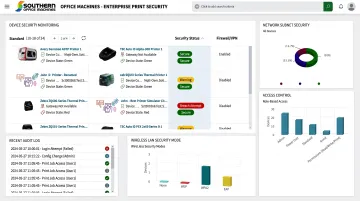
A 2024 Quocirca study of 500 U.S. and European IT decision-makers found that 67% had experienced print-related data loss in the prior year, and only 16% felt completely confident in their print infrastructure's security. Business-grade MFPs typically build in stronger access controls than a basic desk printer ever will.
Key Benefits of Multifunction Copiers for Businesses
Consolidating print, copy, scan, and fax into one MFP isn't just tidier. It changes how a business runs.
- Space and cost savings — One machine means less floor space, fewer maintenance contracts, and a single toner supply chain. Fewer devices also means fewer things that can break.
- Faster daily workflows — Copying, printing, scanning, and emailing live in one path, so staff stop shuttling between machines. A document can be scanned, filed, and emailed to a client in one motion.
- Better document retrieval — Southern Office Machines' Cloud Portal Office captures and indexes paper and electronic files in one repository, reachable from desktop or mobile. IT can set folder permissions by user or group, which matters for HIPAA-conscious healthcare and finance teams.
- Stronger security — Sharp MFPs support Active Directory/LDAP and Kerberos single sign-on, audit-trail logging, and optional Data Security Kits with 256-bit AES encryption. Some configurations overwrite deleted data up to seven times.
- Simpler IT and support — One connected system replaces a scatter of devices, so fewer handoffs, fewer errors, and one vendor path for service and supplies.
How to Choose the Right Multifunction Copier for Your Business
Buying the wrong machine (too big, too small, or missing a critical feature) is an expensive mistake. Here's how to avoid it.
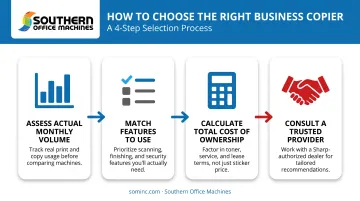
- Know your actual monthly volume. Not your duty cycle ceiling, your real usage. A machine rated for 40,000 pages a month is overkill for an office printing 3,000.
- Match features to actual use. Do you need color, or is black-and-white sufficient for 90% of jobs? Do you need booklet-making, or would stapling alone cover it?
- Calculate total cost of ownership. Not just the sticker price. Sharp USA's TCO framework includes acquisition or lease cost, consumables, service, downtime, energy, and IT support over a 3-5 year horizon, not just what's on the invoice today.
- Work with someone who learns your business first. Sheldon Michaels, an office equipment professional at Southern Office Machines, describes the approach this way: identify the smallest, sturdiest machine with the exact features needed, then evaluate total cost of ownership. That's the opposite of selling the biggest machine possible.
Get volume, features, and TCO right, and print spend stops leaking. Unmanaged printing environments can consume more than 3% of annual company revenue. A properly sized MFP, paired with Managed Print Services, brings that number down through usage monitoring, automated meter readings, and toner replenishment.
Buying, Leasing, or Renting: Which Option Fits Your Business?
There's no universally right answer. It depends on cash flow, how long you'll need the equipment, and whether your needs might change.
- Buying suits businesses with stable, predictable volume and available capital who want to avoid ongoing payments
- Leasing (fair-market-value or $1-buyout) works for lower monthly payments and end-of-term flexibility
- Renting fits temporary needs: a satellite office, a print-volume spike, or a merger transition
SBA guidance on equipment financing outlines how these structures differ. Southern Office Machines offers sales, service, and rental options, including new and refurbished Sharp equipment, so budget need not dictate features. Maintenance agreements are available monthly, quarterly, or annually on any acquisition path.
Frequently Asked Questions
What is a copier?
A modern office copier is typically a multifunction device that copies, prints, scans, and often faxes documents for higher-volume business use. Most offices treat it as a networked document hub, not a standalone copy machine.
What's the difference between a copier and a printer?
Printers are single-purpose, digital-to-paper devices designed for lower monthly volumes. Copiers (MFPs) handle much higher volumes and add scanning, faxing, and finishing features printers typically lack.
How many pages per month should a business print before upgrading to a multifunction copier?
Offices printing more than roughly 2,000 pages a month, or needing scanning and document finishing, typically benefit from an MFP. Volume isn't the only factor; workflow needs matter too.
Are multifunction copiers more expensive than printers?
MFPs usually carry a higher upfront or lease cost than a basic printer. However, their lower cost-per-page and consolidated maintenance often reduce total cost of ownership over time.
Can a multifunction copier really replace multiple desk printers?
Yes. A centralized MFP can consolidate several standalone printers into one machine, cutting toner costs, maintenance calls, and floor space used across departments.
Should I buy, lease, or rent a copier for my business?
The right choice depends on your budget, expected volume, and how long you'll need the equipment. A dealer can map those factors to purchase, lease, or rental so cost and term fit your office.
Ready to stop juggling multiple printers? Contact Southern Office Machines at 770-919-8989 to discuss the right multifunction copier for your Metro Atlanta business.