Businesses that get this right save more than money. They protect sensitive documents and keep workflows moving without bottlenecks. In fact, 71% of organizations already using managed print services expect their investment to grow, according to Quocirca's 2025 Managed Print Services report — a clear sign that smart print infrastructure is becoming a business priority, not an afterthought.
This guide breaks down the specific features worth prioritizing in 2026, and how to match them to your actual workflow.
TL;DR
- 2026 copiers function as AI-enabled, cloud-connected hubs built for modern workflows
- Security, speed, connectivity, and sustainability are the categories that matter most
- Matching features to real business volume prevents overspending or underpowered equipment
- A trusted local partner, like Southern Office Machines, keeps total cost of ownership in check
Overview of Copier Technology Heading into 2026
A modern copier is more accurately called a multifunction printer, or MFP. It combines several core functions into a single networked device:
- Copying and printing
- Scanning and faxing
- Cloud-based document routing and storage
That's a far cry from the standalone analog copiers of a decade ago. Today's machines are network-integrated endpoints, often managing security permissions, routing documents to cloud storage, and reporting their own usage data automatically.
Managed print services have grown alongside this shift, as businesses demand more control over print costs, security, and uptime. Offices now need equipment that does more than duplicate paper.
The following sections break down the specific features that separate a smart 2026 investment from a machine you'll regret buying in eighteen months.
Top Copier Features to Look for in 2026
Not every feature matters equally for every business. The features below were selected based on five criteria: efficiency, security, connectivity, scalability, and sustainability. Each one ties directly to a measurable business outcome, not just a spec sheet number.
Multifunction & Workflow Integration
A true multifunction device handles copy, print, scan-to-email, scan-to-folder, OCR, and fax through one continuous digital workflow. That consolidation matters because it reduces equipment sprawl, cuts maintenance overhead, and speeds up document turnaround across departments.
Southern Office Machines' Sharp MFP lineup, for example, integrates with Cloud Portal Office, a centralized repository that lets teams capture, index, and retrieve both paper and digital documents from virtually any device. That same lineup connects with document management platforms including DocuWare, Nuance, and Microsoft, so your MFP becomes a workflow hub rather than an isolated box.
| Aspect | Details |
|---|---|
| Key Capability | Copy, print, scan-to-email/folder, OCR, and fax in a single unit |
| Business Benefit | Reduces hardware costs and centralizes document workflows |
| 2026 Consideration | Look for native integration with cloud storage and DMS platforms |
Advanced Security & Data Protection
Every networked MFP is also a storage device holding sensitive scans, print jobs, and fax logs. Left unprotected, it's an entry point for a breach. 67% of organizations reported at least one print-related data-loss incident in the past year, up from 61% in 2023, according to Quocirca's Print Security Landscape report.
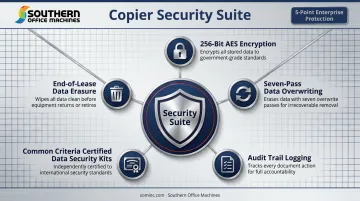
Sharp addresses this through its Security Suite, which covers encryption, overwriting, logging, and certified data destruction:
- 256-bit AES encryption on all data written to RAM and the hard drive
- Up to seven-pass data overwriting
- Audit trail logging for compliance and incident review
- Optional Data Security Kits certified to Common Criteria standards for government and high-security environments
- End-of-Lease data erasure that automatically wipes stored data when equipment is returned
| Aspect | Details |
|---|---|
| Key Capability | User authentication, data encryption, secure print release, audit trails |
| Business Benefit | Prevents unauthorized access and protects compliance-sensitive documents |
| 2026 Consideration | Prioritize devices with strong access controls and regular security updates |
Cloud, Mobile & AI-Powered Automation
Hybrid offices expect to print and retrieve documents from anywhere, not just the desk closest to the machine. Cloud printing, mobile release, and AI-driven automation, such as smart routing and predictive alerts, have moved from nice-to-have to baseline expectation.
Across Sharp's Color MFPs (25–70 ppm), Black & White MFPs, and Laser Printers, mobile device access and printing come standard, letting staff send jobs from a phone or tablet and pick them up later. Documents scanned into Cloud Portal Office become searchable and retrievable from any connected device, supporting teams that split time between home and office.
| Aspect | Details |
|---|---|
| Key Capability | Mobile print apps, cloud scanning, smart document routing |
| Business Benefit | Enables remote and hybrid teams to print and retrieve documents from anywhere |
| 2026 Consideration | Ask vendors directly about predictive maintenance alerts on the specific model you're considering |
Speed, Volume & Finishing Capabilities
Pages-per-minute, monthly duty cycle, and finishing options like stapling or booklet-making determine whether a machine can actually keep up with your daily workload. Get this wrong in either direction and you've either created a bottleneck or paid for horsepower you'll never use.
For context, Xerox's own product line illustrates the range:
- Small work-team model: 35 ppm, up to 6,000 recommended pages monthly
- Busy workgroup model: 52 ppm, up to 20,000 recommended pages monthly
- High-volume configuration: 70–80 ppm, duty cycles up to 300,000 images
One important distinction: duty cycle is the maximum a machine can handle occasionally, not a sustainable monthly average.
| Aspect | Details |
|---|---|
| Key Capability | PPM speed, monthly duty cycle, paper tray capacity, finishing options |
| Business Benefit | Prevents workflow bottlenecks and reduces per-page operating costs |
| 2026 Consideration | Confirm duty cycle headroom for future volume growth, not just current needs |
Energy Efficiency & Total Cost of Ownership
Sticker price tells you almost nothing about what a copier will actually cost over five years. Toner consumption, service contracts, and energy use add up fast, which is why total cost of ownership, not upfront price, should drive the decision.
ENERGY STAR-certified imaging equipment can use up to 35% less energy than non-certified models, according to the EPA's ENERGY STAR imaging equipment program. Beyond certification, ask about auto-sleep modes, duplex printing defaults, and toner-saving settings.
Southern Office Machines also notes that unmanaged print environments can cost businesses more than 3% of total annual revenue — a figure that makes fleet monitoring through Managed Print Services worth serious consideration.
| Aspect | Details |
|---|---|
| Key Capability | ENERGY STAR certification, auto-sleep, duplex printing, low-cost toner systems |
| Business Benefit | Lowers monthly operating costs and supports sustainability goals |
| 2026 Consideration | Ask vendors for a documented cost-per-page and TCO comparison before purchase |
Matching Copier Features to Your Business Size and Needs
Feature priorities shift depending on how many people are actually using the machine. A five-person small business office needs simplicity above all else. An enterprise floor needs volume headroom, tiered security, and finishing options that support marketing and legal teams alike.
Here's a general reference point, though your actual numbers should come from a consultation, not a chart:
| Business Tier | Typical PPM Range | Security Priority | Common Finishing Needs |
|---|---|---|---|
| Small office (1–15 users) | 25–35 ppm | Basic access control, encryption | Minimal — stapling at most |
| Mid-size office (15–75 users) | 35–52 ppm | Audit trails, user authentication | Stapling, hole-punch |
| Enterprise/high-volume | 52–80 ppm | Tiered access, Common Criteria certification | Booklet-making, multi-folding, saddle-stitch |
Beyond matching your current tier, scalability matters more than most buyers realize. A device that accepts add-on paper trays, finishers, or expanded software licenses can grow alongside your business, so you won't replace a perfectly good machine just because your team doubled in size.
How to Choose the Right Copier and Partner for Your Business
Before comparing specific models, work through four questions: What's your real monthly volume? What security tier does your industry require? What's your budget, including service? And where do you expect to be in three years?
Skipping this step leads to two common mistakes:
- Focusing only on the purchase price while ignoring toner costs, service fees, and energy consumption over the life of the contract
- Guessing at duty cycle needs — either overbuying capacity you'll never use or underbuying and creating daily bottlenecks
Beyond avoiding these cost and capacity traps, vendor reputation matters just as much as the hardware itself. Factory-trained technicians and responsive local service directly affect how much uptime you actually get.
Southern Office Machines has used a Business-to-Technology approach since 1985, learning a client's actual workflow first, then identifying the smallest, sturdiest machine that fits, before calculating total cost of ownership.
Sheldon Michaels, one of the team's longtime equipment specialists, put it plainly in The IT Pro's Guide to Choosing the Right MFP: many models look nearly identical on paper, but the differences that matter only show up once you dig into how a machine handles your specific workload.
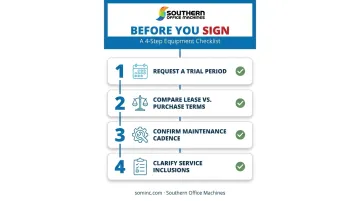
A few practical steps before signing anything:
- Request a trial period to confirm the device fits your daily workflow, not just its spec sheet
- Compare lease versus purchase terms carefully, including contract length and maintenance coverage
- Ask what maintenance cadence is available, since Southern Office Machines offers monthly, quarterly, or annual agreements backed by factory-trained technicians and remote support through LogMeIn Rescue
- Clarify what's included in service, since coverage shouldn't differ based on whether you lease, buy, or rent
Conclusion
Choosing the best copier for 2026 comes down to matching features with your workflow, security requirements, and growth trajectory over the next few years, not chasing brand recognition.
Before finalizing any purchase or lease, take a hard look at scalability and total cost of ownership. Then weigh the level of support your vendor provides once the ink dries on the contract.
If you're a Metro Atlanta business weighing your options, Southern Office Machines offers a no-hassle consultation and Sharp-backed recommendations tailored to your budget and workflow. Reach out at 770-919-8989 or info@sominc.com to talk through what fits your business.
Frequently Asked Questions
What are the key features of a copier?
Key features to evaluate include multifunction capability, an automatic document feeder, network connectivity, security controls like encryption and authentication, and finishing options such as stapling or booklet-making.
What is the function of a copier?
A copier duplicates physical documents. Modern MFPs go further, also printing, scanning, and sharing digital files across a network or cloud platform.
What copier features matter most for small businesses in 2026?
Small businesses generally benefit most from multifunction simplicity, moderate PPM speeds, cloud and mobile printing support, and basic security features sized to lower print volumes.
Should I lease or buy a copier with advanced features?
Leasing suits businesses that want current technology with maintenance included and lower upfront costs. Buying fits companies with in-house support and steadily growing print volume.
How are AI and automation changing copier technology in 2026?
AI-driven features are starting to include predictive maintenance alerts, smarter document routing, and automated OCR, which together reduce manual work and unplanned downtime.
How often should I upgrade my copier to keep up with new features?
Most office copiers run on three-to-four-year service contracts, with actual replacement timing depending more on usage volume and maintenance history than a fixed calendar date.