Print management gets framed as an enterprise IT concern, but its real impact plays out in everyday office life. It's the reason a small accounting firm isn't blindsided by a $2,000 color-printing bill, or why a healthcare practice can prove HIPAA compliance during an audit.
This article breaks down what print management actually means for a growing business and helps you figure out whether your company needs it.
TL;DR
- Print management tracks and optimizes how your printers, copiers, and MFPs are used.
- Benefits include lower printing costs, faster document workflows, and stronger data security.
- Rising costs, no usage visibility, or security gaps are strong signs you need it.
- Most SMBs should start with a print assessment, not enterprise software.
What Is Print Management? (Brief Context)
Print management is the set of practices and tools that monitor, control, and optimize how an organization's printers, copiers, and document workflows operate.
It applies to any office with more than one device, user, or department, whether that's a single multifunction printer in a five-person office or a fleet of 40 machines across three locations.
Print management works as an ongoing discipline that drives three specific outcomes:
- Cost control: knowing exactly what printing costs and why
- Security: protecting sensitive documents at every stage
- Productivity: cutting the manual steps that slow employees down
It brings deliberate attention to a resource most businesses stopped monitoring years ago.
Key Advantages of Print Management
The advantages below focus on measurable, operational impact, not theoretical upside. Each one ties directly to metrics your business already tracks: cost, turnaround time, and compliance risk.
Advantage 1: Cost Control and Waste Reduction
This advantage centers on tracking print volume, toner and paper consumption, and per-device or per-department costs.
In practice, businesses:
- Set print quotas by user or department
- Restrict default color printing to specific roles
- Allocate print costs back to the departments generating them
Why it matters: Visibility into print spend stops unnecessary printing before it becomes a budget problem.
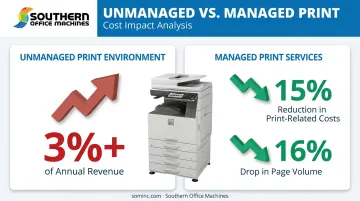
According to Southern Office Machines' internal data, expenses in an unmanaged print environment can climb to over 3% of a company's total annual revenue. That figure is easy to miss because printing costs are scattered across supply orders, service calls, and IT time instead of showing up as one line item.
Separately, IDC found that organizations using managed print services achieved an average 15% reduction in print-related costs and a 16% drop in page volume.
KPIs impacted:
- Cost per page
- Monthly print spend
- Paper and toner consumption
This advantage matters most when you have multiple users, departments, or locations, and when supply costs keep climbing month over month.
Advantage 2: Streamlined Document Workflows
Document workflows improve when printing, scanning, copying, faxing, and email operate as one connected process instead of a dozen disconnected steps.
For example, an employee can scan a signed contract directly to a cloud folder or email inbox instead of walking it to a filing cabinet or a colleague's desk.
Why it matters: Fewer manual handoffs mean fewer errors and shorter processing delays. IDC surveyed over 1,500 information workers and business leaders. The study found that administrative tasks, many tied to document handling, consumed 28% of information workers' time. Document processes remained 80% paper or mixed paper-and-digital.
Sharp MFPs paired with a platform like Cloud Portal Office let employees scan and index documents directly into a searchable cloud repository, then retrieve them from nearly any device. No more physical routing between departments.
KPIs impacted:
- Document turnaround time
- Retrieval time
- Employee hours spent on administrative work
Growing businesses, hybrid teams, and document-heavy industries such as legal, healthcare, or government stand to benefit most.
Advantage 3: Stronger Security and Compliance
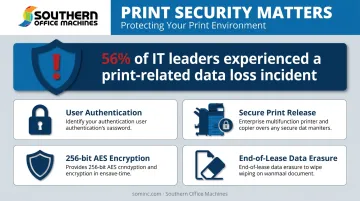
Protecting sensitive documents relies on user authentication, secure print release, and activity tracking built into the device itself.
Businesses typically require identity verification before a print job releases, so confidential files don't sit unattended in an output tray waiting for the wrong person to pick them up.
Why it matters: Unmanaged printers are one of the most overlooked points of data exposure in an office. Quocirca's 2025 Print Security Landscape survey of 400 IT decision-makers found that 56% had experienced at least one print-related data loss incident in the prior year.
That's down from 67% the year before, but the exposure is still substantial. The same research found 83% of IT leaders expect print-security spending to increase over the next year.
Sharp's Security Suite addresses this through access control, audit trail logging, and 256-bit AES encryption, with up to seven-times data overwriting on stored files. An end-of-lease data erasure feature also wipes devices clean before they leave your building.
KPIs impacted:
- Security incidents
- Compliance audit readiness
- Unauthorized access attempts
Regulated industries like healthcare, legal, and government agencies handling sensitive client or financial records face the highest stakes here.
Does Your Company Need Print Management? (Signs to Watch For)
Without print management, businesses commonly run into the same handful of warning signs. Here's the reality check:
- Rising, hard-to-trace printing costs that climb month to month without a clear cause
- No visibility into who's printing what, how much, or on which device
- Frequent printer downtime, toner run-outs, or slow service response
- Sensitive documents sitting unclaimed in printer trays
- Difficulty scaling print infrastructure as staff or locations grow
If two or more of these sound familiar, a print assessment is a practical next step, not an overreaction.
Southern Office Machines' Business-to-Technology approach helps Atlanta-area businesses identify these exact gaps before committing to equipment or service.
The process starts with your workflow, not a product catalog. Southern Office Machines learns how your business actually operates, then matches equipment to real usage. As the company puts it, the goal is finding the smallest, sturdiest machine with the features you actually need, not the biggest sale.
How to Get the Most Value from Print Management
Print management delivers the most value when it's applied consistently, monitored regularly, and acted on, not just documented and forgotten in a drawer.
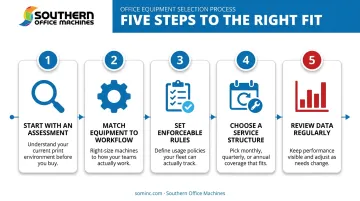
Here's a practical sequence:
- Start with an assessment. Before investing in new tools, audit your current devices, usage patterns, and actual costs. You can't fix what you haven't measured.
- Match equipment to workflow, not the reverse. Right-sized devices with the correct features cost less over time than oversized systems nobody fully uses.
- Set enforceable rules. Color restrictions and user-level quotas only work if they're actually enforced, not just written down.
- Choose a service structure that fits your rhythm. Southern Office Machines offers monthly, quarterly, and annual maintenance agreements, plus remote support through LogMeIn Rescue for faster response when something goes wrong.
- Review the data regularly. Automated meter readings and month-over-month reporting only help if someone looks at them.
For many small and mid-sized businesses, the smartest entry point is partnering with a local, factory-trained provider who can right-size equipment and service plans to actual workflow. This approach beats defaulting to costly enterprise-only software that assumes a much larger IT team.
Conclusion
Software and hardware alone don't deliver print management's real value. That comes from the visibility and control it brings to something most businesses ignore until it becomes costly or risky, sustained through consistent oversight.
Cost savings and security improvements compound when print management gets applied and reviewed regularly rather than set up once and forgotten. A single quarter of tighter print rules won't transform your budget, but a year of consistent monitoring will show up clearly on your bottom line.
Print management works best as an ongoing practice tied to how your business grows. Southern Office Machines helps Metro Atlanta companies keep pace, reviewing fleet performance on a regular schedule rather than setting it up once.
Frequently Asked Questions
What is print management?
Print management is the practice of monitoring, controlling, and optimizing an organization's printers, copiers, and related document workflows. It covers everything from cost tracking to security to workflow automation.
How do I know if my company needs print management?
Watch for rising, untraceable printing costs, no visibility into who's printing what, or documents sitting unclaimed in output trays. Two or more of these signs point to a real gap worth addressing.
Is print management only necessary for large companies?
No. Any business with multiple users, devices, or departments can benefit, including small and mid-sized companies. In fact, smaller businesses often have less visibility into print costs simply because no one's watching.
What's the difference between print management and managed print services?
Print management refers to the practices and tools themselves. Managed print services (MPS) is the outsourced service model where a provider implements and maintains those practices, often including hardware and support.
How much does print management typically cost a small business?
Costs vary based on fleet size, industry requirements, and service level requirements. Southern Office Machines offers print assessments for Metro Atlanta and Marietta businesses to determine a right-sized, budget-appropriate approach.
Can print management work with the printers and copiers I already own?
In many cases, yes, though very old or unsupported devices may need evaluation during an assessment. A provider can tell you whether your existing fleet supports the monitoring and security features you need.