Introduction
Staring at a printer spec sheet feels like reading a foreign language. DPI, PPM, duty cycle, ISO yield ratings — the acronyms pile up fast, and most buyers have no idea which numbers actually matter for their office.
That confusion gets expensive. Buy underpowered equipment and you'll fight jams, slow output, and constant service calls. Overbuy, and you've locked budget into capacity your business will never use.
This guide breaks down every major printer specification in plain English, drawing on 40 years of matching equipment to Metro Atlanta businesses at Southern Office Machines.
You'll walk away knowing exactly what to look for before you sign a purchase order, lease, or rental agreement.
Key Takeaways
- DPI determines sharpness, but most offices don't need more than their documents require
- PPM should match your actual daily volume, not just look impressive on a spec sheet
- Duty cycle prevents overuse and directly affects long-term reliability
- Four core printer types exist, each suited to a different business need
- Total cost of ownership (consumables, maintenance, energy) usually outweighs the sticker price
What Are Printer Specifications?
Printer specifications are the manufacturer's documented performance metrics — resolution, speed, capacity, and connectivity — that predict how a machine will actually behave under daily business use. Think of them as the closest thing to a performance contract you'll get before the device arrives at your office.
Two specs cause more confusion (and buyer's remorse) than any others: print resolution and print speed. Let's untangle both.
Print Resolution (DPI) Explained
DPI stands for dots per inch. The more dots packed into that inch, the finer the detail and the sharper your text or images look.
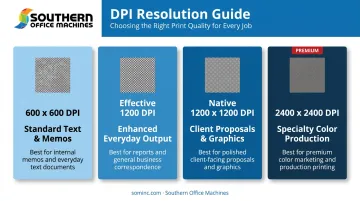
Manufacturers typically offer a few resolution tiers:
- 600 x 600 DPI: standard output, often enhanced with resolution-enhancement technology for cleaner edges
- Effective 1200 DPI — a boosted version of 600 DPI processing (sometimes listed as "1200 dpi" even though it isn't native)
- Native 1200 x 1200 DPI: true fine-line detail, built for precision graphics
For everyday business text and internal memos, 600 DPI is plenty. Step up to 1200 DPI when you're producing client-facing proposals, marketing collateral, or anything with fine graphic detail where crispness matters to your brand image.
Here's the catch worth knowing before you compare specs: going beyond 1200 to 2400 DPI rarely improves standard office output. Some production-grade machines advertise 2400 x 2400 DPI, but that's built for specialty color work, not your quarterly report. Paying extra for resolution you'll never notice is money left on the table.
Print Speed (PPM) Explained
PPM (pages per minute) measures how fast a printer produces output. Manufacturers usually list black-and-white and color speeds separately, since color engines work harder per page.
Testing methodology matters here. ISO/IEC 24734:2021 is the current standard for measuring digital-printing productivity across real office applications, and it applies to both inkjet and laser devices. That's useful context, because two printers rated at "30 PPM" using different test conditions may perform very differently in your office.
Sharp's current workgroup MFP lineup, for example, spans 26 to 65 PPM depending on the model. A small office running a handful of employees typically doesn't need the same throughput as a centralized print hub serving an entire floor.
Speed alone doesn't tell the whole story. A printer rated at 50 PPM but paired with a low duty cycle can still burn out under sustained heavy use. Speed and duty cycle need to be evaluated together, not separately.
The 4 Main Types of Printers
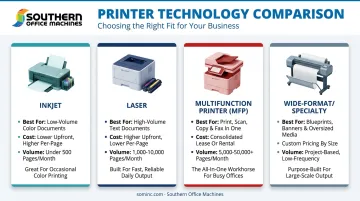
Printer "type" is itself a specification. It determines the underlying technology, the realistic speed range, and the long-term cost structure you're signing up for. Businesses generally choose from four categories.
Inkjet Printers
Inkjet technology deposits liquid ink through printhead nozzles onto the page. It excels at:
- Color-rich documents and photos
- Low-to-moderate print volume
- Lower upfront equipment cost
The drawback shows up over time. Ink cartridges run out faster under business-level volume, and per-page costs climb quickly compared to laser alternatives once you're printing hundreds of pages weekly.
Laser Printers
Laser printers use toner, an electrical charge, and heat to fuse the image onto the page. This mechanism makes laser the standard choice for high-volume, text-heavy business printing.
HP's comparison of laser versus inkjet confirms what most office managers already suspect: laser printers typically deliver a lower cost-per-page at scale, especially for monochrome text documents. If your office prints contracts, invoices, and reports all day, laser is almost always the better financial call.
Multifunction Printers (MFPs/Copiers)
MFPs consolidate printing, copying, scanning, and faxing into one device and a single workflow. Instead of walking between four separate machines, employees complete the entire document cycle at one station.
Southern Office Machines applies this same principle: fully integrating copying, printing, scanning, and emailing into one continuous flow saves office hours every day. For a mid-sized business processing dozens of documents daily, that consolidation adds up fast.
Wide-Format and Specialty Printers
Wide-format printers, plotters, and label or thermal-transfer devices round out the fourth category. These handle jobs standard office printers simply can't:
- Architectural blueprints and engineering schematics
- Signage and large-format posters
- Barcode labels, shipping tags, and receipts
Most businesses won't need one of these as a primary device, but industry-specific operations (construction firms, healthcare labs, retail warehouses) often require at least one.
Other Key Specs to Check: Duty Cycle, Paper Handling & Connectivity
Beyond resolution, speed, and type, three more specs determine whether a printer survives daily office life.
Duty cycle is the maximum monthly page volume a manufacturer recommends for that machine. Consistently pushing a printer near or beyond its rated duty cycle accelerates wear on rollers, fusers, and internal components, leading to breakdowns sooner than expected. As a rule of thumb, choose a machine rated comfortably above your actual monthly average, not right at it.
Paper handling affects how often staff interrupt their work to reload trays or flip paper manually:
- Tray capacity: how many sheets load before a refill
- Supported media sizes: legal, tabloid, envelopes, or specialty stock
- Duplex printing: automatic double-sided output, which cuts paper costs and speeds up multi-page jobs
Connectivity matters too. USB still exists, but most modern offices rely on Wi-Fi, Ethernet, and mobile printing standards like AirPrint or Mopria.
For multi-user offices handling sensitive documents, secure network connectivity isn't optional. These features matter as much as raw print speed, particularly in regulated industries like healthcare and government:
- Encrypted connections that protect data in transit
- Access controls that limit who can print, scan, or release jobs
- Audit logging that tracks document activity for compliance reviews
Why Specifications Matter for Total Cost of Ownership
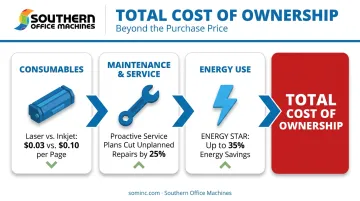
The purchase price is the smallest piece of the cost equation. Toner or ink consumption, maintenance, and energy use accumulate over the machine's entire lifespan, and specs predict every one of those costs before you buy.
Consumables drive the biggest gap. Laser printers generally carry a lower running cost per page at volume than inkjet, particularly for text-heavy monochrome printing, according to HP's own laser-versus-inkjet analysis. Choosing the wrong technology for your volume locks in years of avoidable expense.
Maintenance and service matter just as much, since even a well-specified machine breaks down without support behind it. Southern Office Machines backs its equipment with monthly, quarterly, or annual maintenance agreements, factory-trained on-site technicians, and remote support through LogMeIn Rescue for software and configuration issues, keeping uptime high and repair costs predictable.
Energy use is the line item most buyers forget. ENERGY STAR–certified imaging equipment can save up to 35% on electricity compared with conventional machines, delivering meaningful savings across a multi-device fleet running eight hours a day, five days a week.
This is exactly the thinking behind Sheldon Michaels' Business-to-Technology philosophy at Southern Office Machines:
"We identify the smallest, sturdiest machine with the features and functions they need and then determine the total cost of ownership."
Mismatched specs, like a duty cycle too low for actual volume, don't just risk a warranty dispute. They lead to premature breakdowns, more frequent service calls, and a replacement cycle that costs far more than buying correctly the first time.
How Southern Office Machines Helps You Choose the Right Equipment
Southern Office Machines has served Metro Atlanta since 1985. That history means something practical: factory-trained technicians who can translate a spec sheet into a machine that actually fits your workflow, not just your budget on paper.
The company carries a complete product mix, including:
- New and refurbished copiers, printers, and MFPs
- Color MFPs rated 25 to 70 PPM for demanding departments
- Black-and-white MFPs for cost-conscious small offices
- Production printers and document imaging equipment
- Purchase, lease, or rental acquisition options, backed by a lowest price guarantee
Whether you're a healthcare office needing encrypted document workflows or a small business trying to right-size your first MFP, the specs you've just learned to read matter. Southern Office Machines' team uses those same specs every day to match equipment to real operations.
Ready to stop guessing at spec sheets? Call Southern Office Machines at 770-919-8989 or email info@sominc.com for a free equipment consultation. The team serves Metro Atlanta, Marietta, and Cobb County, Georgia, Monday through Friday, 9 a.m. to 5 p.m.
Frequently Asked Questions
What are the specifications of a printer?
Core printer specs include resolution (DPI), speed (PPM), duty cycle, paper handling capacity, and connectivity options. Together, these metrics predict how a machine will perform under your actual daily print volume.
What are the 4 types of printers?
The four main types are inkjet (color and photos), laser (high-volume text), multifunction printers or MFPs (print, copy, scan, fax in one device), and wide-format or specialty printers (blueprints, signage, labels).
Is 600 or 1200 dpi better for print quality?
600 DPI suits everyday text documents and internal memos just fine. 1200 DPI is better for detailed graphics, marketing materials, and client-facing documents where crispness affects your brand image.
What is a good print speed for a small business printer?
It depends on your team size and volume. Small offices usually do fine in the lower-to-mid PPM ranges, while higher-volume departments need machines rated near 50-plus PPM. Match speed to your daily page count, not the spec sheet.
How do I know what duty cycle I need?
Estimate your average monthly print volume first, then choose a machine rated comfortably above that number rather than right at it. Running a printer near its maximum duty cycle month after month accelerates wear and shortens its lifespan.
What's the difference between a printer and a multifunction printer (MFP)?
A standard printer only prints. An MFP adds copying, scanning, and often faxing into one device, consolidating multiple office tasks into a single continuous workflow.