Most businesses don't think about it that way. They lock down servers, train employees on phishing, and patch their workstations religiously — then leave the printer running on default settings since the day it was installed.
That gap matters. Unsecured printers leak sensitive data, give hackers a quiet entry point into your network, and create real headaches during compliance audits. Yet printers remain one of the most overlooked devices in most IT security plans.
This article covers why printer security matters, the warning signs of a compromised device, the features worth demanding from any vendor, a practical checklist you can act on today, and how a local partner like Southern Office Machines keeps your fleet locked down.
Key Takeaways
- 56% of organizations reported a print-related data loss last year, per Quocirca's 2025 research
- Printers are full network computers — they store, process, and transmit data just like a PC
- Warning signs include unexpected print jobs, unfamiliar IP settings, and unusual network traffic
- Secure print release, encryption, and access controls form the backbone of printer protection
- Standardized configurations and ongoing monitoring beat a one-time setup every time
Why Network Printer Security Matters
A modern multifunction printer (MFP) does far more than print. It stores scanned documents on an internal hard drive, processes fax data, holds print jobs in memory, and communicates across your network constantly. Treating it like a "dumb" peripheral is exactly the mistake attackers count on.
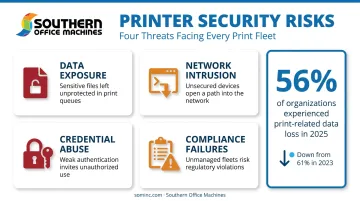
Four risks show up again and again:
- Data exposure: confidential documents sitting in output trays where anyone can grab them
- Network intrusion: the printer acting as a backdoor into servers and workstations
- Credential abuse: weak or default admin passwords giving attackers easy control
- Compliance failures: unencrypted stored data or missing audit logs surfacing during a HIPAA, financial, or government audit
The numbers back this up. Quocirca's 2025 Global Print Security Landscape study of 400 IT decision-makers found that 56% of organizations experienced at least one print-related data loss in the previous 12 months. That's down slightly from 61% in 2023, but it's still more than half of every organization surveyed.
Industries That Carry Heightened Risk
Healthcare, legal, financial, and government organizations handle records where a single exposed document can trigger regulatory penalties. Southern Office Machines has worked directly with agencies like the Georgia Department of Community Health, where document security isn't optional. It's baked into every workflow decision.
Even in these high-stakes environments, most breaches don't come from sophisticated exploits. They trace back to simple oversights:
- Default admin passwords never changed since installation
- Firmware updates ignored for months or years
- Printers left completely unmonitored after setup
None of that requires a skilled hacker. It just requires nobody paying attention.
Signs of a Hacked Printer
How do you know if a printer has already been compromised? The signs are often subtle, but they're there if you know where to look.
Watch for these physical and behavioral clues:
- Unexpected print jobs, blank pages, or jobs that appear with no sender
- Unfamiliar changes to network or IP settings you didn't make
- Slower printing speeds or a sudden increase in error messages
- Unexplained spikes in paper or toner usage
Unauthorized printouts deserve special attention. Spam pages, junk faxes, or altered "ready" messages on the control panel often mean someone has gained direct access to the device itself, not just the network.
Network-Level Red Flags
Beyond what prints out, check what's happening under the hood:
- The printer communicating with unknown external IP addresses
- Firmware version changes nobody on your team authorized
- The device suddenly showing up as a "new" or unrecognized entry during a routine network scan
- Login attempts or configuration changes in device logs that don't match any authorized activity
This isn't theoretical. In a well-documented 2020 awareness demonstration, security researchers remotely accessed nearly 28,000 unsecured printers and forced them to print a security guide. No malware, no exploit kit — just printers left wide open on the internet.
That same exposure applies to any unmonitored device on your network. If a compromised printer goes undetected, attackers can use it as a launch point to move laterally into other systems or quietly exfiltrate stored scan and print data.
If you spot any of these signs, act fast:
- Isolate the device from the network immediately
- Change all admin credentials
- Review firmware version and logs for unauthorized changes
- Contact Southern Office Machines' factory-trained technicians for a full security review
Essential Printer Security Features (What to Look For)
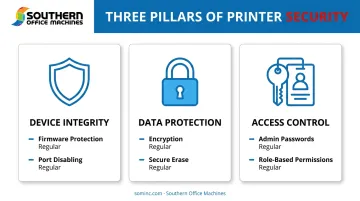
Not every printer on the market offers the same protection. Security features generally fall into three buckets: protecting the device itself, protecting data in transit and at rest, and controlling who can actually use the machine.
Protecting Data in Transit and at Rest
Secure print release is the single most effective fix for documents sitting exposed in output trays. Instead of printing instantly, the job holds until the user enters a PIN, swipes a badge, or logs in at the panel.
Beyond that, look for:
- Encrypted network connections (HTTPS and secure protocols instead of plain HTTP)
- Disk or data encryption for anything stored internally
- Automatic data cleanup or secure erase routines for internal storage
Controlling Access
Access control features determine who can do what on the device:
- Strong, unique admin passwords (never the factory default)
- Role-based permissions, for example restricting who can scan-to-email or print in color
- Multi-factor or badge-based authentication for regular users
Device Integrity Features
Finally, the printer itself needs built-in protection against tampering:
- Automatic firmware updates or a scheduled patch process
- Firmware tampering detection at startup and during operation
- Disabling unused ports and protocols like Telnet and FTP to shrink the attack surface
Firmware updates matter more than most businesses realize. HP's 2025 survey of 803 IT and security decision-makers found that only 36% applied printer firmware updates promptly, and just 35% could even identify which printers in their fleet were vulnerable to newly published threats.
Security capabilities vary significantly between manufacturers and models. Southern Office Machines' partnership with Sharp gives customers access to devices built around the Sharp Security Suite: 256-bit AES encryption, up to seven-pass data overwriting, and Common Criteria Certified Data Security Kits for regulated environments. It's part of how the company identifies the smallest, sturdiest machine with the right features for each customer's budget, rather than defaulting to whatever's on the showroom floor.
Printer Security Best Practices Checklist
Printer security isn't a one-and-done task. It requires both immediate fixes and ongoing habits, and skipping either one leaves gaps attackers can exploit.
Quick Wins Every Business Should Implement
These take minutes to complete but close the most common attack vectors:
- Change all default admin passwords immediately, and store new ones securely
- Set printers to auto-update firmware, or establish a scheduled patch process
- Segment printers onto their own network or VLAN, and restrict access from the public internet
Ongoing Habits for Long-Term Protection
These take longer to build into daily operations, but they keep the fleet secure over time:
- Standardize security configurations across every device in the fleet so nothing sits on default settings
- Turn on activity logging and review it periodically to catch unauthorized changes early
- Restrict physical access to printers in sensitive areas, and enforce secure print release for confidential documents
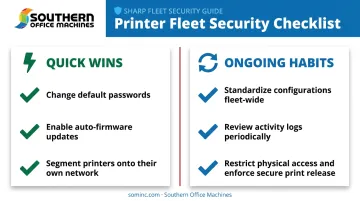
The businesses that get burned usually skip the second list entirely. They handle the quick wins once during setup, then never revisit the fleet again.
How Southern Office Machines Helps Keep Your Fleet Secure
Security shouldn't depend on whether someone remembered to change a password during setup. Southern Office Machines' factory-trained technicians configure new and rental equipment with secure settings from day one — changed defaults, standardized configurations, and access controls applied before the device ever reaches your office.
That starts with what the company calls a Business-to-Technology approach. Rather than pushing a generic model, the team first learns a customer's workflow and compliance needs.
Sheldon Michaels and the team then identify the smallest, sturdiest machine with the right features, weighing total cost of ownership against those requirements.
This shows up in practical ways:
- Devices use the Sharp Security Suite's built-in encryption and audit trail logging out of the box
- Rental equipment includes automated end-of-lease data erasure, so nothing lingers on a returned device
- Managed Print Services provide fleet-wide monitoring and on-time security updates, rather than relying on someone remembering to check firmware manually
This same philosophy extends beyond individual devices. Since 1985, Southern Office Machines has approached document management as an ongoing partnership, not a one-time purchase. Sales, service, and rental support continue long after the initial installation.
If you suspect a device on your fleet has been compromised, or if it's simply been years since anyone reviewed your printer security posture, call 770-919-8989 for a security review.
Frequently Asked Questions
What are the security features of printing?
Core features include secure print release (PIN or badge), encryption in transit and at rest, role-based authentication, and firmware tamper protection. Together, they secure the device, data, and access.
What are the signs of a hacked printer?
Watch for unexpected print jobs, unfamiliar changes to network or IP settings, and unusual network behavior like communication with unknown external addresses. Spikes in supply usage or sudden firmware changes are also red flags.
Can a network printer really be hacked?
Yes. Printers are full network computers, and outdated firmware or default settings make them easy targets. Researchers have shown remote access to tens of thousands of unsecured printers using nothing more than default configurations.
How often should printer firmware be updated?
Set devices to auto-update where possible, or check manually at least monthly. Updates patch known vulnerabilities, and delaying them leaves an open door for attackers.
Do small businesses really need to worry about printer security?
Yes. Any business handling customer, financial, or HR data is a potential target regardless of size. Smaller organizations often have fewer IT resources to catch problems, which makes them more attractive, not less.
Should I handle printer security myself or get professional help?
Basic steps like changing default passwords are fine to DIY. But standardizing and monitoring firmware across a full fleet usually requires dedicated software and trained technicians, like those at a local provider.