Introduction
Legal firms, healthcare practices, government offices, and real estate agencies across Metro Atlanta run on paper — even in 2026. Contracts, patient charts, closing documents, and compliance records still need to be printed, scanned, and filed accurately every single day.
An unreliable copier slows down these workflows and creates hidden costs: downtime, inflated cost-per-page, and security gaps that expose sensitive documents. A dependable machine keeps operations running smoothly while steadily lowering costs over time.
This guide ranks the top office copiers of 2026 by speed, reliability, security, and total cost of ownership. We'll also cover what actually matters when buying for an Atlanta-area business, not just spec-sheet bragging rights.
Key Takeaways
- Print volume, color needs, and budget determine the "best" copier — not brand recognition alone
- 2026's top picks span enterprise brands (Sharp, Canon, Xerox) to SMB options (Ricoh, Konica Minolta)
- Toner, maintenance, and energy costs matter more than sticker price over a five-year lifespan
- Local, factory-trained service can affect uptime as much as the hardware itself
Overview of Office Copiers in the Business Market
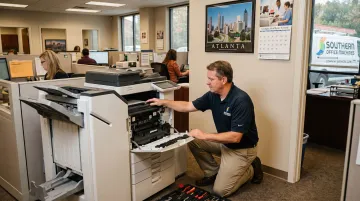
Today's office copier functions as a multifunction printer (MFP), combining printing, copying, scanning, and faxing with cloud connectivity, mobile access, and embedded security controls. Despite decades of digital-workflow predictions, these devices remain central to daily operations in document-heavy industries.
Metro Atlanta's office equipment market reflects that reality. Businesses, healthcare organizations, and government agencies throughout the region depend on dependable MFP fleets to keep operations compliant and efficient. Southern Office Machines has served this market since 1985, working with clients ranging from small offices to the Georgia Department of Community Health.
Below, we break down the five copiers best positioned to serve Atlanta businesses in 2026. Our selections weigh:
- Reliability across daily, high-volume workloads
- Feature sets suited to different office sizes
- Total value, not just sticker price
Top 5 Office Copiers for Businesses in 2026
Each model below was evaluated on print speed, duty cycle, security certifications, multifunction versatility, and overall value for businesses of varying sizes.
Sharp BP-70C65 Color MFP
Sharp has built its reputation on durable hardware and intuitive touchscreen workflows, and the BP-70C65 continues that trend. It's also the manufacturer partner behind Southern Office Machines' equipment lineup, which means Metro Atlanta businesses get factory-trained support directly tied to the machine they're running.
What makes it stand out: a fast, dependable engine paired with strong document security and a workflow interface that doesn't require a training manual to operate.
| Spec | Detail |
|---|---|
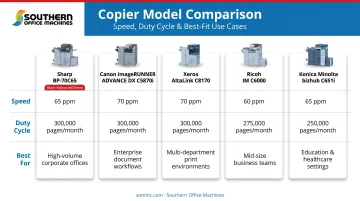
| Print speed | 65 ppm color/mono |
| Resolution | 1,200 x 1,200 dpi print |
| Scan speed | 280 ipm |
| Max paper capacity | 6,300 sheets |
Best for: Mid-to-large offices needing dependable color output with minimal downtime.
Local advantage: Available for sale, lease, or rental through Southern Office Machines, with factory-trained technicians supporting the machine across Metro Atlanta.
Canon imageRUNNER ADVANCE DX C5870i
This is Canon's flagship enterprise MFP, built for departments that need to consolidate multiple standalone devices into one workflow hub. It fits cloud-integrated, high-volume printing environments well.
Standout features include fast color and mono output, generous paper capacity, and scan-to-cloud tools with built-in OCR, useful for firms digitizing large volumes of paperwork.
| Spec | Detail |
|---|---|
| Print speed | 70 ppm (Letter/A4); 36 ppm A3 |
| RAM | 5 GB |
| Max paper capacity | 6,350 sheets |
| Scan speed | 270 ipm duplex |
Best for: Enterprises replacing several standalone printers with a single, centralized workflow device.
Considerations: Its large footprint and higher acquisition cost mean professional installation is mandatory for most offices.
Xerox AltaLink C8170
Part of Xerox's AltaLink series, the C8170 targets high-volume, security-conscious offices. It runs on ConnectKey technology with allow-listing security (now branded Trellix Whitelisting, formerly known as McAfee Embedded Control) built in and always active.
A 10.1-inch touchscreen makes adoption easy for teams switching from older hardware, and mobile/cloud connectivity supports hybrid work setups well.
| Spec | Detail |
|---|---|
| Print speed | 70 ppm color/mono |
| Duty cycle | 300,000 pages/month maximum |
| Resolution | 1,200 x 2,400 dpi |
| Scan speed | 270 ipm |
| Max paper capacity | 6,140 sheets |
According to Xerox's published specifications for the AltaLink C8100 series, the C8170 supports a monthly maximum duty cycle of 300,000 pages, among the highest of the models compared here.
Best for: Hybrid offices that need strong mobile and cloud collaboration tools.
Considerations: Toner costs and physical size run higher than SMB-class machines.
Ricoh IM C6000
Ricoh's Intelligent Multifunction series pairs solid hardware with cloud-connected, AI-assisted device management. The IM C6000 uses RICOH Always Current Technology (ACT), which delivers feature and security updates automatically after installation, extending the useful life of the machine without a hardware swap.
The 10.1-inch Smart Operation Panel supports familiar tap, swipe, and pinch gestures, which shortens the learning curve for staff.
| Spec | Detail |
|---|---|
| Print speed | 60 ppm color/mono |
| Scan speed | 120 ipm simplex / 240 ipm duplex |
| RAM | 2 GB standard, 4 GB maximum |
| Max paper capacity | 4,700 sheets |
Best for: Digital-first offices that want ongoing feature updates without replacing hardware every few years.
Considerations: You get the most value when Ricoh's software ecosystem is fully deployed, not just the base hardware.
Konica Minolta bizhub i-Series (C651i)
Konica Minolta's i-Series delivers consistent print quality at scale, backed by long-life components that reduce service calls. The C651i, a representative model in the lineup, backs that reputation with published duty-cycle data, a transparency not every competitor offers at the model level.
| Spec | Detail |
|---|---|
| Print speed | 65 ppm color/mono |
| Duty cycle | 250,000 max / 53,000 recommended pages/month |
| Scan speed | 280 opm duplex |
| Max paper capacity | 6,650 sheets |
Best for: Growing SMBs that need scalable multifunction capability with lower long-term maintenance demands.
Considerations: Confirm regional parts and service availability before purchase, since support networks vary by dealer.
How We Chose the Best Office Copiers
We evaluated these five machines on more than just top-line speed. Our criteria included:
- Print and scan throughput: sustained performance, not just marketing-page maximums
- Duty cycle transparency: whether the manufacturer publishes real monthly volume data
- Security certifications: encryption, allow-listing, and audit-trail capabilities
- Multifunction versatility: finishing options, paper handling, and workflow integrations
- Manufacturer reputation: track record for reliability in commercial environments
The most common mistake businesses make? Buying on sticker price alone. A cheaper machine with high per-click toner costs and frequent service calls almost always costs more over five years than a slightly pricier model with lower total cost of ownership.
That's the calculation Southern Office Machines applies for every client , factoring toner, energy, and maintenance costs, not just the invoice total, before recommending a machine.
Factory-trained service availability matters just as much as hardware specs. A machine with excellent duty-cycle ratings still creates downtime if the nearest qualified technician is hours away.
As Business News Daily notes in its guide to choosing a digital copier, service agreements typically cover toner, drums, parts, and repairs. Response time, though, depends entirely on the vendor's local presence.
Energy costs matter too. ENERGY STAR-certified imaging equipment can use up to 35% less energy than conventional models — a real factor in five-year TCO calculations, especially for offices running multiple units.
Conclusion
Choosing the best office copier in 2026 comes down to matching print volume, workflow, and budget to the right machine. A 70 ppm enterprise MFP is wasted on a 12-person office, and a compact SMB machine will buckle under a legal firm's scan-heavy caseload.
Before committing to a purchase or lease, evaluate scalability, total cost of ownership, and vendor support alongside the spec sheet. The fastest machine on paper isn't always the right fit once toner costs and service response times enter the picture.
Southern Office Machines has helped Metro Atlanta businesses, including the Georgia Department of Community Health, match the right equipment to their actual needs since 1985. If you'd like a free consultation, competitive pricing, or a look at new and refurbished copiers backed by factory-trained service, call 770-919-8989 or reach out at info@sominc.com.
Frequently Asked Questions
What is the best office copier?
It depends on your print volume, color needs, and budget. The Sharp BP-70C65 leads on reliability, Canon's imageRUNNER line scales well for enterprise fleets, and Ricoh's IM series stands out for software-driven longevity.
Should I buy, lease, or rent an office copier?
Buying suits stable, predictable print volumes with available capital. Leasing or renting fits growing businesses that want flexibility and lower upfront costs without a long-term hardware commitment.
How much does an office copier cost per page?
Cost-per-page runs 6-8 cents for laser output, varying by mono versus color output and machine class. Calculate total cost of ownership rather than relying on purchase price alone.
How long does an office copier typically last?
A well-maintained commercial copier typically lasts 5-7 years with regular servicing and factory-trained maintenance. Heavy use with poor upkeep shortens that window considerably.
What size copier does a small business need vs. a large enterprise?
Small offices with 1-10 users need compact MFPs starting around 25-30 ppm. Larger enterprises with high concurrent usage need machines rated 50-70+ ppm with higher duty cycles.
Why choose a local dealer over a big-box retailer for a copier?
Local dealers like Southern Office Machines offer faster factory-trained service response, tailored consultations based on your actual workflow, and flexible financing options that national retailers typically don't provide.