Introduction
Your practice's biggest HIPAA risk might be sitting in the break room right now, quietly holding a stack of patient records.
Printers, copiers, and fax machines process protected health information (PHI) all day, every day, in medical and dental offices. Yet most compliance conversations focus on EHR passwords and network firewalls, not the multifunction device in the corner.
That's a problem. A single unclaimed print job on a shared tray, a fax sent to the wrong number, or an old copier hard drive sold without wiping its memory can trigger a reportable violation.
HIPAA's tiered penalty structure allows fines up to $2 million per violation category each year. That kind of mistake carries real financial weight for a small or mid-size practice.
With those stakes in mind, this article breaks down what HIPAA actually requires from print technology, where the risks hide in everyday workflows, a practical path to a compliant setup, fax-specific guidance, and how to pick the right local equipment partner.
Key Takeaways
- No printer is "HIPAA-certified"—compliance depends on configuration, not purchase
- Most violations stem from human error and neglected equipment, not hacking
- Pull-printing, authentication, encryption, and audit logging form the compliance foundation
- A knowledgeable local provider lowers compliance risk and total ownership costs
What Does "HIPAA Compliant Printing" Actually Mean?
There's no such thing as a HIPAA-certified printer. HHS has confirmed it does not endorse or recognize private certifications for Security Rule compliance. Compliance means applying specific administrative, physical, and technical practices to any device that touches ePHI.
The Security Rule requires "reasonable and appropriate" safeguards across three categories, and each applies directly to your print fleet:
- Administrative: written policies, staff training, and a documented risk analysis that includes every printer, copier, and fax
- Physical: where devices sit, who can walk up to them, and how output is secured
- Technical: encryption, user authentication, and audit trails on the device itself
"Print technology" isn't limited to desktop printers, either. Multifunction copiers, scanners, and fax machines also store, transmit, or output PHI, placing them squarely inside HIPAA's scope.
The Real Cost of Getting It Wrong
HIPAA penalties are assessed on a four-tier culpability scale, and the numbers get adjusted for inflation each year. Under the current inflation-adjusted penalty schedule, the ranges break down like this:
| Culpability Tier | Per-Violation Range | Annual Cap (Identical Violations) |
|---|---|---|
| No knowledge, reasonable diligence | $145 – $73,011 | $2,190,294 |
| Reasonable cause, no willful neglect | $1,461 – $73,011 | $2,190,294 |
| Willful neglect, corrected in 30 days | $14,602 – $73,011 | $2,190,294 |
| Willful neglect, not corrected | $73,011 – $2,190,294 | $2,190,294 |
Fines are only part of the exposure. A print-related breach can also trigger:
- Mandatory breach notification to affected patients (and sometimes the media)
- A formal corrective action plan monitored by OCR
- Lasting damage to patient trust (hard to quantify, but real)
Where HIPAA Printing Risks Hide in Everyday Practice
Most print-related violations come from small, everyday habits that quietly accumulate into liability.
Front-office risks show up constantly:
- Leaving print jobs sitting on a tray in a shared or patient-facing area
- Allowing walk-up access to unlocked multifunction devices
- Setting scan-to-email defaults with no restriction on destination addresses
Aging equipment creates a quieter, longer-term risk. Many multifunction printers store images of scanned or copied documents on an internal hard drive.
If that drive isn't encrypted, it becomes a liability the moment the device is sold, returned, or thrown out. Outdated firmware compounds the problem by leaving the device exposed on the network.
This isn't theoretical. Enforcement actions show exactly what these lapses cost:
- Affinity Health Plan paid $1,215,780 after returning leased copiers to a leasing agent without erasing the hard drives, exposing up to 344,579 individuals' health information
- Cornell Prescription Pharmacy paid $125,000 after disposing of patient records in an unlocked, publicly accessible dumpster
- HHS breach reporting shows paper was the storage location in 62% of small reported breaches in a recent reporting year — proof that shredding matters as much as encryption
How to Make a Printer HIPAA Compliant: A Step-by-Step Approach
No single setting makes a printer or copier HIPAA compliant. Compliance comes from layering several controls together.
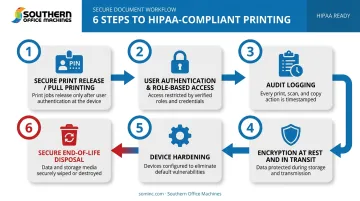
Enable secure print release (pull printing). Jobs hold in a queue until the user authenticates at the device with a badge or PIN. Nothing sits exposed on an output tray waiting to be claimed or misplaced.
Set up user authentication and role-based access. Not every staff member needs to print, scan, or retrieve every document type. Restrict access by job function so front-desk staff and billing staff see only what they need.
Turn on audit logging. Every print, scan, and fax job should tie back to a specific user ID and timestamp. If HHS's Office for Civil Rights (OCR) ever asks who accessed a document and when, you need an answer.
Encrypt data at rest and in transit. This means onboard hard drive encryption plus network-level protections like TLS/HTTPS, so a job is protected the entire time it's traveling to the device.
Harden the device itself. Disable ports and protocols you don't use, require admin passwords for any configuration change, and lock scan-to-email or scan-to-folder options down to pre-approved addresses only.
Plan for secure end-of-life. Before trading in, returning on a lease, or scrapping a copier or printer, wipe or physically destroy its hard drive. This is exactly where Affinity Health Plan's breach originated.
Sharp multifunction devices, which Southern Office Machines has sold and serviced across Metro Atlanta since 1985, build several of these steps directly into the hardware. Sharp's security architecture includes:
- 256-bit AES encryption applied to all data written to RAM and the hard drive
- Overwrite routines that pass up to seven times, making stored data virtually unrecoverable
- An end-of-lease data erasure feature that wipes the device before it changes hands
Audit trail logging and access control security are also built into the network interface — the same technical controls the Security Rule calls for.
Is a Regular Fax Machine HIPAA Compliant?
Short answer: a standard analog fax machine isn't automatically non-compliant, but it's a risky method by design.
Incoming faxes print automatically the moment they arrive. If that machine sits in a hallway or a shared area, the page can sit exposed for anyone to see before staff notices it.
Faxes also get sent to wrong numbers more often than most offices realize. OCR has documented one case where a patient's HIV status was faxed to their employer instead of their new provider. The mistake led to workforce counseling and a revised confidentiality cover sheet.
Encrypted electronic or cloud fax solutions solve the exposure problem by routing incoming faxes to a secure email inbox or an EHR system instead of a paper tray. No page ever sits in the open.
That said, "cloud" and "encrypted" aren't automatic compliance guarantees. The safeguard depends on the specific service, its configuration, and whether a signed business associate agreement (BAA) is in place.
For instance, Southern Office Machines configures its Sharp MFPs with secure fax-to-email routing, but the BAA with your provider still has to be current for the setup to be compliant.
If your office is sticking with traditional fax for now, minimum safeguards include:
- Placing the machine in a restricted-access area, not a public hallway
- Periodically verifying recipient fax numbers, especially for frequently used contacts
- Using a cover sheet with a confidentiality notice on every transmission
Choosing a HIPAA-Ready Print Partner in Metro Atlanta
Compliance requires ongoing attention, not a one-time setup. It also requires a partner who understands your workflow, not just your budget.
Southern Office Machines has served Metro Atlanta and Marietta businesses since 1985, including government health agencies like the Georgia Department of Community Health. That relationship reflects a Business-to-Technology approach: learning how a practice actually operates before recommending a device, rather than pushing a one-size-fits-all sale.
What this looks like in practice:
- Device hardening during setup: configuring the Sharp Security Suite's access controls, encryption, and audit logging rather than leaving factory defaults in place
- Secure handling at end-of-life: using the end-of-lease data erasure feature and overwrite routines when equipment is traded in or retired
- Ongoing service: factory-trained technicians and maintenance agreements (monthly, quarterly, or annual) that keep firmware and security settings current, backed by remote support through LogMeIn Rescue
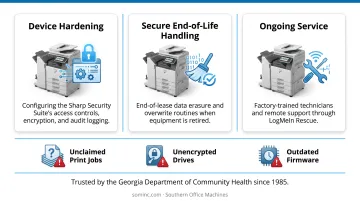
A practice that's never had its print fleet reviewed for PHI exposure is overdue for one. Southern Office Machines offers a print environment assessment that spots compliance gaps: unclaimed print jobs, unencrypted drives, and outdated firmware. Catching these early keeps them from becoming a line item in an OCR settlement letter. Reach out to request one before your next equipment refresh.
Frequently Asked Questions
How to make a printer HIPAA compliant?
Enable secure pull printing, require user authentication, and encrypt data at rest and in transit. Harden the device by disabling unused ports and locking down scan destinations, then add audit logging so every job is traceable to a user.
Is a regular fax machine HIPAA compliant?
A traditional fax can be used with proper physical safeguards, like restricted placement and number verification, but it's inherently risky since incoming pages print automatically. Encrypted electronic fax is the safer, more auditable option.
Does HIPAA require a specific "certified" printer or copier brand?
No such certification exists. HHS does not endorse or recognize private Security Rule certifications, so compliance depends entirely on how a device is configured and used, not which brand you buy.
What happens if a healthcare practice has a HIPAA violation tied to printing?
Fines range from $145 to over $2 million per violation depending on culpability, with an annual cap around $2.19 million for identical violations. Beyond fines, practices face mandatory breach notifications and potential corrective action plans.
Do printer and copier hard drives actually store patient information?
Yes. Many multifunction devices cache images of scanned, copied, or printed documents on an internal hard drive. That drive must be encrypted while in use and wiped or destroyed before the device is sold, returned, or disposed of.
How often should a healthcare office review its print environment for HIPAA compliance?
A quarterly internal check is a reasonable baseline, with an additional review any time new equipment arrives or staff turnover occurs. Device settings and user access should never be a "set it and forget it" task.