This guide breaks down copier size categories, real-world dimensions from current Sharp models, and the clearance math manufacturers rarely put front and center. We'll also cover the mistakes that trip up Atlanta-area offices before their new machine ever gets plugged in.
Key Takeaways
- Copiers range from 68-lb desktop units (19"x22"x24") to 485-lb production models over 60" tall
- Spec sheets list only the base chassis, not clearance for doors, trays, or feeders
- Add roughly 24" of side clearance, 60" of vertical space, and 28-30" of front depth beyond listed dimensions
- Finishers and paper decks can nearly double a machine's operating footprint
- A pre-purchase site visit from a local specialist prevents power, space, and workflow surprises
Copier Size Categories: What "Copier Size" Actually Means
When someone asks "how big is a copier," they're usually asking about three separate things at once: the width-by-depth-by-height measurement, the weight, and the total footprint once accessories are attached. Manufacturers typically quote only the first one, and that's where planning problems start.
Here's how current Sharp models illustrate each category.
Desktop and Compact Copiers
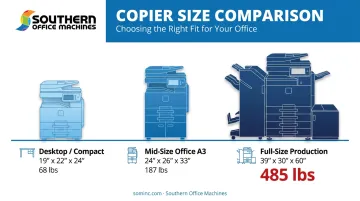
Sharp's BP-B550WD, a compact A4 monochrome multifunction unit, measures approximately 19⅜" x 21⅝" x 24" and weighs about 68 pounds. It ships with one 500-sheet drawer and a 50-sheet bypass tray.
These desktop-class machines fit on a sturdy desk or a small stand and suit offices printing lower volumes: think a small law office or a satellite location handling routine paperwork rather than mass mailings.
Mid-Size Office Copiers
Step up to A3 capability, and the footprint grows accordingly. Sharp's BP-50C26/31/36/45 series runs about 24" x 26" x 33" and weighs roughly 187 pounds in its base configuration.
Machines in this class need dedicated floor space, not a desktop. They're built for small-to-medium offices that regularly print oversized documents, spreadsheets, or marketing materials alongside standard letter-size jobs.
Full-Size and Production Copiers
At the top end, Sharp's BP-90C70/C80 production system measures roughly 38¾" x 30¼" x 60¼" and weighs about 485 pounds. Attach the multi-bypass tray, and width extends to nearly 50 inches.
These floor-standing engines serve high-volume print environments: think in-house print shops, government offices, or healthcare systems generating thousands of pages daily. With finishers and extra trays attached, total footprint can grow well beyond the base unit's listed size.
| Category | Width | Depth | Height | Typical Weight |
|---|---|---|---|---|
| Desktop/Compact (A4) | ~19-20" | ~21-22" | ~24" | 68-90 lbs |
| Mid-Size Office (A3) | ~24" | ~26" | ~33" | 150-190 lbs |
| Full-Size Production | ~38-50" | ~30" | ~60" | 200-485+ lbs |
Notice the jump between A4 and A3 machines isn't just about paper size. A3-capable copiers need wider paper paths and larger trays to handle 11"x17" sheets, which is why even a "mid-size" A3 unit outweighs a compact desktop model by more than 100 pounds.
What Influences a Copier's Actual Footprint
Base dimensions describe the engine. Everything attached to that engine determines the floor space you actually need.
Paper capacity and tray count. More drawers mean more depth and height. Sharp's compact BP-B550WD holds 550 sheets standard, expandable to 2,350. The BP-90C70/C80 production model starts at 3,000 sheets and can scale to 13,500 with add-on feeders, each additional feeding module adding roughly 30"-39" of its own footprint.
Finishing accessories. Stapling, booklet-making, and hole-punch modules mount to the side of the machine. Canon's imageRUNNER ADVANCE DX C5800 illustrates this well.
According to Canon's published specifications, the basic configuration needs 44⅞" x 45¾" of operating space, expanding to 73½" x 45¾" once a paper deck and staple or booklet finisher are added. That's nearly 30 extra inches of width from finishing hardware alone.
Print volume and duty cycle. Higher-volume engines pack in larger internal components and cooling systems to sustain heavy daily output. Canon markets the C5800 series toward mid-volume environments, while Sharp positions the BP-90C70/C80 for high-volume, in-plant use. The correlation is consistent even if there's no universal formula: bigger duty cycle, bigger machine.
The Real Space Requirements: Clearance Beyond the Listed Dimensions
Here's the single most overlooked factor in copier planning: brochure dimensions describe the machine sitting still. They say nothing about the space needed to use it. You need room to open paper drawers, lift the document feeder, replace toner, and let a technician kneel behind the unit during service.
Width Clearance
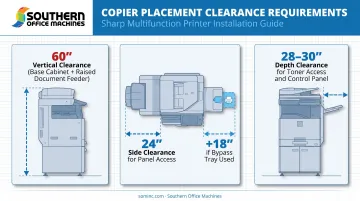
Plan for roughly 24 inches of clearance on at least one side of the machine. That space allows technicians to open the paper transport compartment, clear jams, and access internal components without disassembling your office layout.
If your workflow relies on the manual bypass tray for 11"x17" paper, add up to 18 more inches on that side to let the tray extend fully. Xerox's own documentation reflects this variability: the VersaLink C415 specifies 20 inches of front clearance, 4 inches rear, 3 inches left, and 12 inches right, while the larger VersaLink C625 calls for nearly 20 inches on the right side alone.
Clearance requirements depend on the specific model, not a universal standard.
Height Clearance
Listed heights typically run 28"-32", but that number is misleading on its own. Add the base cabinet (roughly 16" if the machine sits on a stand) and the lifted document feeder or platen cover (about 18" when raised), and real-world vertical clearance lands closer to 60 inches.
This is why copiers should never sit under wall cabinets, floating shelves, or low soffits. Staff need to lift the cover fully every time they scan a document, and a shelf six inches too low turns that into a daily frustration.
Depth Clearance
Budget an additional 28-30 inches of front clearance for toner cartridge replacement and comfortable day-to-day access. Models with a protruding control panel or touchscreen console may need up to 6 more inches.
- Adding a stapling finisher after purchase extends depth and width further
- Extra paper drawers stack onto the base unit, raising both height and footprint
- Retrofitting a floor plan after installation costs more than planning for these changes upfront
Southern Office Machines takes a Business-to-Technology approach, learning how a client's workflow actually runs before recommending equipment. As team member Sheldon Michaels puts it, the goal is identifying "the smallest, sturdiest machine" with the right features for a client's space and budget, not the biggest machine that happens to be on the showroom floor.
A pre-purchase site visit catches clearance conflicts before they become installation-day problems.
Common Mistakes and Consequences of Poor Space Planning
Most copier headaches trace back to the same handful of planning gaps.
- Enclosed, poorly ventilated placement. Sharp's BP-1250M setup guide requires roughly 100mm rear clearance and 80mm side clearance for airflow and power access. Skipping this risks misfeeds and inconsistent print quality.
- Ignoring side and rear access. If a technician can't reach the feed rollers or internal panels, a five-minute repair turns into an hour of downtime.
- Overlooking power and network needs. Compact Sharp models run on a standard 120V, 15-amp outlet, but production machines like the BP-90C70/C80 need 208-240V at 20 amps. Plan that wiring before delivery.
- Treating brochure dimensions as the total space required. This underlies nearly every other mistake here: the listed footprint is a starting point, not a floor plan.
Conclusion
Copier size combines the width, depth, and height on the spec sheet with the machine's weight and the operational clearance your team and service technician need every day. Skip that clearance math, and you risk cramped workflows, delayed repairs, or a machine that doesn't fit the space you planned.
Planning for width, height, and depth clearance before delivery day prevents costly redesigns and service delays down the road. If you're finalizing an office layout in Marietta or anywhere across Metro Atlanta, talk to Southern Office Machines before you commit to a floor plan. Getting the right-sized machine into the right space the first time keeps your workflow running smoothly and your service calls quick.
Frequently Asked Questions
What are the dimensions of a copy machine?
Dimensions vary widely by category. Compact desktop units run roughly 19"x22"x24", while large floor-standing production models can exceed 48" wide once finishers and paper decks are attached.
What are the dimensions of copier paper?
Standard U.S. sizes include Letter (8.5"x11"), Legal (8.5"x14"), and Tabloid/Ledger (11"x17"). Most A3-capable office copiers handle all three, while compact A4 units are typically limited to Letter and Legal.
How much clearance do I need around a copier?
As a general rule, plan for roughly 24 inches of extra side width, 60 inches of vertical clearance, and 28-30 inches of front depth beyond the machine's listed dimensions. Exact figures vary by model.
Do I need a dedicated power outlet for a copier?
Most compact and mid-size copiers run on a standard 120V, 15-amp outlet. High-capacity or production models often require a dedicated 208-240V, 20-amp circuit, so check the specific model's electrical requirements first.
How much does a copier weigh?
Weight ranges from about 68 pounds for a compact desktop unit to nearly 200 pounds for mid-size A3 machines, and 485 pounds or more for large production systems.
Can a copier be placed on a regular desk or table?
Only compact, desktop-class models are designed for desk placement. Mid-size and full-size copiers require dedicated floor space and sturdier structural support than a standard desk or table provides.