Introduction
Paper isn't dead. In 2026, most offices still print contracts, scan intake forms, and fax the occasional signed document, even as everything else moves to the cloud. The equipment behind those tasks shapes daily productivity.
Pick the wrong setup and you'll feel it fast: toner bills that balloon, a machine that jams during a client meeting, or a scanner that chokes on your monthly volume.
In fact, a recent SBE Council survey found 33% of small business owners reinvested savings into new technology and equipment in 2025 (SBE Council, 2025). Many are actively upgrading their equipment rather than limping along with outdated gear.
This guide breaks down the top printer and scanner options for offices this year, along with the criteria that actually matter. You'll also see how to match equipment to your business size, whether you're a five-person law office or a growing Metro Atlanta company.
TL;DR
- Office needs in 2026 span budget mono laser AIOs, secure color laser MFPs, and dedicated high-volume scanners
- Laser MFPs fit steady daily print volume; add a dedicated ADF scanner once digitization becomes routine
- Duty cycle, cost-per-page, and security matter more for offices than for home setups
- National brands like Brother, HP, and Epson lead the market, while Sharp-authorized dealers such as Southern Office Machines offer localized support
- The right equipment partner often lowers total cost of ownership more than the right brand alone
Overview of Printers and Scanners in the Modern Office
"Office-grade" equipment means something specific: devices built for daily, multi-user volume rather than occasional home use. That distinction shows up in duty cycle ratings, paper capacity, and security features that consumer printers simply skip.
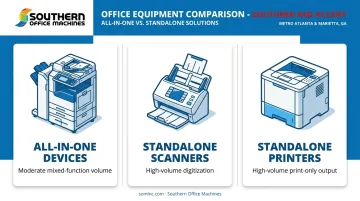
Three categories dominate business purchasing:
- All-in-one (AIO) devices: combine print, scan, copy, and sometimes fax in one unit for offices with moderate, mixed-function volume
- Standalone scanners: dedicated capture devices that pair with any printer, built for offices digitizing high volumes of paper daily
- Standalone printers: dedicated print-only devices for offices needing high-volume output without integrated scanning or copying
Despite expanding AI tools and digital workflows, this equipment remains core infrastructure for converting paper to digital and back again. Financial pressure adds urgency to getting the choice right.
According to 2025 Atlanta Fed data, 60% of Sixth District small businesses (the region that includes Georgia) reported only fair or poor financial condition in 2024. That reality makes right-sizing equipment, not maxing out specs, the smarter play.
The list below evaluates the top options based on reliability, duty cycle, and total cost of ownership, not just sticker price.
Top Printers and Scanners for Office Use in 2026
Selection criteria: print/scan speed, duty cycle, security, cost-per-page, and access to service support when something breaks.
Brother MFC-L3780CDW
This color laser AIO handles print, scan, copy, and fax in one unit built for small business use. NFC badge authentication, directory-based fax security, and a 50,000-page maximum duty cycle (4,000 pages recommended monthly) make it well-suited for offices handling sensitive paperwork.
PCMag tested it at 32.0 ppm simplex text and awarded it 4.5/5, noting the 30-sheet multipurpose tray as its only real drawback (PCMag's 2024 review).
| Category | Details |
|---|---|
| Pricing | ~$570 street price; toner runs 2.85¢/page black and 14.95¢/page CMYK using super-high-yield cartridges |
| Key Features | Print/scan/copy/fax, 250-sheet tray, 50-sheet ADF, NFC authentication, admin security controls |
| Best For | Small businesses, law offices, and medical practices needing secure, high-duty-cycle document handling |
HP LaserJet Pro MFP 3101sdw
A monochrome laser AIO built for speed, with automatic duplex printing at up to 35 ppm. PCMag's testing placed it near the top of its comparison group for fast, clean text output.
Cloud integration is unconfirmed here: HP's documentation doesn't list native Google Drive or Dropbox support for this specific model, so confirm compatibility first if that feature matters.
| Category | Details |
|---|---|
| Pricing | $289 MSRP, about $280 less than the Brother color AIO above |
| Key Features | Print/scan/copy, automatic duplex, 250-sheet tray, 50-sheet ADF, monochrome only |
| Best For | Budget-conscious offices with high-volume, text-heavy monochrome printing needs |
Brother MFC-L2820DW
A compact mono laser AIO with a genuine phone-line fax, 50-page ADF, and dual-band Wi-Fi. Unlike AIOs that bolt fax on as an afterthought, this one treats it as functional infrastructure, useful anywhere signed documents still move by fax.
| Category | Details |
|---|---|
| Pricing | $279.99 — a $70 premium over the non-fax DCP-L2640DW at $209.99 |
| Key Features | Print/scan/copy/fax, 50-page ADF, 2.7-inch touchscreen, dual-band Wi-Fi |
| Best For | Offices in legal, medical, or government sectors still relying on fax workflows |
Epson WorkForce ES-400 II (Dedicated Document Scanner)
A standalone color duplex ADF scanner meant to pair with any office printer for heavy digitization. It handles two-sided, multi-page batches that flatbed AIO scanners simply can't manage efficiently, which frees up the printer to actually print.
| Category | Details |
|---|---|
| Pricing | $299.99, sitting between budget and premium desktop scanner tiers |
| Key Features | 35 ppm/70 ipm duplex color ADF, 50-sheet ADF, 4,000-sheet daily duty cycle, USB connection |
| Best For | Offices scanning receipts, contracts, or intake forms daily rather than occasionally |
Southern Office Machines (Sharp Document Management Systems)
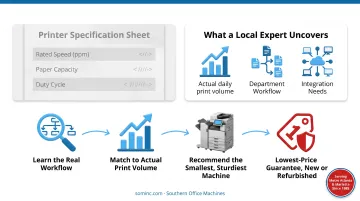
Spec sheets only tell part of the story; matching a machine to an office's real print volume and workflow takes a local expert. Southern Office Machines has sold, serviced, and rented Sharp and other leading printer, copier, and scanner brands to Metro Atlanta and Marietta businesses since 1985.
Rather than pushing the biggest machine on the floor, their Business-to-Technology approach has factory-trained technicians learn each client's actual workflow first, then recommend the smallest, sturdiest machine that fits, backed by a lowest-price guarantee and both new and refurbished equipment options.
| Category | Details |
|---|---|
| Pricing | Lowest-price guarantee in the Atlanta area; flexible purchase, lease, or rental structures |
| Key Features | Integrated copy/print/scan/email workflows, 256-bit AES encryption, factory-trained local technicians |
| Best For | Metro Atlanta businesses wanting personalized equipment selection plus ongoing local support instead of an online-only purchase |
How We Chose the Best Office Printers and Scanners
Buyers make three mistakes constantly: choosing on price alone, ignoring duty cycle, and sizing equipment for the volume they wish they had instead of what they actually print.
We weighed each device against factors that tie directly to uptime and staff productivity:
- Duty cycle — the stress-tested ceiling versus the recommended monthly volume a device can sustain without excess wear
- Total cost of ownership — toner or ink cost per page plus service and maintenance, not just the sticker price
- Security capability — encrypted printing, user authentication, and audit trails for sensitive data
- Scanning capacity — ADF speed and daily volume limits for document-heavy workflows
- Access to local support — how quickly a technician can get a broken machine running again
A machine rated for 50,000 pages monthly sounds great until you realize your office prints 2,000. That mismatch either wastes money upfront or leaves you undersized as you grow, which is why duty cycle needs to match actual volume, not aspirational volume.
Choosing the Right Printer and Scanner Setup for Your Office
All-in-One vs. Standalone Scanner
A flatbed scanner built into your MFP works fine for occasional single-page jobs. But once your office digitizes documents daily, that flatbed becomes a bottleneck. A dedicated ADF scanner, like the Epson ES-400 II, handles duplex, multi-page batches at speeds a flatbed can't touch, and it frees your printer to keep printing instead of babysitting scan jobs.
Laser vs. Inkjet for Office Use
Laser wins for most offices with steady daily volume. Toner doesn't dry out sitting idle over a slow week, and cost-per-page drops at scale. Inkjet and ink-tank systems still make sense for offices heavy on color graphics or photo-quality output, but for text-driven daily use, laser is the more economical long-term choice.
Duty Cycle and Cost-Per-Page
The sticker price is rarely the real cost. Calculate cost-per-page by dividing cartridge price by rated yield:
- Brother's current super-high-yield toner runs 2.85¢ per page black, 14.95¢ CMYK
- Consumer Reports measured the Brother MFC-L2820DW at 5.6¢ per page
- PCMag's 2023 estimate for comparable laser output landed near 2.3¢ black/12.3¢ color
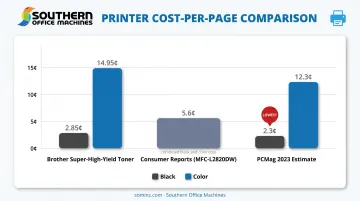
These numbers add up fast at volume, which is exactly why cost-per-page belongs in your decision, not just upfront cost.
Security and Compliance Features
Offices handling client, patient, or government data need more than a password screen. Look for:
- Encrypted printing and transmission
- User authentication (badge, PIN, or NFC)
- Audit logging and access controls
- End-of-lease data erasure on leased or rented units
HHS technical safeguards and NIST guidance both stress authenticated access and encrypted transmission for any device handling regulated data. No printer is automatically "HIPAA certified," but the right features support your compliance posture.
Rental vs. Purchase vs. Managed Service
Growing offices often benefit from rental or lease flexibility over outright purchase. Local dealers like Southern Office Machines offer purchase, lease, and rental options across their full product line. Pair that with monthly, quarterly, or annual maintenance agreements, and you get room to scale without a big upfront capital hit.
Conclusion
The right printer and scanner setup comes down to workflow fit and total cost of ownership, not brand name or the lowest number on a price tag. Before you buy or lease anything, assess how the equipment scales with your business, how fast service responds when something breaks, and what it actually costs per page over its lifespan.
If you're a Metro Atlanta business weighing these options, Southern Office Machines offers a workflow assessment and personalized equipment recommendation. That could mean anything from a compact mono laser AIO to a fully integrated Sharp document management system. Call 770-919-8989 to talk through your office's actual print and scan volume before you commit to anything.
Frequently Asked Questions
Which all-in-one printer is best for office use?
The Brother MFC-L3780CDW is a strong overall pick, offering secure color printing, scanning, and fax in one unit. The right choice still depends on your volume, security needs, and whether you need fax at all.
Which printer and scanner is best for office use?
A laser AIO handles combined light-duty tasks well for most small offices. Document-heavy offices are better served pairing a printer with a dedicated ADF scanner like the Epson ES-400 II.
What is the best printer scanner for a small or growing office?
A moderate-volume flatbed all-in-one is generally sufficient for a small office's needs. The Brother MFC-L3780CDW works well here too, even though it's built with office-grade capacity in mind.
Should my office buy a laser or inkjet printer?
Laser is generally better for daily office use due to lower cost-per-page and no drying issues from sitting idle. Inkjet still suits offices with heavy color or photo-quality printing needs.
Do I need a fax function on my office printer?
Rental or leasing preserves cash flow and adds flexibility as your office grows, especially through local dealers who bundle service and support. Purchasing suits stable, predictable volume where long-term ownership costs less than ongoing lease payments.