For a company generating $10 million a year, that's potentially $300,000 disappearing into toner, paper, service calls, and machines nobody's tracking.
A Managed Print Services (MPS) agreement is how businesses take that expense back under control. Instead of juggling vendors, guessing at supply orders, and absorbing surprise repair bills, one contract handles the equipment, the consumables, the maintenance, and increasingly, the security of every networked printer on the floor.
This guide breaks down what belongs in an MPS agreement, the red flags that quietly inflate costs, and how to choose a provider who won't lock you into a bad deal.
Key Takeaways
- Printing consumes 1%-3% of revenue annually, and unmanaged fleets often run even higher
- A solid contract covers equipment, supplies, SLAs, security, and clear exit terms
- Minimum volume commitments and uncapped rate escalators are the costliest hidden traps
- Cost-per-page pricing usually beats flat-rate plans for most usage patterns
- Choosing a provider means prioritizing a real needs assessment over the cheapest quote
What Is a Managed Print Services Agreement?
A Managed Print Services agreement is a contract between a business and a provider that takes over day-to-day management of printers, copiers, and multifunction printers (MFPs). Instead of your team ordering toner, scheduling repairs, and tracking who's abusing the color printer, the provider handles it under one contract.
Typical scope includes:
- Equipment via lease, rental, or purchase
- Installation and setup across the fleet
- Ongoing supply fulfillment, including toner, drums, and parts
- Scheduled maintenance and emergency repairs
- Usage reporting and cost breakdowns by department
Any business running its own print fleet without a formal management plan is a candidate for MPS. This holds especially true if you're dealing with frequent breakdowns, unpredictable monthly supply costs, or no visibility into which devices are actually earning their keep.
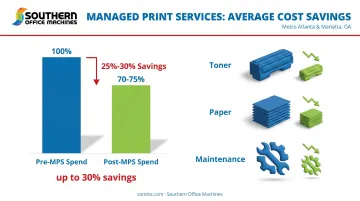
The financial case is well documented. Industry estimates place potential MPS savings at up to 30%, with a widely cited InfoTrends study putting average savings between 25% and 30% among businesses that adopted a managed model. Results vary by fleet size and how disciplined the print environment was before signing, but the direction is consistent: less waste, tighter budgets.
There's also a security dimension that didn't exist in older MPS conversations. Every networked printer and MFP is effectively a computer on your network, and hackers have taken notice. Canon's 2025 security advisory flagged buffer-overflow vulnerabilities in several office laser printers and MFPs, flaws serious enough to allow remote code execution or denial-of-service attacks.
That's exactly why modern MPS agreements now build these protections into the base contract:
- Automatic firmware updates that patch known vulnerabilities
- Continuous device monitoring for suspicious network activity
- Rapid remote patch deployment with no add-on fees
Key Components of a Managed Print Services Agreement
A well-written agreement covers five specific areas. Skip any one of these, and you're negotiating blind.
Equipment & Supplies
A properly structured agreement spells out exactly what's included in the equipment and supply line so nothing shows up as a surprise later. That typically means:
- Leased, rented, or purchased hardware: MFPs, laser printers, copiers, and production printers
- Toner and ink, including all four cartridges (cyan, magenta, yellow, black) for color devices
- Replacement parts and drums as machines age
- A defined path for equipment upgrades as your print volume changes
Auto-replenishment is worth asking about specifically. Southern Office Machines, for example, builds toner auto-replenishment into its MPS program so clients never run a device dry mid-project. Supplies arrive before anyone notices they're running low, which eliminates one of the most common causes of unplanned downtime in an unmanaged fleet.
Service Level Agreements (SLAs)
An SLA determines what happens when something breaks. It should spell out response times for service calls, uptime expectations, scheduled maintenance windows, and how remote monitoring or help desk support actually functions.
Ask specifically about:
- Guaranteed on-site response time (same-day versus next-business-day)
- Remote diagnostic capability, since many issues get resolved without a truck roll
- Scheduled preventive maintenance frequency
- Escalation steps if a first-line fix doesn't work
Remote diagnostic support is now standard practice for any competitive MPS provider. Southern Office Machines uses LogMeIn Rescue to connect a technician directly to a client's device with a six-digit PIN, often resolving issues before a technician would even arrive on-site.
Pricing & Payment Terms
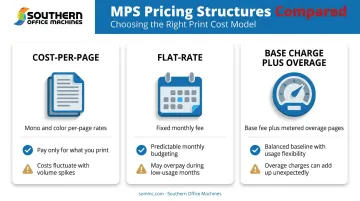
Most MPS agreements use one of three pricing structures:
- Cost-per-page (CPP): A fixed rate per page printed, separated by mono and color output. This scales naturally with actual usage.
- Flat-rate: A single fee regardless of volume, simple to budget but risky if usage shifts.
- Base charge plus overage: A set monthly fee covers a committed volume, with additional pages billed above that threshold.
Clarity matters more than which model you pick. A vague contract that doesn't define what's bundled into the per-page rate (toner only, or toner plus parts and labor) makes it impossible to compare quotes fairly. Ask your provider to itemize exactly what's included, and make sure pricing reflects your actual print volume rather than an industry average.
Security Provisions
Security is now a required clause in every well-drafted MPS agreement. A solid agreement should specify user authentication, data encryption, and a defined schedule for firmware and software updates.
This risk carries real financial consequences. Quocirca's 2025 survey of 400 IT decision-makers found that 56% had experienced at least one print-related data loss incident in the prior year, with breaches averaging roughly £630,000 (about $800,000 USD) in cost. Networked printers store scanned documents, fax logs, and print jobs on internal hard drives, data that deserves the same protection as anything on your server.
Look for agreements that specify:
- Data encryption standards, with 256-bit AES as the current benchmark
- Multi-pass data overwriting for stored print jobs
- End-of-lease data erasure before equipment changes hands
- Scheduled firmware updates on a defined cadence, addressing vulnerabilities before they're exploited
Sharp devices deployed under Southern Office Machines' MPS agreements run on the Sharp Security Suite, which includes 256-bit AES encryption and up to seven-times data overwriting. Clients in regulated industries like healthcare and government can add Common Criteria–certified security kits for extra protection.
Termination & Renewal Clauses
A fair contract states plainly how to end it: clear termination fees (if any), notice periods, and renewal terms that don't quietly lock you into another multi-year cycle at a higher rate.
Before signing, confirm:
- What happens if you want to exit early
- Whether the contract auto-renews and how much notice is required to opt out
- Whether pricing resets or escalates at renewal
Flexibility varies widely by provider. Some agreements run on a single rigid multi-year term. Others, like Southern Office Machines' monthly, quarterly, or annual maintenance options, let businesses match their commitment length to their actual comfort level instead of a one-size-fits-all contract.
Benefits of Signing a Managed Print Services Agreement
Signing an MPS agreement pays off in three concrete ways.
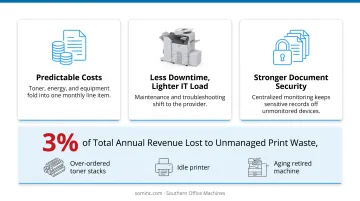
Predictable costs. Toner, energy, and equipment expenses fold into one measurable monthly line item instead of a dozen unpredictable invoices. Budgeting gets easier, and finance teams stop getting blindsided by emergency service calls.
Less downtime, lighter IT load. Maintenance, troubleshooting, and supply replenishment shift to the provider. Your IT team stops fielding jammed-printer tickets and gets that time back for actual infrastructure work.
Stronger document security. Centralized monitoring, access controls, and audit trails mean sensitive documents such as patient records, contracts, and financial statements aren't sitting exposed on an unmonitored device. For regulated industries, this is often a compliance requirement, not just a convenience.
Southern Office Machines has seen firsthand how unmanaged print environments push costs past 3% of a company's total annual revenue. Much of that expense comes from waste nobody's tracking: over-ordered toner, idle machines while others are overworked, and repair bills for equipment that should've been retired years ago. A managed agreement puts a number on all of that, then works to shrink it.
Red Flags & Hidden Costs to Watch For
Not every MPS agreement is built to save you money. Some are built to lock you in.
The minimum print volume trap. Many contracts include a committed monthly page volume, and you pay for it whether you print those pages or not. Pull 12 months of actual usage data before signing anything, and negotiate the committed volume to match reality, not a sales projection.
Uncapped rate escalators. Some agreements include annual price increases with no ceiling, inflating your cost year after year. Negotiate a capped escalator tied to a known index, like CPI, rather than an open-ended percentage set unilaterally by the provider.
"All-you-can-eat" flat-rate pricing. Flat-rate sounds simple, but it's often priced to cover worst-case usage. Businesses with moderate or seasonal print needs end up subsidizing a plan built for someone else's volume. A properly managed cost-per-page plan, matched to real usage, usually costs less over a full contract term.
Inflated or blended cost-per-page rates. Watch for blended CPP rates that don't separate mono from color. Current U.S. vendor benchmarks put monochrome CPP around 1 cent or less, with color running roughly 6 to 9 cents per page. If a quote lands well outside that range, ask why, and get a breakdown of what the rate includes.
No audit clause. Request a detailed contract and invoice audit annually, comparing what's billed against what's actually used. Meter readings drift, retired devices sometimes stay on the invoice, and print habits change. A yearly audit catches the gap before it compounds.
How to Choose the Right Managed Print Services Provider
Price shouldn't be the only variable in this decision. A cheap quote from a provider without local support or trained technicians usually costs more once the first breakdown happens.
Prioritize providers who offer:
- Factory-trained technicians with a proven local track record, not a call center reading from a script
- A print needs assessment before you sign, so equipment and pricing match actual usage instead of a generic package
- Transparent, itemized pricing you can compare against current spend
- Flexible contract terms that don't force a five-year commitment on a business that might outgrow its fleet in two
Southern Office Machines has served Metro Atlanta and Marietta businesses since 1985 with what the company calls a Business-to-Technology approach. The process starts with learning how a client's workflow actually functions, rather than leading with a sales pitch.

Team members like Sheldon Michaels then identify the smallest, sturdiest machine that meets a business's real needs. From there, they calculate total cost of ownership so there are no surprises later.
That consultative process, paired with factory-trained technicians and flexible monthly, quarterly, or annual maintenance terms, separates a provider you'll trust for years from one you'll be renegotiating with in eighteen months.
If your printers already cost more in downtime and guesswork than they should, call Southern Office Machines at 770-919-8989 to start the conversation.
Frequently Asked Questions
What does print service mean?
A print service refers to outsourcing the management of an organization's printing needs, including equipment, supplies, maintenance, and monitoring, to a dedicated provider instead of handling it in-house.
What is a print on a contract?
In an MPS agreement, a "print" typically means one metered page tracked and billed under the contract's cost-per-page rate, separated by mono or color output.
What is included in a managed print services agreement?
Standard inclusions are equipment (leased or purchased), consumable supplies, scheduled maintenance and repairs, security provisions, and usage reporting, all bundled under one contract.
How much can a business save with managed print services?
Savings vary by fleet size and current usage, but many organizations cut print costs by up to 30% after switching to MPS. A print needs assessment gives you figures specific to your business.
How long do managed print service contracts typically last?
Many bundled lease-and-service agreements run three to five years, though providers like Southern Office Machines also offer monthly, quarterly, or annual maintenance options. Review renewal terms carefully either way.
Can I customize my managed print services agreement?
Yes. Reputable providers tailor equipment, pricing structure, and service levels to your specific workflow, industry, and budget rather than offering one standard package.