DPI, or dots per inch, determines how sharp your text, logos, and images look on paper. It's a real factor in whether your proposals and marketing materials look professional or amateurish. This article breaks down what counts as "high DPI," why it matters for business printing, and how to pick the right printer without overpaying for resolution you'll never use.
Key Takeaways
- DPI is dots per inch; higher values produce sharper printed output
- 600-1200 DPI covers most business documents; only specialized graphics need more
- Choose DPI based on printer type, document type, and how closely readers view the page
- Match equipment to real needs so you avoid paying for unused resolution
What Is DPI and What Makes a Printer "High DPI"?
DPI counts how many ink or toner dots a printer places within one square inch of paper. More dots generally means finer detail in text edges, logos, and images.
There's no single industry certification for "high DPI." Instead, it's relative to what's typical:
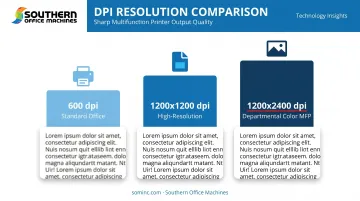
- 600 dpi — the routine tier for everyday business laser printers and MFPs
- 1200 x 1200 dpi — a practical high-resolution tier, seen in devices like the HP Color LaserJet Enterprise MFP 6800dn
- 1200 x 2400 dpi — found in some departmental color MFPs, such as the Xerox AltaLink C8100 series
Specs are usually listed as two numbers, like 1200 x 1200, for horizontal and vertical dot density. A bigger number does not always mean better output.
HP, for example, distinguishes "effective" resolution (FastRes 1200) from true native output (ProRes 1200 at 1200 x 1200). Always ask whether a rating is native or enhanced.
DPI and PPI are not the same thing. PPI (pixels per inch) is the resolution of your source image file. A printer cannot invent detail that is missing from the file you send—if your logo is low-resolution, no printer DPI will fix it.
Why High DPI Matters for Business Printing
Resolution shows up most in the details clients actually notice.
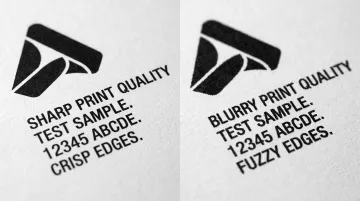
Low DPI can make small fonts look fuzzy and fine lines appear jagged, especially on proposals, letterhead, or anything with a logo. That's not the impression you want to leave with a prospective client reviewing a contract.
Certain industries deal with resolution-sensitive material more often than others:
- Legal — small type, footnotes, and exhibits that need to stay crisp
- Healthcare — forms and labels, including barcodes that must scan correctly
- Architecture and engineering — CAD line work and reduced-scale plans
- Design and marketing — logos, gradients, and brand colors
That said, not every job needs maximum resolution. Internal memos, drafts, and routine paperwork print fine at standard 600 dpi. Reserve higher-resolution settings for documents that leave the building or represent your brand.
How to Choose the Right DPI for Your Office Needs
Match your DPI setting to what's actually on the page:
| Document Type | Recommended DPI |
|---|---|
| Standard text, internal memos, tables | 600 dpi |
| Marketing materials, presentations, logos | 1200 dpi |
| Photo-quality output, fine CAD detail | 2400+ dpi |
Before settling on a high-DPI model, think through:
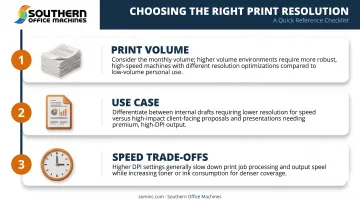
- Print volume: a workgroup churning out hundreds of pages daily has different needs than a small office
- Use case: internal drafts versus client-facing proposals call for different quality bars
- Speed trade-offs: very high DPI settings can slow print jobs and raise toner use; many office MFPs run high-DPI modes at reduced speed
This is where a Business-to-Technology approach helps. Rather than guessing at specs, match workflow, document types, and print volume against total cost of ownership. That usually lands businesses on the right machine the first time, not after a costly do-over.
Laser vs. Inkjet: Which Delivers Better High-DPI Results?
Laser printers use dry toner and often carry higher rated DPI to match the sharpness inkjets achieve through liquid ink blending. Inkjets can produce excellent photo detail even at lower DPI numbers, since the ink physically blends on the page. That's part of why they remain popular for color-critical graphic work.
For high-volume professional office documents, laser printers with high DPI ratings tend to win on reliability and long-term cost. PCMag's comparison of the two technologies notes lasers handle typesetter-quality fonts more cleanly and resist fading and smearing better over time—key for offices printing thousands of pages a month.
When each technology wins:
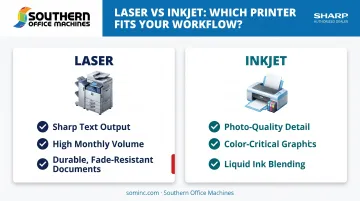
- Laser for sharp text, high monthly volume, and durable office documents
- Inkjet for photo detail and color-critical graphic work
Get Expert Guidance on High-DPI Printers for Your Business
Since 1985, Southern Office Machines has helped Metro Atlanta and Marietta businesses cut through spec-sheet confusion. Rather than starting with a DPI number, we start with your business: what you print, how often, and who sees the final result.
From there, we identify the smallest, sturdiest Sharp machine with the right features for your budget and calculate the true total cost of ownership.
Whatever equipment you choose, factory-trained technicians handle installation, network configuration, and driver setup, so your high-DPI output stays consistent instead of drifting over time.
If you're weighing new or refurbished Sharp MFPs and printers for your Georgia office, talk to someone who'll ask about your documents before quoting a spec sheet. Call 770-919-8989 or email info@sominc.com.
Frequently Asked Questions
Is higher DPI better for printers?
Higher DPI generally means finer detail, but only if your source file and printer driver both support it. Unnecessary DPI can also slow print speed without a visible quality gain.
What DPI is considered "high" for a printer?
Anything above 1200 DPI is generally considered high for business printers, though some models reach 2400 DPI or beyond in one axis.
Does DPI affect print speed and cost?
Yes. Higher DPI settings typically use more toner or ink and take longer per page, which raises your cost per page over time.
What DPI do I need for professional business documents?
Most business documents look sharp at 600–1200 DPI. Design-heavy materials like brochures or presentations may benefit from higher settings.
Can I change my printer's DPI settings?
Most printers let you adjust DPI in the print driver settings, so you can balance quality against speed depending on the job.
Is a laser or inkjet printer better for high-DPI business printing?
Laser generally suits high-volume, text-heavy business use better. Inkjet tends to shine for color and photo-detail work.